

 AzureAD
Are you trying to connect to "Azure AD app name" prompt displayed when signing
Describe the bug App is in production.
Smartphone (please complete the following information):
- Device: Motorola G10, Pixel 4a, all devices
- Android Version: API 29, API 30, API 31, etc
- Browser: Chrome
- MSAL Version: 3.0.2
To Reproduce
- Tap Sign in with Microsoft button
- Enter your credentials
- See are you trying to connect to "Azure AD app name" prompt
If related to development, please provide relevant configuration details necessary to understand your problem including any relevant traces, logs, or otherwise.
Expected behavior Prompt shouldn’t be display as the admin consent has been granted.
Actual Behavior Prompt is displayed after authenticating in the Chrome Custom Tab
Screenshots

Additional context We provide an application that is used by Azure AD customers. They use Microsoft to sign in with their professional accounts. They add our Azure AD app on their tenant to grant it some permissions. They do it using the admin consent. The end user doesn’t know the name of our product as the customer can fully customise it. So when the user is prompted about signing in to the Azure AD app with our name, they don’t understand what is happening. So we would like for this prompt to not be displayed.
Note that we found something that might be related with the error AADSTS50199 (https://docs.microsoft.com/en-us/azure/active-directory/develop/reference-aadsts-error-codes):
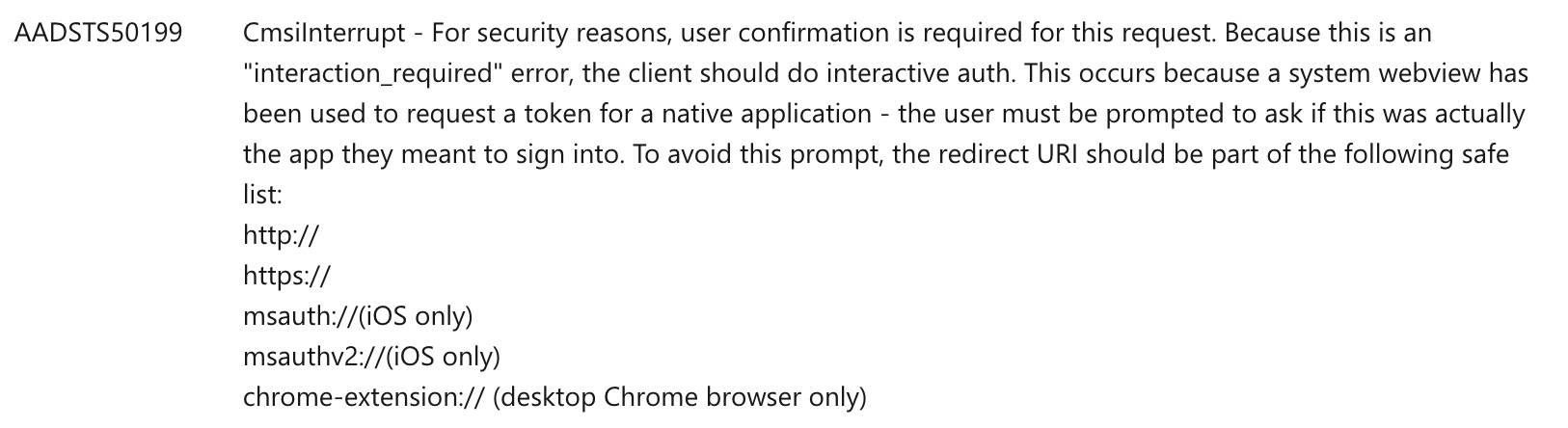
But it is not possible to configure the redirect URI in Azure AD to match the requirements listed there. It seems to be determined automatically using the package name and signature.
Questions What are the rules that make this prompt appear? Is it possible to configure it to not appear?
Thank you for your help.

@MathieuCalba What is the authorization agent you are using in this case? Please follow the instructions here: https://docs.microsoft.com/en-us/azure/active-directory/develop/msal-android-single-sign-on#authorization-agents

@negoe He mentions he's using Chrome Custom Tabs. The UX of his screenshot also matches.

@negoe we are indeed using the CustomTabs flow. It is the default behaviour from the SDK, we didn’t customise anything. Do you know what makes this prompt being displayed?

@MathieuCalba I was able to resolve the issue by issue with the help of following links https://learn.microsoft.com/en-us/azure/active-directory/develop/msal-net-xamarin-android-considerations https://thewissen.io/implementing-msal-authentication-in-xamarin-forms/
var parentActivity = Xamarin.Essentials.Platform.CurrentActivity;
                bool useSystemBrowser = PCA.IsSystemWebViewAvailable();
                interactiveRequest = PCA.AcquireTokenInteractive(Scopes)
                    .WithParentActivityOrWindow(parentActivity)
                    .WithUseEmbeddedWebView(!useSystemBrowser);
&
    protected override void OnActivityResult(int requestCode, Result resultCode, Intent data)
    {
        base.OnActivityResult(requestCode, resultCode, data);
        AuthenticationContinuationHelper.SetAuthenticationContinuationEventArgs(requestCode, resultCode, data);
    }