
terraform-azurerm-compute
 terraform-azurerm-compute copied to clipboard
 Azure
Azure
add support on extra_disks with iops
hi team ,
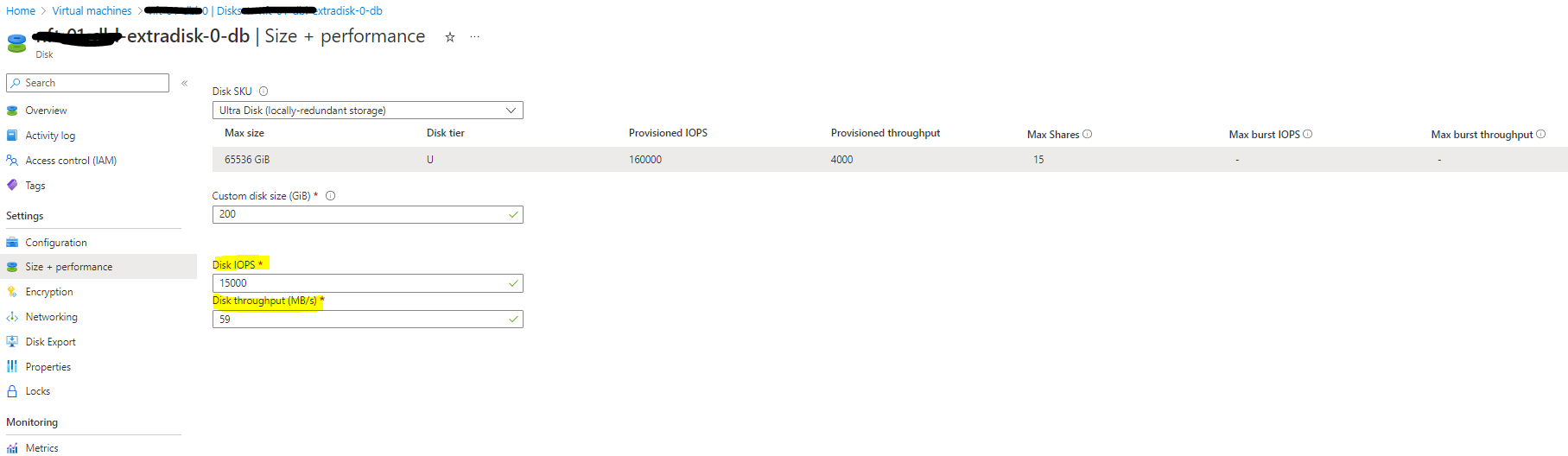
its will be great that when you using extra_disks that we be able to use Disk IOPS
disk_iops_read_write disk_mbps_read_write
its somting that will be as very help when we try to create disk its come with default values

![azureterraformbot[bot] avatar](https://avatars.githubusercontent.com/in/17863?v=4 "Published by a pub.dev verified publisher")
Hi @sb185296 thanks for opening this issue, I'd like to try a pr for this feature, but may I ask which specific arguments you would like to have for the azurerm_virtual_machine resource? Could you please give me some pseudo code to demonstrate your requirement? Thanks!

i wont to create new VM and be able to create extra disk with spsifce IOPS
@sb185296 thanks for your reply, we need some time to investigate how to implement this feature, I'll keep you updated on progress.
@sb185296 I've finished my investigation, unfortunately it seems impossible to implement this feature in this module, and here's why:
There're two ways to attach a data disk on a virtual machine resource:
For the first approach, as you can see in the document, there's no way to set disk's iops in this nested block, and as azurerm_virtual_machine has been replaced by new resources like azurerm_linux_virtual_machine, I don't think we can add this new features to this resource.
We can set iops in azurerm_managed_disk resource, then attach this disk to our vm via azurerm_virtual_machine_data_disk_attachment resource, but unfortunately as the document said:
Data Disks can be attached either directly on the
azurerm_virtual_machineresource, or using theazurerm_virtual_machine_data_disk_attachmentresource - but the two cannot be used together. If both are used against the same Virtual Machine, spurious changes will occur.
We've got storage_data_disk nested block declared already in our azurerm_virtual_machine resource so we cannot just add azurerm_virtual_machine_data_disk_attachment in this module. Another way is rewriting the storage_data_disk to azurerm_managed_disk and azurerm_virtual_machine_data_disk_attachment, but that'll be way too much for this module and might brought breaking changes.
One way is create your vm by using this module with var.nb_data_disk = 0, and declare your managed disk in another module, then we glue the disk and the vm by azurerm_virtual_machine_data_disk_attachment. I'll do a test, if it works, I'll provide you a sample code.