

 Azure
Azure
[Visual Studio 2022] Using deployproj does not allow to choose bicep template for deployment
Bicep version v0.13.1
Describe the bug I tried to use Resource Group Deployment project to build infrastructure in VS2022 alongside app code. However when I tried to do a deployment from GUI it does not allow me to choose bicep template. I've renamed azuredeploy.json to azuredeploy.bicep but it seems it has validation on json file.
It would be good to have an end2end support for bicep-based deployments in Visual Studio.
To Reproduce
- Add
Azure Resource Groupproject into solution - Change
azuredeploy.jsontoazuredeploy.bicep(and remove the ARM code) - Right click and try to deploy the file
- Template dropdown is empty.
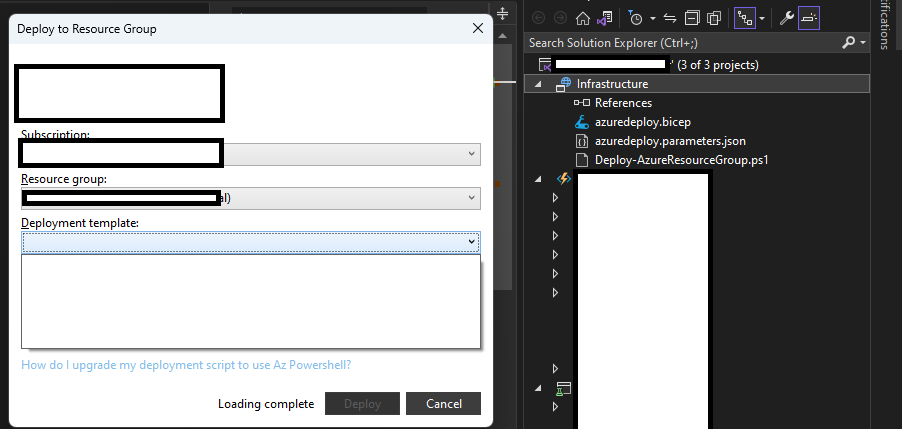
Additional context Add any other context about the problem here.
cc: @davidcho23 @bhsubra as you have been working on VS Extension AFAIR.

@miqm I have added a "Needs: Upvote" tag so that we can prioritize accordingly.

I got around this by having a template json in the project to select in the dropdown and adding a BuildBicep target in the deployproj like so:
<Project>
...
  <PropertyGroup>
    <PrepareForBuildDependsOn> <!-- this should exist already -->
        BuildBicep             <!-- add this target -->
    </PrepareForBuildDependsOn>
  </PropertyGroup>
...
  <Target Name="BuildBicep">
    <Exec Command="az bicep build --file main.bicep --outfile azuredeploy.json" />
  </Target>
</Project>
This should keep your arm json up to date with your bicep when you deploy.

Guess we will not get this one...
The Azure Resource Group project is now in extended support, meaning we will continue to support existing features and capabilities but won't prioritize adding new features. -- https://learn.microsoft.com/en-us/azure/azure-resource-manager/templates/create-visual-studio-deployment-project
Bicep support in VS is minimal, anyway, and requires an extension.
https://learn.microsoft.com/en-us/azure/azure-resource-manager/bicep/quickstart-create-bicep-use-visual-studio
