
azure-policy
 azure-policy copied to clipboard
 Azure
Azure
Parameters/Evaluation: Configure diagnostic settings for storage accounts to Log Analytics workspace
Details of the scenario you tried and the problem that is occurring
The policy does actually not enforce the configuration which the parameters suggest it will do.
The policy actually checks for the Diagnostic Setting on the Storage Account level only but not on the specific storage services ( blobServices, fileServices, tableServices, queueServices). Because of that the Storage Account get compliant as son as the Diagnostic Settings on the Storage Account is created.
So assuming I want to ensure that the Diagnostic Settings is configured at Storage Account level and for all storage services I would assign the Policy with the default Parameters. Now assume we have a Storage account which has a Diagnostic Setting as follows:
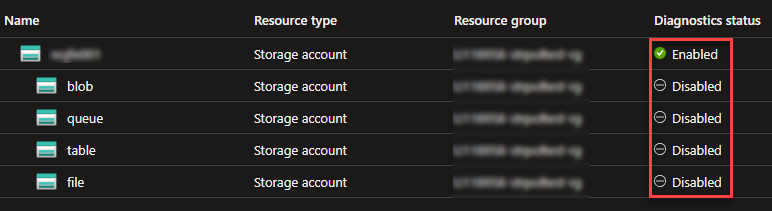
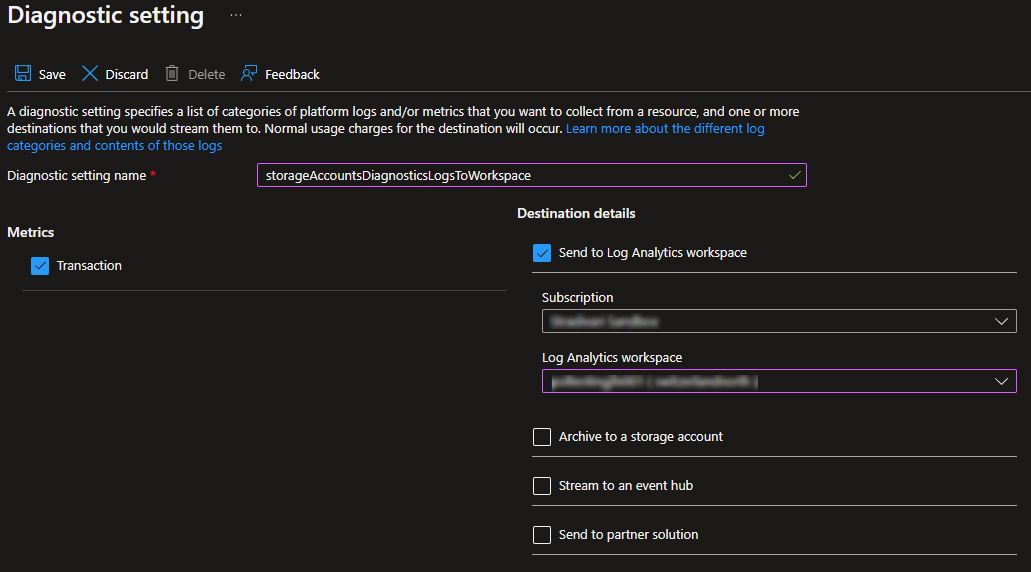
By the description and parameters of the Policy we now would expect that the Storage Account get evaluated as "Not Compliant" because the Diagnostic Settings for blob, queue, table and file are disabled which is not what we want.
But what instead actually happens ist that the Storage Account gets evaluated as "Compliant" because only the Diagnostic Settings at the top - Storage Account level get evaluated by the Policy but not these on the the particular storage service.
Verbose logs showing the problem
N/A
Suggested solution to the issue
- Either: The
existenceConditionrule should be rewritten so it checks the Diagnostic Settings not only in theMicrosoft.Storage/storageAccountsresource itself but also on theMicrosoft.Storage/storageAccounts/blobServices,Microsoft.Storage/storageAccounts/fileServices,Microsoft.Storage/storageAccounts/tableServices, andMicrosoft.Storage/storageAccounts/queueServicesSub-Resources. If possible. I think the corresponding Policy Aliases are currently missing for doing that. - Or: Or: Split the Policy in one Policy per Storage Service type.
Any way the Policy should be rewritten so it actually checks if all of the desired Diagnostic Settings are really configured.

The old, now deprecated policy, did exactly what you expect it to do. This policy has been replaced by five new policies. One policy for the storage account and a separate policy for every storage service.

Yes, I saw that there are new policies. But the new policies still have a drawback. Because the resource for the storage services always created implicitly when a storage account gets created the DeployIfNotExists effect does only work after a manual remediation.
So for example the rule for Microsoft.Storage/storageAccounts/blobServices never matches when a Storage Account is created because the resource type Microsoft.Storage/storageAccounts does not fulfil the Policy Rule:
    "policyRule": {
      "if": {
        "field": "type",
        "equals": "Microsoft.Storage/storageAccounts/blobServices"
      },
Because of that the Policy marks the Storage Account only as non-compliant after creation and the a remediation must run. Only then the Diagnostic Settings will then get deployed. But not automatically after the Storage Account is created like the DeployIfNotExists effect works for other resource types.
I think it my be worth to mention e.g. in the Policy description that always a manual remediation is needed.
Because of that the Policy marks the Storage Account only as non-compliant after creation and the a remediation must run.
Are you sure, Jonas? I've tested this and had a different experience. Only applied the "Configure diagnostic settings for Blob Services to Log Analytics workspace".
A newly created storage account was automatically remediated without a task.
Worth mentioning that the storage account template used by the portal also has additional sub-resource definition for Microsoft.Storage/storageAccounts/blobServices and Microsoft.Storage/storageAccounts/fileservices baked in.
Still have another issue with this policy, but thats not related. The Storage Account still comes up as "non compliant" after deployment.

@cloudchristoph Oh yeah, you are right! 👍🏻
Worth mentioning that the storage account template used by the portal also has additional sub-resource definition for
Microsoft.Storage/storageAccounts/blobServicesandMicrosoft.Storage/storageAccounts/fileservicesbaked in.
Yes, i noticed that too, and this is probably exactly what has changed since I last tried it in June/July and what makes the policy working now. But unfortunately, only when deploying a storage account through the portal. I have also tested with a Bicep template and then the issue still exists, and you have to manually remediate the storage account after the deployment. (Except you add also the blob storage resource to the template as the portal does. But normally this does no one which deploys a storage account with ARM / Bicep or even Terraform).
So only fixed when deploying trough, the Portal but not when using other methods aka IaC.
Just tested also with Azure CLI and Azure PowerShell and it's the same. Policy does not trigger, and the resources must be remediated manually afterwards.

Has anyone found a solution to this?
Yeah I'm curious as well. Got also some issues with azure policies on Storage accounts.


Yes, I saw that there are new policies. But the new policies still have a drawback. Because the resource for the storage services always created implicitly when a storage account gets created the DeployIfNotExists effect does only work after a manual remediation.
So for example the rule for
Microsoft.Storage/storageAccounts/blobServicesnever matches when a Storage Account is created because the resource typeMicrosoft.Storage/storageAccountsdoes not fulfil the Policy Rule:"policyRule": { "if": { "field": "type", "equals": "Microsoft.Storage/storageAccounts/blobServices" },Because of that the Policy marks the Storage Account only as non-compliant after creation and the a remediation must run. Only then the Diagnostic Settings will then get deployed. But not automatically after the Storage Account is created like the DeployIfNotExists effect works for other resource types.
I think it my be worth to mention e.g. in the Policy description that always a manual remediation is needed.
In my case, except table & queue, it is creating for others when a new storage is being added. Pls throw some light on this thread...

I had logged a ticket with Microsoft on this issue and was provided a custom Policy that utilizes tags to enable diagnostic settings on child resources without manual remediation needed. We have been using it for a few months now without issue. You may want to test first in your tenant before applying to all.
deploy DS to storage's child resources (keeping tags) with delay_renamejson.txt
