
azure-functions-core-tools
 azure-functions-core-tools copied to clipboard
 Azure
Azure
[Triage] Function core tool release 4.0.4629 missing Function Host dependency, host cannot start in certain configurations
[Keywords] Function core tool, 4.0.4629, missing dependency, Function Host cannot start, "microsoft.azure.webjobs.extensions.http: could not load file or assembly 'system.net.http.formatting, version=5.2.8.0"
[Issue]
After upgrading to release 4.0.4629, the Function Host fails on startup with the following AssemblyNotFoundException. Seems some dependencies were missing.

[Repro Steps]
- Install Azure Function core tool 4.0.4629.
- Using "func new" to create an HTTP Function.
- Attach to Node Function in VScode. Start debugging.
- Function Host startup fails and reports the missing assembly.
[Mitigation]
Downgrade to 4.0.4590, try again repro steps, and Function Host starts normally.

[Comment] Please double-check release 4.0.4629 and fix if the packages were indeed missing. Thanks in advance.

[Update]
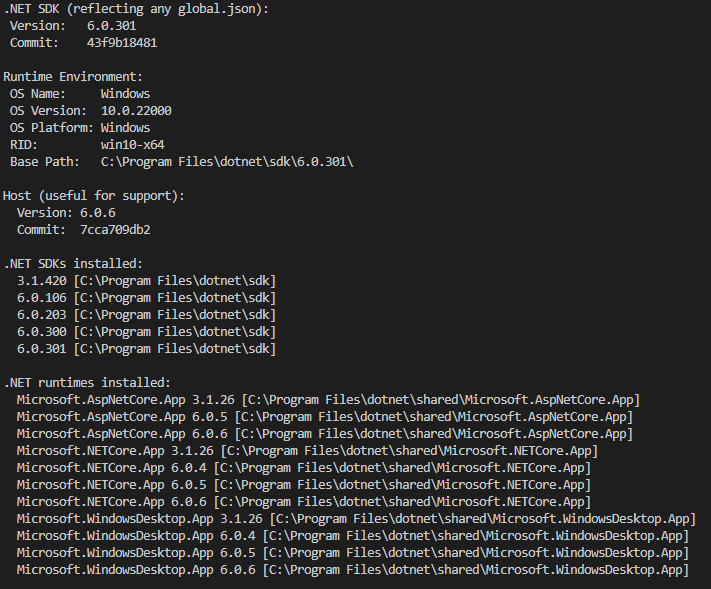
Cannot repro on some systems
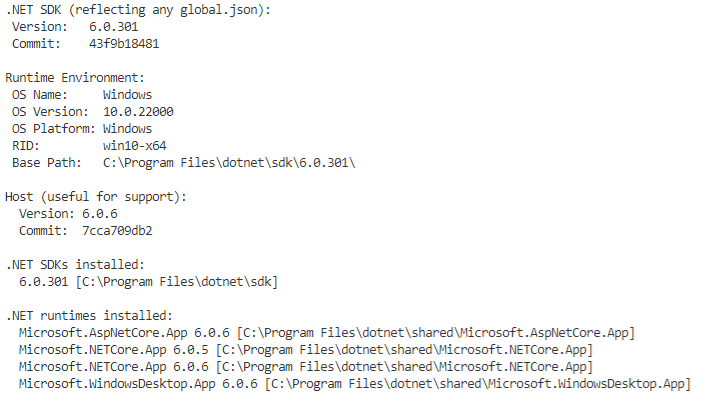
Stable repro on some, VScode 1.69.0, Azure Functions extension 1.7.4, Node.js 16.13.2, both .NET core 3.1 and .NET 6 installed

I'm getting this exception on 4.0.4629 as well when I'm running deployment to function app on linux from Octopus with the following command line:
func azure functionapp publish $appServiceName --csharp


Hello, some updates here.
On Windows 11, I can fully resolve this issue for 4.0.4629 by the following steps. "Purging SDKs"
-
Clear all NuGet package caches. "dotnet nuget locals all --clear" https://docs.microsoft.com/en-us/dotnet/core/tools/dotnet-nuget-locals#examples Also the VS NuGet cache via GUI.
-
Completely uninstall all .NET versions, Function core tools, delete all residual files.
-
Install only the latest .NET, then Function core tools, and do a repro to make sure it starts normally.
-
Then reinstall everything else as needed.
I haven't yet encountered the same on Linux as most are disposable containers. Not sure if purging SDKs will help.
I'm getting this exception on 4.0.4629 as well when I'm running deployment to function app on linux from Octopus with the following command line:
func azure functionapp publish $appServiceName --csharp
Sounds like a build issue to me. Any sharable repro? I'd suggest flushing the cache first. I haven't yet encountered the same on Linux or on the cloud. Just the local toolchain.
@kiwiliam I'm running Octopus as a windows service, so it is neither Linux nor cloud. Downgrading function core tools to 4.0.4590 fixed the issue.