
azure-cli
 azure-cli copied to clipboard
 Azure
Azure
`az resource list` fails to return images that do in fact exist
The following BUG in your software is breaking our automated testing of resources in Azure. Our automation has not changed for a few months. And our automation worked perfectly before this BUG was introduced in your software in recent weeks.
Related command
az resource list --resource-group $imageResourceGroup --resource-type Microsoft.Compute/images
[]
Describe the bug
A resource group contains various resources, including one resource of type Microsoft.Compute/images . This is validated by logging into portal.azure.com and viewing the list of resources in the resource group to clearly see the image among the resources.
The bug is that nothing is returned when the az resource list --resource-group $imageResourceGroup --resource-type Microsoft.Compute/images command is run, only an empty list is returned, even though the command is run by the subscription owner.
So the problem is that the CLI fails to report the existence of an image resource which clearly is shown in the UI portal.azure.com.
Furthermore, when we reduce the command to az resource list --resource-group aibmdi001 , the result is that all of the other resources in the resource group are indeed listed in the results, but yet the image is still not listed even though the portal.azure.com UI again still clearly shows that the image does indeed exist, and can even be used by scale sets as the valid image that it is.
This is NOT custom programming. This is an Official Microsoft QuickStart which now breaks as a result of a BUG that was introduced into your software in recent weeks.
To Reproduce
-
First follow Microsoft's own explicit instructions for creating an image through automation using this official Microsoft QuickStart. Our transcript of the explicit step by step to reproduce this BUG fixes a couple of errors in the official Microsoft QuickStart and is as follows. Note that
original-sp-uid-redactedrefers to the subscription owner.[user@myVMSSx azureuser]$ cd /home/user/imageTest/ [user@myVMSSx imageTest]$ az login --service-principal -u original-sp-uid-redacted -p original-sp-password-redacted --tenant tenant-id-redacted [ { "cloudName": "AzureCloud", "homeTenantId": "tenant-id-redacted", "id": "subscription-id-redacted", "isDefault": true, "managedByTenants": [], "name": "subscription-name-redacted", "state": "Enabled", "tenantId": "tenant-id-redacted", "user": { "name": "original-sp-uid-redacted", "type": "servicePrincipal" } } ] [user@myVMSSx imageTest]$ az account set --subscription subscription-id-redacted [user@myVMSSx imageTest]$ az feature register --namespace Microsoft.VirtualMachineImages --name VirtualMachineTemplatePreview Once the feature 'VirtualMachineTemplatePreview' is registered, invoking 'az provider register -n Microsoft.VirtualMachineImages' is required to get the change propagated { "id": "/subscriptions/subscription-id-redacted/providers/Microsoft.Features/providers/Microsoft.VirtualMachineImages/features/VirtualMachineTemplatePreview", "name": "Microsoft.VirtualMachineImages/VirtualMachineTemplatePreview", "properties": { "state": "Registered" }, "type": "Microsoft.Features/providers/features" } [user@myVMSSx imageTest]$ az feature show --namespace Microsoft.VirtualMachineImages --name VirtualMachineTemplatePreview | grep state "state": "Registered" [user@myVMSSx imageTest]$ az feature show --namespace Microsoft.KeyVault --name VirtualMachineTemplatePreview | grep state ERROR: (FeatureNotFound) The feature 'VirtualMachineTemplatePreview' could not be found. Code: FeatureNotFound # But we continued because this link said to ignore the message: https://github.com/danielsollondon/azvmimagebuilder/issues/27 [user@myVMSSx imageTest]$ az provider show -n Microsoft.VirtualMachineImages -o json | grep registrationState "registrationState": "Registered", [user@myVMSSx imageTest]$ az provider show -n Microsoft.KeyVault -o json | grep registrationState "registrationState": "Registered", [user@myVMSSx imageTest]$ az provider show -n Microsoft.Compute -o json | grep registrationState "registrationState": "Registered", [user@myVMSSx imageTest]$ az provider show -n Microsoft.Storage -o json | grep registrationState "registrationState": "Registered", [user@myVMSSx imageTest]$ az provider show -n Microsoft.Network -o json | grep registrationState "registrationState": "Registered", [user@myVMSSx imageTest]$ imageResourceGroup=aibmdi001 [user@myVMSSx imageTest]$ location=WestUS2 [user@myVMSSx imageTest]$ subscriptionID=$(az account show | grep id | tr -d '",' | cut -c7-) [user@myVMSSx imageTest]$ imageName=aibCustomLinuxImg01 [user@myVMSSx imageTest]$ runOutputName=aibCustLinManImg01ro [user@myVMSSx imageTest]$ az group create -n $imageResourceGroup -l $location { "id": "/subscriptions/subscription-id-redacted/resourceGroups/aibmdi001", "location": "westus2", "managedBy": null, "name": "aibmdi001", "properties": { "provisioningState": "Succeeded" }, "tags": null, "type": "Microsoft.Resources/resourceGroups" } [user@myVMSSx imageTest]$ identityName=aibBuiUserId$(date +'%s') [user@myVMSSx imageTest]$ az identity create -g $imageResourceGroup -n $identityName { "clientId": "created-client-id-redacted", "id": "/subscriptions/subscription-id-redacted/resourcegroups/aibmdi001/providers/Microsoft.ManagedIdentity/userAssignedIdentities/aibBuiUserId1660333972", "location": "westus2", "name": "aibBuiUserId1660333972", "principalId": "created-serviceprincipal-id-redacted", "resourceGroup": "aibmdi001", "tags": {}, "tenantId": "tenant-id-redacted", "type": "Microsoft.ManagedIdentity/userAssignedIdentities" } [user@myVMSSx imageTest]$ imgBuilderCliId=$(az identity show -g $imageResourceGroup -n $identityName | grep "clientId" | cut -c16- | tr -d '",') [user@myVMSSx imageTest]$ imgBuilderId=/subscriptions/$subscriptionID/resourcegroups/$imageResourceGroup/providers/Microsoft.ManagedIdentity/userAssignedIdentities/$identityName [user@myVMSSx imageTest]$ curl https://raw.githubusercontent.com/Azure/azvmimagebuilder/main/solutions/12_Creating_AIB_Security_Roles/aibRoleImageCreation.json -o aibRoleImageCreation.json % Total % Received % Xferd Average Speed Time Time Time Current Dload Upload Total Spent Left Speed 100 714 100 714 0 0 4127 0 --:--:-- --:--:-- --:--:-- 4127 [user@myVMSSx imageTest]$ imageRoleDefName="AzureImageBuilderImageDef"$(date +'%s') [user@myVMSSx imageTest]$ sed -i -e "s/<subscriptionID>/$subscriptionID/g" aibRoleImageCreation.json [user@myVMSSx imageTest]$ sed -i -e "s/<rgName>/$imageResourceGroup/g" aibRoleImageCreation.json [user@myVMSSx imageTest]$ sed -i -e "s/Azure Image Builder Service Image Creation Role/$imageRoleDefName/g" aibRoleImageCreation.json [user@myVMSSx imageTest]$ az role definition create --role-definition ./aibRoleImageCreation.json { "assignableScopes": [ "/subscriptions/subscription-id-redacted/resourceGroups/aibmdi001" ], "description": "Image Builder access to create resources for the image build, you should delete or split out as appropriate", "id": "/subscriptions/subscription-id-redacted/providers/Microsoft.Authorization/roleDefinitions/created-roledefinition-id-redacted", "name": "created-roledefinition-id-redacted", "permissions": [ { "actions": [ "Microsoft.Compute/galleries/read", "Microsoft.Compute/galleries/images/read", "Microsoft.Compute/galleries/images/versions/read", "Microsoft.Compute/galleries/images/versions/write", "Microsoft.Compute/images/write", "Microsoft.Compute/images/read", "Microsoft.Compute/images/delete" ], "dataActions": [], "notActions": [], "notDataActions": [] } ], "roleName": "AzureImageBuilderImageDef1660334204", "roleType": "CustomRole", "type": "Microsoft.Authorization/roleDefinitions" } [user@myVMSSx imageTest]$ az role assignment create --role $imageRoleDefName --scope /subscriptions/$subscriptionID/resourceGroups/$imageResourceGroup --assignee-object-id created-serviceprincipal-id-redacted --assignee-principal-type ServicePrincipal { "canDelegate": null, "condition": null, "conditionVersion": null, "description": null, "id": "/subscriptions/subscription-id-redacted/resourceGroups/aibmdi001/providers/Microsoft.Authorization/roleAssignments/created-roleassignment-id-redacted", "name": "created-roleassignment-id-redacted", "principalId": "created-serviceprincipal-id-redacted", "principalType": "ServicePrincipal", "resourceGroup": "aibmdi001", "roleDefinitionId": "/subscriptions/subscription-id-redacted/providers/Microsoft.Authorization/roleDefinitions/created-roledefinition-id-redacted", "scope": "/subscriptions/subscription-id-redacted/resourceGroups/aibmdi001", "type": "Microsoft.Authorization/roleAssignments" } [user@myVMSSx imageTest]$ curl https://raw.githubusercontent.com/Azure/azvmimagebuilder/main/quickquickstarts/0_Creating_a_Custom_Linux_Managed_Image/helloImageTemplateLinux.json -o helloImageTemplateLinux.json % Total % Received % Xferd Average Speed Time Time Time Current Dload Upload Total Spent Left Speed 100 2885 100 2885 0 0 10158 0 --:--:-- --:--:-- --:--:-- 10158 [user@myVMSSx imageTest]$ curl https://raw.githubusercontent.com/danielsollondon/azvmimagebuilder/master/quickquickstarts/0_Creating_a_Custom_Linux_Managed_Image/helloImageTemplateLinux.json -o helloImageTemplateLinux.json % Total % Received % Xferd Average Speed Time Time Time Current Dload Upload Total Spent Left Speed 100 2893 100 2893 0 0 16162 0 --:--:-- --:--:-- --:--:-- 16162 [user@myVMSSx imageTest]$ sed -i -e "s/<subscriptionID>/$subscriptionID/g" helloImageTemplateLinux.json [user@myVMSSx imageTest]$ sed -i -e "s/<rgName>/$imageResourceGroup/g" helloImageTemplateLinux.json [user@myVMSSx imageTest]$ sed -i -e "s/<region>/$location/g" helloImageTemplateLinux.json [user@myVMSSx imageTest]$ sed -i -e "s/<imageName>/$imageName/g" helloImageTemplateLinux.json [user@myVMSSx imageTest]$ sed -i -e "s/<runOutputName>/$runOutputName/g" helloImageTemplateLinux.json [user@myVMSSx imageTest]$ sed -i -e "s%<imgBuilderId>%$imgBuilderId%g" helloImageTemplateLinux.json [user@myVMSSx imageTest]$ az resource create --resource-group $imageResourceGroup --properties @helloImageTemplateLinux.json --is-full-object --resource-type Microsoft.VirtualMachineImages/imageTemplates -n helloImageTemplateLinux01 { "extendedLocation": null, "id": "/subscriptions/subscription-id-redacted/resourcegroups/aibmdi001/providers/Microsoft.VirtualMachineImages/imageTemplates/helloImageTemplateLinux01", "identity": { "principalId": null, "tenantId": null, "type": "UserAssigned", "userAssignedIdentities": { "/subscriptions/subscription-id-redacted/resourcegroups/aibmdi001/providers/Microsoft.ManagedIdentity/userAssignedIdentities/aibBuiUserId1660333972": { "clientId": "created-client-id-redacted", "principalId": "created-serviceprincipal-id-redacted" } } }, "kind": null, "location": "westus2", "managedBy": null, "name": "helloImageTemplateLinux01", "plan": null, "properties": { "buildTimeoutInMinutes": 80, "customize": [ { "name": "RunScriptFromSource", "scriptUri": "https://raw.githubusercontent.com/danielsollondon/azvmimagebuilder/master/quickquickstarts/customizeScript.sh", "sha256Checksum": "checksum-redacted", "type": "Shell" }, { "name": "CheckSumCompareShellScript", "scriptUri": "https://raw.githubusercontent.com/danielsollondon/azvmimagebuilder/master/quickquickstarts/customizeScript2.sh", "sha256Checksum": "checksum-redacted", "type": "Shell" }, { "destination": "/tmp/index.html", "name": "downloadBuildArtifacts", "sha256Checksum": "checksum-redacted", "sourceUri": "https://raw.githubusercontent.com/danielsollondon/azvmimagebuilder/master/quickquickstarts/exampleArtifacts/buildArtifacts/index.html", "type": "File" }, { "inline": [ "sudo mkdir /buildArtifacts", "sudo cp /tmp/index.html /buildArtifacts/index.html" ], "name": "setupBuildPath", "type": "Shell" }, { "inline": [ "sudo apt install unattended-upgrades" ], "name": "InstallUpgrades", "type": "Shell" } ], "distribute": [ { "artifactTags": { "baseosimg": "ubuntu1804", "source": "azVmImageBuilder" }, "imageId": "/subscriptions/subscription-id-redacted/resourceGroups/aibmdi001/providers/Microsoft.Compute/images/aibCustomLinuxImg01", "location": "WestUS2", "runOutputName": "aibCustLinManImg01ro", "type": "ManagedImage" } ], "exactStagingResourceGroup": "/subscriptions/subscription-id-redacted/resourceGroups/IT_aibmdi001_helloImageTemplateLinux01_created-resourcegroup-id-redacted", "provisioningState": "Succeeded", "source": { "exactVersion": "18.04.202208100", "offer": "UbuntuServer", "publisher": "Canonical", "sku": "18.04-LTS", "type": "PlatformImage", "version": "latest" }, "stagingResourceGroup": "", "vmProfile": { "osDiskSizeGB": 30, "vmSize": "Standard_D1_v2" } }, "resourceGroup": "aibmdi001", "sku": null, "tags": { "imagebuilderTemplate": "ubuntu1804", "userIdentity": "enabled" }, "type": "Microsoft.VirtualMachineImages/imageTemplates" } [user@myVMSSx imageTest]$ az resource invoke-action --resource-group $imageResourceGroup --resource-type Microsoft.VirtualMachineImages/imageTemplates -n helloImageTemplateLinux01 --action Run { "endTime": "2022-08-12T22:28:08.6302341Z", "name": "created-image-id-redacted", "startTime": "2022-08-12T22:17:31.1284365Z", "status": "Succeeded" } [user@myVMSSx imageTest]$ az resource list --resource-group $imageResourceGroup --resource-type Microsoft.Compute/images [] -
Then confirm that the image was indeed successfully added into the resource group by examining the portal.azure.com UI. ... See that the image is available in the portal, but cannot be seen by the
az resource list --resource-group $imageResourceGroup --resource-type Microsoft.Compute/imagesCLI command.
Expected behavior
The correct expected result would be for the az resource list --resource-group $imageResourceGroup --resource-type Microsoft.Compute/images cli command to return a data representation of the image which was created.
Environment summary
This problem occurs in both RHEL8 machines and in Windows 10 machines.
In RHEL8, we have:
$ az --version
azure-cli                         2.39.0

core                              2.39.0
telemetry                          1.0.6 *

Extensions:
account                            0.2.3
azure-devops                      0.25.0

Dependencies:
msal                            1.18.0b1
azure-mgmt-resource             21.1.0b1

Python location '/bin/python3.9'
Extensions directory '/home/packer/.azure/cliextensions'

Python (Linux) 3.9.7 (default, Sep 13 2021, 08:18:39)
[GCC 8.5.0 20210514 (Red Hat 8.5.0-3)]
And in Windows 10, we have:
C:\Users\user>az --version
azure-cli                         2.33.1 *

core                              2.33.1 *
telemetry                          1.0.6 *

Extensions:
account                            0.2.3
azure-devops                      0.25.0

Dependencies:
msal                              1.16.0
azure-mgmt-resource               20.0.0

Python location 'C:\Program Files (x86)\Microsoft SDKs\Azure\CLI2\python.exe'
Extensions directory 'C:\Users\user\.azure\cliextensions'

Python (Windows) 3.8.9 (tags/v3.8.9:a743f81, Apr  6 2021, 13:22:56) [MSC v.1928 32 bit (Intel)]
Again in Windows 10, after upgrading the Azure CLI version, we re-ran the same commands above to recreate the same exact BUG in your software with the following results from az --version :
C:\path\to\dir>az --version
azure-cli                         2.39.0

core                              2.39.0
telemetry                          1.0.6 *

Extensions:
account                            0.2.3
azure-devops                      0.25.0

Dependencies:
msal                            1.18.0b1
azure-mgmt-resource             21.1.0b1

Python location 'C:\Program Files (x86)\Microsoft SDKs\Azure\CLI2\python.exe'
Extensions directory 'C:\Users\user8\.azure\cliextensions'

Python (Windows) 3.10.5 (tags/v3.10.5:f377153, Jun  6 2022, 15:58:59) [MSC v.1929 32 bit (Intel)]
Additional context
We encounter this in the "eastus" Azure region, but we have not tried this in other regions, so we cannot comment on whether or not this bug manifests in other regions also.
The debug trace on a Windows 10 laptop is as follows:
C:\path\to\dir>az resource list --resource-group $imageResourceGroup --resource-type Microsoft.Compute/images --debug
cli.knack.cli: Command arguments: ['resource', 'list', '--resource-group', 'aibmdi001', '--resource-type', 'Microsoft.Compute/images', '--debug']
cli.knack.cli: __init__ debug log:
Enable color in terminal.
Init colorama.
cli.knack.cli: Event: Cli.PreExecute []
cli.knack.cli: Event: CommandParser.OnGlobalArgumentsCreate [<function CLILogging.on_global_arguments at 0x01DE40B8>, <function OutputProducer.on_global_arguments at 0x01E50F10>, <function CLIQuery.on_global_arguments at 0x01F78AD8>]
cli.knack.cli: Event: CommandInvoker.OnPreCommandTableCreate []
cli.azure.cli.core: Modules found from index for 'resource': ['azure.cli.command_modules.resource']
cli.azure.cli.core: Loading command modules:
cli.azure.cli.core: Name                  Load Time    Groups  Commands
cli.azure.cli.core: resource                  0.012        40       187
cli.azure.cli.core: Total (1)                 0.012        40       187
cli.azure.cli.core: These extensions are not installed and will be skipped: ['azext_ai_examples', 'azext_next']
cli.azure.cli.core: Loading extensions:
cli.azure.cli.core: Name                  Load Time    Groups  Commands  Directory
cli.azure.cli.core: Total (0)                 0.000         0         0
cli.azure.cli.core: Loaded 40 groups, 187 commands.
cli.azure.cli.core: Found a match in the command table.
cli.azure.cli.core: Raw command  : resource list
cli.azure.cli.core: Command table: resource list
cli.knack.cli: Event: CommandInvoker.OnPreCommandTableTruncate [<function AzCliLogging.init_command_file_logging at 0x039C77C0>]
cli.azure.cli.core.azlogging: metadata file logging enabled - writing logs to 'C:\Users\user\.azure\commands\2022-08-11.12-02-31.resource_list.28996.log'.
az_command_data_logger: command args: resource list --resource-group {} --resource-type {} --debug
cli.knack.cli: Event: CommandInvoker.OnPreArgumentLoad [<function register_global_subscription_argument.<locals>.add_subscription_parameter at 0x03A182B0>]
cli.knack.cli: Event: CommandInvoker.OnPostArgumentLoad []
cli.knack.cli: Event: CommandInvoker.OnPostCommandTableCreate [<function register_ids_argument.<locals>.add_ids_arguments at 0x03A71418>, <function register_cache_arguments.<locals>.add_cache_arguments at 0x03A714A8>]
cli.knack.cli: Event: CommandInvoker.OnCommandTableLoaded []
cli.knack.cli: Event: CommandInvoker.OnPreParseArgs []
cli.knack.cli: Event: CommandInvoker.OnPostParseArgs [<function OutputProducer.handle_output_argument at 0x01E50F58>, <function CLIQuery.handle_query_parameter at 0x01F78B20>, <function register_ids_argument.<locals>.parse_ids_arguments at 0x03A71460>]
cli.azure.cli.core.commands.client_factory: Getting management service client client_type=ResourceManagementClient
cli.azure.cli.core.auth.persistence: build_persistence: location='C:\\Users\\user\\.azure\\service_principal_entries.bin', encrypt=True
cli.azure.cli.core.auth.persistence: build_persistence: location='C:\\Users\\user\\.azure\\msal_token_cache.bin', encrypt=True
cli.azure.cli.core.auth.identity: _load_msal_http_cache: C:\Users\user\.azure\msal_http_cache.bin
cli.azure.cli.core.auth.identity: __load_msal_http_cache: C:\Users\user\.azure\msal_http_cache.bin
urllib3.util.retry: Converted retries value: 1 -> Retry(total=1, connect=None, read=None, redirect=None, status=None)
msal.authority: openid_config = {'token_endpoint': 'https://login.microsoftonline.com/active-directory-id-alpha-numeric/oauth2/v2.0/token', 'token_endpoint_auth_methods_supported': ['client_secret_post', 'private_key_jwt', 'client_secret_basic'], 'jwks_uri': 'https://login.microsoftonline.com/active-directory-id-alpha-numeric/discovery/v2.0/keys', 'response_modes_supported': ['query', 'fragment', 'form_post'], 'subject_types_supported': ['pairwise'], 'id_token_signing_alg_values_supported': ['RS256'], 'response_types_supported': ['code', 'id_token', 'code id_token', 'id_token token'], 'scopes_supported': ['openid', 'profile', 'email', 'offline_access'], 'issuer': 'https://login.microsoftonline.com/active-directory-id-alpha-numeric/v2.0', 'request_uri_parameter_supported': False, 'userinfo_endpoint': 'https://graph.microsoft.com/oidc/userinfo', 'authorization_endpoint': 'https://login.microsoftonline.com/active-directory-id-alpha-numeric/oauth2/v2.0/authorize', 'device_authorization_endpoint': 'https://login.microsoftonline.com/active-directory-id-alpha-numeric/oauth2/v2.0/devicecode', 'http_logout_supported': True, 'frontchannel_logout_supported': True, 'end_session_endpoint': 'https://login.microsoftonline.com/active-directory-id-alpha-numeric/oauth2/v2.0/logout', 'claims_supported': ['sub', 'iss', 'cloud_instance_name', 'cloud_instance_host_name', 'cloud_graph_host_name', 'msgraph_host', 'aud', 'exp', 'iat', 'auth_time', 'acr', 'nonce', 'preferred_username', 'name', 'tid', 'ver', 'at_hash', 'c_hash', 'email'], 'kerberos_endpoint': 'https://login.microsoftonline.com/active-directory-id-alpha-numeric/kerberos', 'tenant_region_scope': 'NA', 'cloud_instance_name': 'microsoftonline.com', 'cloud_graph_host_name': 'graph.windows.net', 'msgraph_host': 'graph.microsoft.com', 'rbac_url': 'https://pas.windows.net'}
msal.application: Region to be used: None
cli.azure.cli.core.auth.credential_adaptor: CredentialAdaptor.get_token: scopes=('https://management.core.windows.net//.default',), kwargs={}
cli.azure.cli.core.auth.msal_authentication: ServicePrincipalCredential.get_token: scopes=('https://management.core.windows.net//.default',), kwargs={}
msal.application: Cache hit an AT
msal.telemetry: Generate or reuse correlation_id: 0ee6e5db-6fd2-48b9-aef1-5ba6e7fc1ad3
cli.azure.cli.core.sdk.policies: Request URL: 'https://management.azure.com/subscriptions/subscription-id-alpha-numeric/resourcegroups/aibmdi001?api-version=2021-04-01'
cli.azure.cli.core.sdk.policies: Request method: 'GET'
cli.azure.cli.core.sdk.policies: Request headers:
cli.azure.cli.core.sdk.policies:     'Accept': 'application/json'
cli.azure.cli.core.sdk.policies:     'x-ms-client-request-id': '26e5111d-19a8-11ed-b46e-2811a8790715'
cli.azure.cli.core.sdk.policies:     'CommandName': 'resource list'
cli.azure.cli.core.sdk.policies:     'ParameterSetName': '--resource-group --resource-type --debug'
cli.azure.cli.core.sdk.policies:     'User-Agent': 'AZURECLI/2.33.1 (MSI) azsdk-python-azure-mgmt-resource/20.0.0 Python/3.8.9 (Windows-10-10.0.22000-SP0)'
cli.azure.cli.core.sdk.policies:     'Authorization': '*****'
cli.azure.cli.core.sdk.policies: Request body:
cli.azure.cli.core.sdk.policies: This request has no body
urllib3.connectionpool: Starting new HTTPS connection (1): management.azure.com:443
urllib3.connectionpool: https://management.azure.com:443 "GET /subscriptions/subscription-id-alpha-numeric/resourcegroups/aibmdi001?api-version=2021-04-01 HTTP/1.1" 200 280
cli.azure.cli.core.sdk.policies: Response status: 200
cli.azure.cli.core.sdk.policies: Response headers:
cli.azure.cli.core.sdk.policies:     'Cache-Control': 'no-cache'
cli.azure.cli.core.sdk.policies:     'Pragma': 'no-cache'
cli.azure.cli.core.sdk.policies:     'Content-Type': 'application/json; charset=utf-8'
cli.azure.cli.core.sdk.policies:     'Content-Encoding': 'gzip'
cli.azure.cli.core.sdk.policies:     'Expires': '-1'
cli.azure.cli.core.sdk.policies:     'Vary': 'Accept-Encoding'
cli.azure.cli.core.sdk.policies:     'x-ms-ratelimit-remaining-subscription-reads': '11999'
cli.azure.cli.core.sdk.policies:     'x-ms-request-id': 'fb4ff374-420f-45c4-925f-d0050c1a0444'
cli.azure.cli.core.sdk.policies:     'x-ms-correlation-request-id': 'fb4ff374-420f-45c4-925f-d0050c1a0444'
cli.azure.cli.core.sdk.policies:     'x-ms-routing-request-id': 'WESTUS:20220811T190229Z:fb4ff374-420f-45c4-925f-d0050c1a0444'
cli.azure.cli.core.sdk.policies:     'Strict-Transport-Security': 'max-age=31536000; includeSubDomains'
cli.azure.cli.core.sdk.policies:     'X-Content-Type-Options': 'nosniff'
cli.azure.cli.core.sdk.policies:     'Date': 'Thu, 11 Aug 2022 19:02:29 GMT'
cli.azure.cli.core.sdk.policies:     'Content-Length': '280'
cli.azure.cli.core.sdk.policies: Response content:
cli.azure.cli.core.sdk.policies: {"id":"/subscriptions/subscription-id-alpha-numeric/resourceGroups/aibmdi001","name":"aibmdi001","type":"Microsoft.Resources/resourceGroups","location":"eastus","properties":{"provisioningState":"Succeeded"}}
cli.azure.cli.core.sdk.policies: Request URL: 'https://management.azure.com/subscriptions/subscription-id-alpha-numeric/resources?$filter=resourceGroup%20eq%20%27aibmdi001%27%20and%20resourceType%20eq%20%27Microsoft.Compute%2Fimages%27&$expand=createdTime%2CchangedTime%2CprovisioningState&api-version=2021-04-01'
cli.azure.cli.core.sdk.policies: Request method: 'GET'
cli.azure.cli.core.sdk.policies: Request headers:
cli.azure.cli.core.sdk.policies:     'Accept': 'application/json'
cli.azure.cli.core.sdk.policies:     'x-ms-client-request-id': '26e5111d-19a8-11ed-b46e-2811a8790715'
cli.azure.cli.core.sdk.policies:     'CommandName': 'resource list'
cli.azure.cli.core.sdk.policies:     'ParameterSetName': '--resource-group --resource-type --debug'
cli.azure.cli.core.sdk.policies:     'User-Agent': 'AZURECLI/2.33.1 (MSI) azsdk-python-azure-mgmt-resource/20.0.0 Python/3.8.9 (Windows-10-10.0.22000-SP0)'
cli.azure.cli.core.sdk.policies:     'Authorization': '*****'
cli.azure.cli.core.sdk.policies: Request body:
cli.azure.cli.core.sdk.policies: This request has no body
urllib3.connectionpool: https://management.azure.com:443 "GET /subscriptions/subscription-id-alpha-numeric/resources?$filter=resourceGroup%20eq%20%27aibmdi001%27%20and%20resourceType%20eq%20%27Microsoft.Compute%2Fimages%27&$expand=createdTime%2CchangedTime%2CprovisioningState&api-version=2021-04-01 HTTP/1.1" 200 133
cli.azure.cli.core.sdk.policies: Response status: 200
cli.azure.cli.core.sdk.policies: Response headers:
cli.azure.cli.core.sdk.policies:     'Cache-Control': 'no-cache'
cli.azure.cli.core.sdk.policies:     'Pragma': 'no-cache'
cli.azure.cli.core.sdk.policies:     'Content-Type': 'application/json; charset=utf-8'
cli.azure.cli.core.sdk.policies:     'Content-Encoding': 'gzip'
cli.azure.cli.core.sdk.policies:     'Expires': '-1'
cli.azure.cli.core.sdk.policies:     'Vary': 'Accept-Encoding'
cli.azure.cli.core.sdk.policies:     'x-ms-ratelimit-remaining-subscription-reads': '11998'
cli.azure.cli.core.sdk.policies:     'x-ms-request-id': 'dd2eca11-8fa5-4add-a7e2-a3994c896fcb'
cli.azure.cli.core.sdk.policies:     'x-ms-correlation-request-id': 'dd2eca11-8fa5-4add-a7e2-a3994c896fcb'
cli.azure.cli.core.sdk.policies:     'x-ms-routing-request-id': 'WESTUS:20220811T190229Z:dd2eca11-8fa5-4add-a7e2-a3994c896fcb'
cli.azure.cli.core.sdk.policies:     'Strict-Transport-Security': 'max-age=31536000; includeSubDomains'
cli.azure.cli.core.sdk.policies:     'X-Content-Type-Options': 'nosniff'
cli.azure.cli.core.sdk.policies:     'Date': 'Thu, 11 Aug 2022 19:02:29 GMT'
cli.azure.cli.core.sdk.policies:     'Content-Length': '133'
cli.azure.cli.core.sdk.policies: Response content:
cli.azure.cli.core.sdk.policies: {"value":[]}
cli.knack.cli: Event: CommandInvoker.OnTransformResult [<function _resource_group_transform at 0x03A10808>, <function _x509_from_base64_to_hex_transform at 0x03A10850>]
cli.knack.cli: Event: CommandInvoker.OnFilterResult []
[]
cli.knack.cli: Event: Cli.SuccessfulExecute []
cli.knack.cli: Event: Cli.PostExecute [<function AzCliLogging.deinit_cmd_metadata_logging at 0x039C78E0>]
az_command_data_logger: exit code: 0
cli.__main__: Command ran in 1.161 seconds (init: 0.148, invoke: 1.013)
telemetry.save: Save telemetry record of length 2946 in cache
telemetry.check: Negative: The C:\Users\user\.azure\telemetry.txt was modified at 2022-08-11 12:01:35.855347, which in less than 600.000000 s
cli.azure.cli.core.auth.identity: _dump_msal_http_cache: C:\Users\user\.azure\msal_http_cache.bin


Since CLI directly outputs the data returned by the REST service without any filtering logic, so this should be an arm service-related issue

Thank you for your feedback. This has been routed to the support team for assistance.

What is the status of this crippling BUG in your software that was reported 2 days ago?
@yonzhan When do you expect to resolve this crippling BUG in your software which was reported 3 days ago?
@tjegbejimba Could you please help have a look at this issue? Or do you know who is the right person to investigate it?
@yonzhan and @tjegbejimba When do you expect to resolve this crippling BUG in your software which was reported 4 days ago?
@tjegbejimba When do you expect to resolve this crippling BUG in your software which was reported 5 days ago?
@yonzhan @jtravell Could you open an ICM against ARM to better track this issue? Thanks

@yonzhan Is @tjegbejimba correct that an ICM request against ARM must be opened to resolve this crippling BUG in your software which was reported 5 days ago?
If so, how can you do that in a way that will result in prompt resolution?
We are concerned that each person assigned to this crippling BUG in your software so far has passed the buck to someone else, and that a day or two at a time gets wasted each time another person passes the buck.
Could you open an ICM against ARM to better track this issue? Thanks
This is ARM related issue. @RakeshMohanMSFT Could you please help create an ICM to the ARM team, it will help them follow up this issue with higher priority

@jtravell I am unable to reproduce the issue at my end. Can you please share the debug trace with us for further troubleshooting? and also do verify if you see the resource in the portal (thereby verifying if you (your account) have the list permission for the resource)
az resource list -g shashs-bastion-idLab --resource-type Microsoft.Compute/images
[
{
"changedTime": "2022-05-02T10:13:57.448286+00:00",
"createdTime": "2022-05-02T10:00:18.649136+00:00",
"extendedLocation": null,
"id": "/subscriptions/
@RakeshMohanMSFT I just added the debug trace to the end of my original posting at the top of this thread because that location should make it easier for anyone to understand this. I redacted the subscription ID and the active directory ID, but I kept the request ID because the request ID is an internal Microsoft artifact that you can use to examine the problem.
Also note that this command worked for us a few weeks ago, but suddenly started breaking when we opened this ticket. ... A Microsoft deployment seems to have created this bug in the window of a few weeks when we did not run the test. ... We need to run this test every day, so we need this fixed.
Does what I added give you enough information to identify the root cause?
What else can we provide?
@jtravell Thank you for the trace, i see that you get an empty array as result of list api. As I has requested before, did you get a chance to see if the portal is displaying the resource you are looking for? something like this, if not can you check your permissions to list/read images resource. I understand it was working before but its possible that some permission changes happened accidentally perhaps. Therefore please check once and let us know.

@RakeshMohanMSFT Of course the image is visible in portal.azure.com. We clearly stated the image's visibility throughout the original post above. And again, we have repeated multiple times that nothing has changed in our automation since this worked a few weeks ago. ... If you had read the posting, you would not have wasted this 24 hour cycle and most likely the weekend also. ... We are in North America, so that your responses come in the middle of the night.
THIS IS A CRIPPLING BUG IN YOUR SOFTWARE THAT SEEMS TO HAVE BEEN INTRODUCED IN RECENT WEEKS.
Did you review the request ids in our error log above?
In addition, we have added almost 300 lines of explicit step by step commands to reproduce this error to the original post at the very top of this page. Putting the step-by-step in that location will make it easier for anyone else to quickly understand how to reproduce this BUG in your software. The step by step comes directly from the Official Microsoft QuickStart at this link. This is NOT custom programming. This is an Official Microsoft QuickStart which now breaks as a result of a BUG that was introduced into your software in recent weeks.
Can you see how to resolve this BUG after you reproduce the problem by following the explicit steps now added to the original posting above?
@jtravell Apologies for the misunderstanding, What i meant is if you are using the same credentials to login to portal and to your automation tool because RBAC is tied to the respective account.
We would need you to send us an email at [AzCommunity[@]Microsoft.com] by providing below details. Subject: ATTN:Rakesh The debug trace as is without redacting details like subscriptionid, resourcegroup etc... Please email us these details and we will engage the necessary team to look into it.
@RakeshMohanMSFT Did you follow the explicit step by step instructions which we added to our original posting at top above yesterday for anyone to reproduce this BUG in your software from any computer in the world using any Azure account?
Reproducing this BUG yourselves using the explicit steps we added to the original posting above yesterday is much better than using our un-redacted logs because you could make minor changes to resolve your BUG without wasting time waiting for back and forth with us, and because you could use the explicit steps we added yesterday in automated testing for your future deployments so that you can prevent similar BUGS emerging in the future.
When you failed to reproduce the error the other day, you were not using the more detailed explicit steps that we added to the original posting at top above yesterday.
@RakeshMohanMSFT What is the status of this crippling BUG in your software which was reported 9 days ago?
Have you tried the new explicit step by step instructions that we added to the original posting at top above?
We believe that the newly expanded step by step instructions should make this BUG reproducible on any computer.
Note that original-sp-uid-redacted in the original posting at top above refers to the subscription owner.
@derekbekoe Can you suggest how we might get resolution of this crippling BUG in your software that was reported 10 days ago?
We added more explicit step by step instructions for recreating the BUG this past Friday, but no one seems to have taken the revised and expanded steps to recreate the problem in Microsoft's end.
The original posting at top is up to date. ... We put all changes there to make it easier for new people to read, so you can ignore most of the comments in this thread.
We are asking you because you seem to have made more commits to this repo than anyone else. And also, you seem to be in the same time zone as us.
Hi @jtravell - It has been several years since I last contributed to this project. However, it looks like the relevant people are already on this thread.

@RakeshMohanMSFT What is the status of this crippling BUG in your software which was reported 10 days ago?
Have you tried the new explicit step by step instructions that we added to the original posting at top above?
Also, is there a way this can be worked on during North American daylight hours? We are concerned that days and weeks keep passing because only minimal progress is made each day due to the time difference.
@jtravell I did follow every step mentioned in the document and still i could list the resource. The difference is in the az version i am using 2.39.0 and you are using 2.33.0 (in windows)
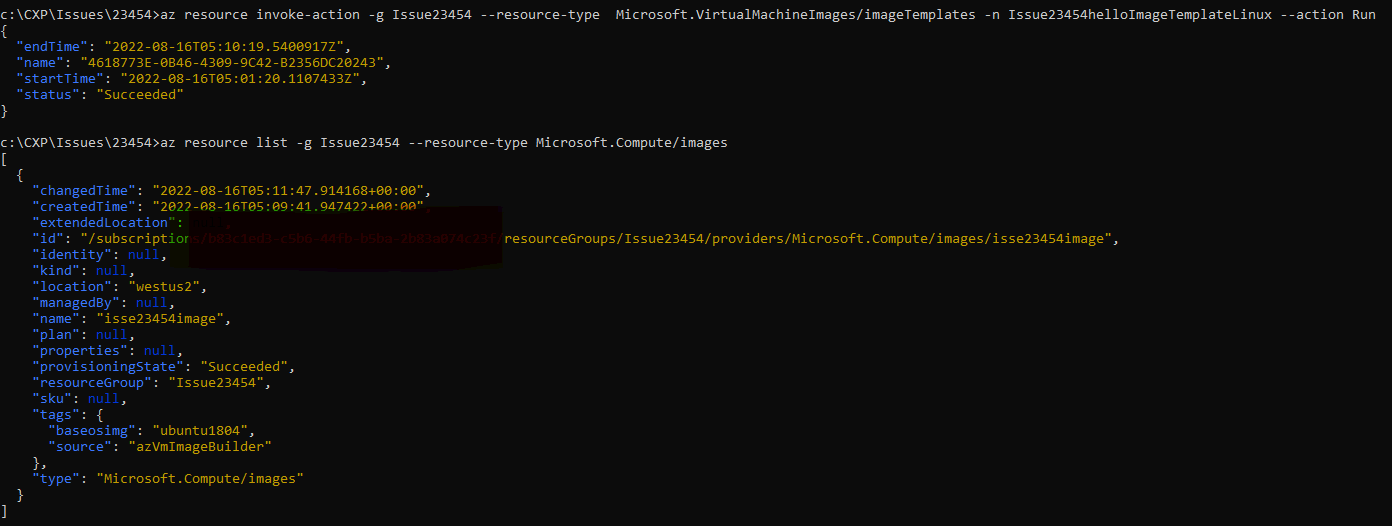

I will try again the same in cloud shell and keep you updated of the progress
@RakeshMohan-MSFT When you follow the new detailed, step by step instructions for recreating the BUG in your software that we added on Friday, what roles are assigned to the very first service principal that logs in to run all the subsequent commands?
We start with a service principal that is the subscription owner.
We will not be able to recreate this with the newer version of the cli you suggested until daytime in North America. … This is why we are frustrated that the only support being offered here is in the middle of the night.
Are you certain that you personally input every single command listed in the original posting at top above? When you initially attempted to recreate the error, you had not done all the actual steps required because we had not posted all the explicit steps yet. … We spent much of this past Friday assembling the much more detailed list of commands that are currently in the original posting at top above, so that you would have needed to have typed them in either today or on Friday night.
@jtravell I am trying this in subscription where i am the owner. I suggest you open a support ticket to address this in your timezone, also you will get support on weekends as well and probably a dedicated engineers. I am about to try with 2.33.0 which is your version and see if i can reproduce your issue.
@RakeshMohan-MSFT How do we open a ticket in our time zone? That is what we thought we were doing when we opened up this ticket.
@jtravell From the azure portal. Depending on your timezone an engineer is assigned even otherwise you can ask them to assign an engineer in your timezone.
Even with 2.33.0 i can list.
az version { "azure-cli": "2.33.0", "azure-cli-core": "2.33.0", "azure-cli-telemetry": "1.0.6", "extensions": { "account": "0.2.3", "aks-preview": "0.5.93", "ml": "2.7.0", "spring-cloud": "3.1.5" } }
az resource list --resource-group Issue23454 --resource-type Microsoft.Compute/images [ { "changedTime": "2022-08-16T05:21:48.548680+00:00", "createdTime": "2022-08-16T05:09:41.947422+00:00", "extendedLocation": null,
@RakeshMohanMSFT We are still getting this BUG in your software even after we upgraded the az cli to the latest version. We just sent you the unredacted debug trace to [email protected] with subject ATTN:Rakesh
Note that this same code worked perfectly for a long time including a few weeks ago. ... This BUG appeared recently and led to the opening of this ticket. ... The code being used is from the Microsoft QuickStart given in the link in the original posting above. ... Nothing has changed in our automation. ... This BUG has resulted from something in your deployments having introduced this BUG in recent weeks.
An addition to your review of this during your shift, can you please get an engineer in our North American Pacific Time time zone to pick this up tomorrow where you leave off at the end of your shift? ... We would just be posting the same identical original posting at top above, so it might be convenient to leave all these records in one place.