

 Azure
Azure
APIM developer portal generated sitemap contains relative path instead of absolute canonical url links
Bug description
On APIM Developer Portal, a sitemap.xml file is automatically generated which can be used for search engine indexing. Unfortunately, the sitemap does not generate full path to resources. Relative url paths are not supported by some search engines like Google (https://developers.google.com/search/docs/advanced/sitemaps/build-sitemap#general-guidelines)
Reproduction steps
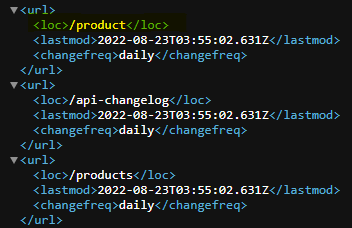
After publishing the portal, the sitemap can be found in the root directory at "https://[portal host path]/sitemap.xml". Inspecting the sitemap reveals relative paths for all resources. See snippet below (screenshot):
Expected behavior
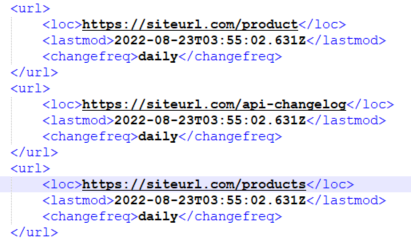
A well formatted sitemap where the each "loc" element in the "urlset > url" is rendered as an absolute canonical link of the page complete with the protocol (https://) specified. The namespace used on the generated sitemap specifies the sitemaps.org namespace. The https://www.sitemaps.org/protocol.html page describes the "loc"element as:
"URL of the page. This URL must begin with the protocol (such as http) and end with a trailing slash, if your web server requires it. This value must be less than 2,048 characters."
See sample screenshot below:
Is your portal managed or self-hosted?
Managed
Question
Does the sitemap generation have any settings which can be configured to generate full canonical url paths?

@ssp-dcom, thank you for opening this issue. We will triage it within the next few business days.


Hi @azaslonov, do you have any progress updates for this issue? Do you know if there's any timelines for when this issue might get resolved?
Hi @azaslonov, May I know whether we have had a chance to implement the fix on the issue? It would be great if you could share some insights on the issue. Thanks in advnance.

This issue is related to managed developer portal. We advise you to create a Azure support request to get assistance on this issue. Please refer to the below link to create a new Azure support request, Please select Problem Type = "Developer Portal" in the request to route it appropriately.
https://learn.microsoft.com/en-us/azure/azure-portal/supportability/how-to-create-azure-support-request
