
Azure-Sentinel
 Azure-Sentinel copied to clipboard
 Azure
Azure
Start-MDEAutomatedInvestigation missing application roles
In Start-MDEAutomatedInvestigation logic app
after granted Alert.ReadWrite.All permissions to the managed identity after all steps with powershell commands (plus MS Sentinel responder at resource group for this logic app)
at step Machines-Get single machine pops out error :"message": "Missing application roles. API required roles: Machine.Read.All,Machine.ReadWrite.All, application roles: Alert.ReadWrite.All."
Expected behavior Could you please advise how to make this logic upp running with no reported error?
Screenshots
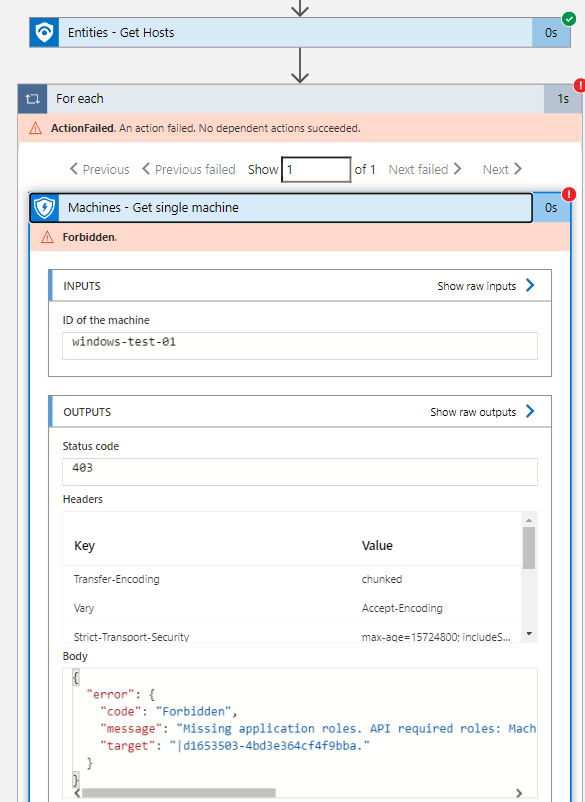
Desktop :
- OS: [Win 11]
- Browser [chrome]
- Version [Version 112.0.5615.138]

Thank you for submitting an Issue to the Azure Sentinel GitHub repo! You should expect an initial response to your Issue from the team within 5 business days. Note that this response may be delayed during holiday periods. For urgent, production-affecting issues please raise a support ticket via the Azure Portal.
![github-actions[bot] avatar](https://avatars.githubusercontent.com/in/15368?v=4 "Published by a pub.dev verified publisher")
Thank you for submitting an Issue to the Azure Sentinel GitHub repo! You should expect an initial response to your Issue from the team within 5 business days. Note that this response may be delayed during holiday periods. For urgent, production-affecting issues please raise a support ticket via the Azure Portal.
Thank you for submitting an Issue to the Azure Sentinel GitHub repo! You should expect an initial response to your Issue from the team within 5 business days. Note that this response may be delayed during holiday periods. For urgent, production-affecting issues please raise a support ticket via the Azure Portal.
Thank you for submitting an Issue to the Azure Sentinel GitHub repo! You should expect an initial response to your Issue from the team within 5 business days. Note that this response may be delayed during holiday periods. For urgent, production-affecting issues please raise a support ticket via the Azure Portal.

Thank you for submitting an Issue to the Azure Sentinel GitHub repo! You should expect an initial response to your Issue from the team within 5 business days. Note that this response may be delayed during holiday periods. For urgent, production-affecting issues please raise a support ticket via the Azure Portal.
Hello, we are 2 weeks after - do we have any news pls?
Hi @ampred1ct as per my understanding of the error you are facing, please follow the steps given below to resolve 'Missing application roles' error: -
- Go to the Azure portal and navigate to the resource group that contains the machines you want to query.
- Select the Access control (IAM) blade and click on Add to add a new role assignment.
- In the Add role assignment blade, select the role Virtual Machine Contributor.
- In the Assign access to section, select User, group, or service principal. In the Select section, search for and select the managed identity associated with the logic app.
- Click on Review + assign to review the details of the role assignment and click Assign to complete the process.
- Repeat the above steps for the Alert Reader and Log Analytics Reader roles.

Thank you for submitting an Issue to the Azure Sentinel GitHub repo! You should expect an initial response to your Issue from the team within 5 business days. Note that this response may be delayed during holiday periods. For urgent, production-affecting issues please raise a support ticket via the Azure Portal.