

 Azure
Azure
Symantec / BlueCoat ProxySG Issues with Rsyslog logging daemon ( + Work-Around )
There are several issues between Bluecoat ProxySG and the rsyslog components to send the logs to Microsoft Sentinel:
Issues between BlueCoat Proxy SG and Rsyslog
The first issue we faced with implementation, was issues of compatibility between the solution itself and the rsyslog logging daemon These issues are documented at the following links and previous issues on this Git:
https://github.com/Azure/Azure-Sentinel/issues/741 https://github.com/Azure/Azure-Sentinel/issues/2042 https://community.splunk.com/t5/Getting-Data-In/BlueCoatProxySG-to-Syslog-to-Splunk-How-do-I-get-this-to-work/m-p/210716
Unfortunately neither of the proposed actions helped reach an acceptable work-around or solution:
- BlueCoat simply writes the access log file straight to the TCP socket
- BlueCoat config allows "periodic" and "continuous" sending modes ( 'continuous' mode is recommended for syslog )
- BlueCoat log records are delimited by CARRIAGE RETURN LINE FEED ( \r\n ), but the carriage return combined with the rsyslog '$EscapeControlCharactersOnReceive on' option causes every BlueCoat message to end with delimiters interpreted incorrectly ( for example, \r is interpreted as # 015 which is 13 in octal -- ASCII 13 = carriage return, and this does not break the message, causing them to be all concatenated and trunked whenever rsyslog reaches the message character framing limit )
- rsyslog (default config) uses LINE FEED ( \n) character as message delimiter
- rsyslog (default config) tries to parse every line
- ProxySG does NOT allow to change the end-message delimiters as they are hard-coded
While rsyslog does have some properties that seem to help with this, they are absolutely not recommended for use in a Production environment ( as stated in rsyslog documentation ):
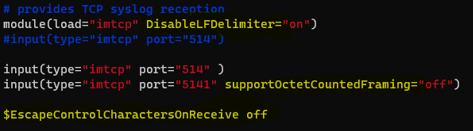
The use of these rsyslog properties combined does allow for the messages to be received correctly on a single line ( the hard-coded ASCII interpreted delimiters are still printed at the end of the message ), but, unfortunately, the 'DisableLFDelimiters' property is global, and it is not applicable to a single TCP listener This means that, if other Data Sources are sending logs to the Forwarder, the aforementioned properties might break these. A viable solution with the usage of the rsyslog properties has to be further tested
This issue can be easily reproduced, since ANY rsyslog daemon will have this kind of issues with BlueCoat ProxySG It has been reproduced in a test environment successfully, but no solutions were found, except for this one Just follow the instructions shown in the Connector page on a machine with the same specifications as the ones we are using ( details below ) for testing and reproducing
Forwarder Specifications:
- OS: Ubuntu 20.04 Server
- Hardware ( 8500eps ): 4 CPU, 8GB RAM
- Memory: 25 GB
- RFC Support: Syslog RFC 3164, Syslog RFC 5424
- Logging Daemon: rsyslog
- Network: Open Net Access
Work-Around / Solution
Since the rsyslog properties are not suggested for application on Forwarders receiving logs from other Data Sources, and since they are not applicable to a single listener, we had to create a Forwarder dedicated to BlueCoat ProxySG logs using the syslog-ng daemon, which is supported by BlueCoat, following are the specifications of the machine:
Forwarder Specifications:
- OS: Ubuntu 20.04 Server
- Hardware ( 8500eps ): 4 CPU, 8GB RAM
- Memory: 25 GB
- RFC Support: Syslog RFC 3164, Syslog RFC 5424
- Logging Daemon: syslog-ng
- Network: Open Net Access
Logs were now received correctly on the Forwarder ( there are issues with the OMS Agent onboarding scripts which break the syslog-ng daemon's configuration, so this needs to be corrected manually on /etc/syslog-ng/syslog-ng.conf so that it listens on port 0.0.0.0:514 and forwards towards 127.0.0.1:25224 and comment out the lines appended at the end of the file by the OMS Agent onboarding script ) NOTE: Disable MetaConfig synchronization, otherwise these lines will keep being appended to the .conf file and the agent will keep crashing
Unfortunately though, when the logs were forwarded, they were wrongly normalized / parsed on the Syslog table by Sentinel itself, causing trunking of the Syslog messages at the beginning and whenever the cs(User-Agent) field contained a colon ( : ) Following is a query on the Syslog table at the time:

Due to this issue we decided to send the logs to CommonSecurityLog with a custom Pseudo-CEF format set on ProxySG These are the steps:
- Configure the following format on BlueCoat ProxySG:
$(date) $(time) s-ip=$(s-ip) CEF:0|Bluecoat|ProxySG|1.0|N/A|$(sc-filter-result)|5|c-ip=$(c-ip) sc-filter-result=$(sc-filter-result) cs-categories=$(cs-categories) cs(Referer)=$(cs(Referer)) sc-status=$(sc-status) s-action=$(s-action) cs-method=$(cs-method) rs(Content-Type)=$(rs(Content-Type)) cs-host=$(cs-host) cs-uri-port=$(cs-uri-port) cs-uri-path=$(cs-uri-path) cs(User-Agent)=$(cs(User-Agent)) sc-bytes=$(sc-bytes) cs-bytes=$(cs-bytes) x-virus-id=$(x-virus-id) x-bluecoat-application-name=$(x-bluecoat-application-name) x-bluecoat-application-operation=$(x-bluecoat-application-operation) cs-username=$(cs-username) cs-auth-group=$(cs-auth-group) time-taken=$(time-taken) - Onboard the OMS using the cef_installer.py script ( purge the OMS Agent configured for Syslog Collection if installed )
- Comment out the lines added by the script to the /etc/syslog-ng/syslog-ng.conf file and to manually configure the listen on 0.0.0.0:514 and forward on 127.0.0.1:25226
- Create a file in /etc/syslog-ng/conf.d with the
- Restart the syslog-ng service
- Logs will now be received on the CEF table
Additionally, a custom parser may be deployed with a KQL function called "SymantecProxySG" ( with a simple regex to parse each field ) This will allow for the connector to turn "green", regardless of the fact that the data is received on the CommonSecurityLog table instead of the Syslog table. Following are the results of this configuration:
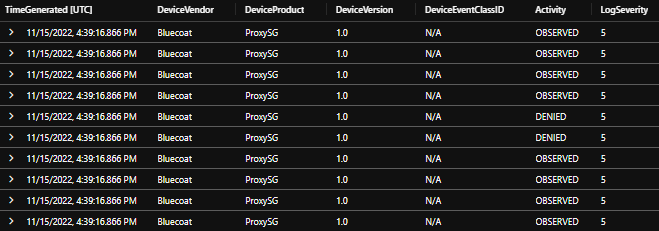
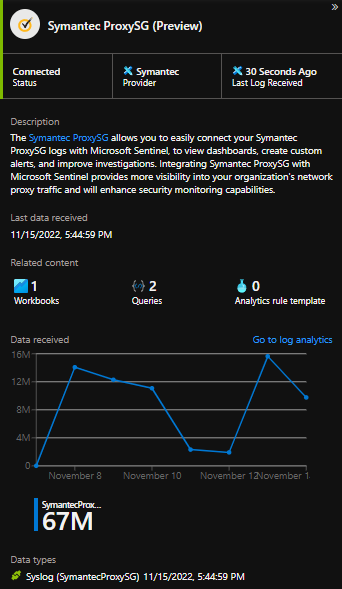


Thank you for submitting an Issue to the Azure Sentinel GitHub repo! You should expect an initial response to your Issue from the team within 5 business days. Note that this response may be delayed during holiday periods. For urgent, production-affecting issues please raise a support ticket via the Azure Portal.
![github-actions[bot] avatar](https://avatars.githubusercontent.com/in/15368?v=4 "Published by a pub.dev verified publisher")
Thank you for submitting an Issue to the Azure Sentinel GitHub repo! You should expect an initial response to your Issue from the team within 5 business days. Note that this response may be delayed during holiday periods. For urgent, production-affecting issues please raise a support ticket via the Azure Portal.
@KenBab thanks a lot for the workaround but could you please add more details for the custom parser? I can see my logs in the CommonSecurityLog table but I'm unable to parse the logs and connect the Symantec ProxySG data connector.

Thank you for submitting an Issue to the Azure Sentinel GitHub repo! You should expect an initial response to your Issue from the team within 5 business days. Note that this response may be delayed during holiday periods. For urgent, production-affecting issues please raise a support ticket via the Azure Portal.
Thank you for submitting an Issue to the Azure Sentinel GitHub repo! You should expect an initial response to your Issue from the team within 5 business days. Note that this response may be delayed during holiday periods. For urgent, production-affecting issues please raise a support ticket via the Azure Portal.
Thank you for submitting an Issue to the Azure Sentinel GitHub repo! You should expect an initial response to your Issue from the team within 5 business days. Note that this response may be delayed during holiday periods. For urgent, production-affecting issues please raise a support ticket via the Azure Portal.

aalhanbali
The deploy of a new KQL Function is needed. The contents of the KQL Function will be a regex pattern according to the keys and values you have set on ProxySG. Once the KQL Function is active and starts parsing data, the connector will turn green
Hi @KenBab has this issue been resolved, please confirm, thanks!
This issue is not resolved. The workaround I presented in the issue description is still needed
We wanted to check on the status of Issue https://github.com/Azure/Azure-Sentinel/issues/6638 . The issue is pending for more than expected days. Please let us know if you need any assistance to review this Issue. As per our standard operating procedures if no response is received in the next 7 business days, we will close this Issue. Thank you for your cooperation.

Since we have not received a response in the last 7 days, we are closing your issue as per our standard operating procedures. If you still need support for this issue, feel free to re-open at any time. Thank you for your co-operation.
Thank you for submitting an Issue to the Azure Sentinel GitHub repo! You should expect an initial response to your Issue from the team within 5 business days. Note that this response may be delayed during holiday periods. For urgent, production-affecting issues please raise a support ticket via the Azure Portal.
This issue is still present and can be duplicated. Contact me internally for a customer scenario and fixing.
