

 Azure
Azure
Autoscaling breaks Key Vault reference
I'm running into a strange, inconsistent issue where autoscaling seems to be corrupting the function app's access to Key Vault.
In some cases where the App Service Plan is automatically scaled out, none of my key vault references in my configurations are able to resolve. When I look at the reason, it says "Other Reasons".
Only fix I've found was having to delete the access policy for the function app in Key Vault and re-add it again. Once I do this then upon checking on the function app, the references are resolved.
This is obviously not ideal as it makes the autoscaling feature of the App Service plan useless as I sometimes need to manually intervene.
I first came across the issue when I UpScaled the App Service Plan and noticed that the Key Vault references were not resolving. I initially thought it had to do with the Private Endpoint and VNet integration that was set up for the function app.
Also there are quite a few function apps in the App Service Plan, only about 3 of them would get the Key Vault reference issue. The others would still be working after the autoscale. Also the issue only seems to occur once out of every 6 or so autoscale instances. So its not consistent.
Any help on this issue would be appreciated.


So this is still happening. What also seems to resolve the issue once it arises, is to merely go into the configuration section of the function app on Azure portal. Once the page has loaded, after a few seconds the Key Vault references work again and the function app runs.
Today 1 of our App Service plans scaled out and this issue popped up. I had to go into each function app's configuration page to get it to run again (get Key Vault references to work). However 2 of the functions from another App Service Plan that didn't scale out, suffered from the same issue. All function apps are connected to the same VNet. I suspect there's some underlying issue with the VNet and references to the Key Vault.
Any help with this issue will be highly appreciate as we always have to manually attend to this issue when it pops up.
Today I received this error when trying to access the Configurations tab on one of the function apps that wouldn't fire because of a keyvault reference issue:
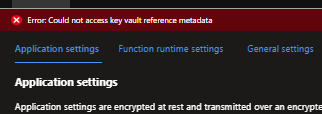
This issue is now happening more frequently. I'm almost certain that it's just isolated to the South African region because surely more noise would have been made of this issue if it was elsewhere. Do you perhaps know how I can get more traction on this issue @v-bbalaiagar @mattchenderson ?
Hi - apologies for missing this before.
Do you have a related support ticket number? You can also provide us with a correlation ID for logs to help us identify the app though the support channel will likely provide a faster answer.
In theory, scaling should not have a general impact here - the report is surprising. If it's multiple apps on a VNET plan, it could be a question of the subnet size. I don't see where that would have been resolved by the remove/add for the access policy.

Hi @mattchenderson sorry for taking so long to respond myself.
I unfortunately don't have a support ticket (long story but happy to explain it to you in private).
So the issue just occurred today again. This time it was logged that an azure infrastructure upgrade happened at 1pm UTC, and a few minutes after the upgrade started our App Service started throwing connection string errors i.e. unable to get the KeyVault value.
When I logged into the portal at around 6:22pm UTC and cleared a piled up queue on our service bus, all of our function apps that reside on the same app service plan started giving the same Key Vault issue (i.e. once the CPU usage dropped).
Again, merely navigating to the configuration section of the function app in the portal is enough to "jump start" it to work again.
Perhaps this is just unexpected behavior because there are too many function apps running on the App Service Plan? In terms of the subnet, there are 27 IPs available and 16 Function apps registered to the subnet.
I can definitely see it being a problem if I had to scale out the App Service Plan but I've set it to manual scale out and it's only set to 1 instance. Perhaps the subnet size needs to cater for 2 instances regardless?
Now that I think about it, this issue comes up a lot more often with the App Service Plans that have a lot of Function Apps running on them. I'm completely not using Auto Scale Out in our system anymore seeing as it's almost a given for the issue to arise when an auto scale out happens, which is a pity because we have known times for peaks and troughs during the day.
.... after reading your response and typing this message I'm starting to think the solution to this would be to:
- Place half of the Function Apps on another App Service Plan
- Make sure the subnet size is for the very least double that which is required.
I hope this is suffice to identify one of the Function Apps on the App Service Plan (it's not exactly the execution log entry, but a log entry in the 'requests' table in App Insights): timestamp [UTC]: 2022-09-28T19:32:47.176Z id: 1b8d49c18e50a045 operation_Id: 39148a6fa499a24ca2c9febfafc48f30 operation_ParentId: 39148a6fa499a24ca2c9febfafc48f30 South Africa North region.