

 AxisCommunications
MSP debugging events
Hi,
I'm wondering if it would be possible to include more debugging events?
Also, would it be possible to add the following kind of information to the client stream data overlay:
- Stream uptime
- Buffer delay
- Dropped frames
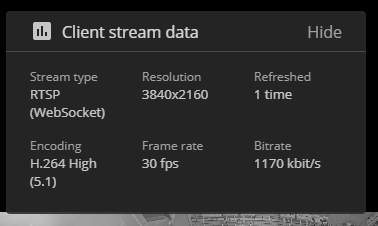

Not sure about displaying it in the stats box, but adding debug logging for MSP shouldn't too much of a problem.
What kind of information are you interested in?

The following would be of interest to log on certain events on a video element
- on
playingandtimeupdateevents, log:- currentTime: the
videoElement.currentTime - delay: time (in seconds) between current playTime and what is already buffered in the player (
videoElement.buffered.end(videoElement.buffered.length - 1) - videoElement.currentTime)
- currentTime: the
- on
progressevent, log:- bufferedEnd:
videoElement.buffered.end(videoElement.buffered.length - 1)
- bufferedEnd:
- on
playevent:- some data about the video like e.g. resolution
Check HTMLMediaElement for docs on the different events.
For the stats, we can add the uptime as the pipeline's currentTime (which is exposed by both H.264 and MJPEG pipelines), and the delay as videoElement.buffered.end(videoElement.buffered.length - 1) - videoElement.currentTime. For the dropped frames, we can use:
if (videoElement.getVideoPlaybackQuality !== undefined) {
  const { droppedVideoFrames, totalVideoFrames } = videoElement.getVideoPlaybackQuality()
  droppedFramesText = `${droppedVideoFrames} of ${totalVideoFrames}`
} else if (videoElement.webkitDecodedFrameCount !== undefined) {
  droppedFramesText = `${videoElement.webkitDroppedFrameCount} of ${videoElement.webkitDecodedFrameCount}`
}
