

 AvaloniaUI
DataTemplate with ComboBox and $parent binding not working
Avalonia 0.9.3 Binding the Items property of a ComboBox in a DataTempate using $parent to bind to the parent DataContext ignores the SelectedItem.
Repo: XAML
<Window xmlns="https://github.com/avaloniaui"
        xmlns:x="http://schemas.microsoft.com/winfx/2006/xaml"
        xmlns:d="http://schemas.microsoft.com/expression/blend/2008"
        xmlns:mc="http://schemas.openxmlformats.org/markup-compatibility/2006"
        xmlns:local="clr-namespace:AvaloniaApplication21"
        mc:Ignorable="d" d:DesignWidth="800" d:DesignHeight="450"
        x:Class="AvaloniaApplication21.MainWindow"
        Name="_window"
        Title="AvaloniaApplication21">
  <Window.DataTemplates>
    <DataTemplate DataType="local:MyClass1">
      <ComboBox Items="{Binding #_window.DataContext.SubItems}" SelectedItem="{Binding Selected, Mode=TwoWay}"/>
    </DataTemplate>
    <DataTemplate DataType="local:MyClass2">
      <ComboBox Items="{Binding $parent[local:MainWindow].DataContext.SubItems}" SelectedItem="{Binding Selected, Mode=TwoWay}"/>
    </DataTemplate>
  </Window.DataTemplates>
  <ItemsControl Items="{Binding Items}"/>
</Window>
And code behind
using System.Collections;
using System.Collections.Generic;
using Avalonia.Controls;
using Avalonia.Markup.Xaml;

namespace AvaloniaApplication21
{
    public class MainWindow : Window
    {
        public IList<MyItem> SubItems { get; }

        public IEnumerable Items { get; }

        public MainWindow()
        {
            SubItems = new List<MyItem>
            {
                new MyItem { Text = "Item1" },
                new MyItem { Text = "Item2" },
                new MyItem { Text = "Item3" },
            };
            Items = new object[]
            {
                new MyClass1 { Selected = SubItems[1] },
                new MyClass2 { Selected = SubItems[1] },
            };
            DataContext = this;

            AvaloniaXamlLoader.Load(this);
        }
    }

    public class MyClass1
    {
        public MyItem Selected { get; set; }
    }
    public class MyClass2
    {
        public MyItem Selected { get; set; }
    }

    public class MyItem
    {
        public string Text { get; set; }

        public override string ToString() => Text;
    }
}
Expected: both ComboBoxes would show the selected item as Item1
Actual: the ComboBox using #element binding works but the ComboBox using $parent binding loses the initial selection.
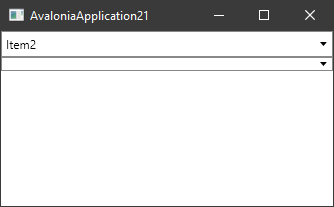
I expect this is due to the binding being performed before the ComboBox is attached to the visual tree.
Is this expected behaviour?

I've run into this also. The $parent binding seems to work fine if the ComboBox is not nested within a DataTemplate itself. The binding works fine apart from not filling the initial value. The behaviour is the same with ListBox.
An expanded example can be found in a gist: https://gist.github.com/VisualMelon/9aa477ef2101cffd1f08e69461fa05f2
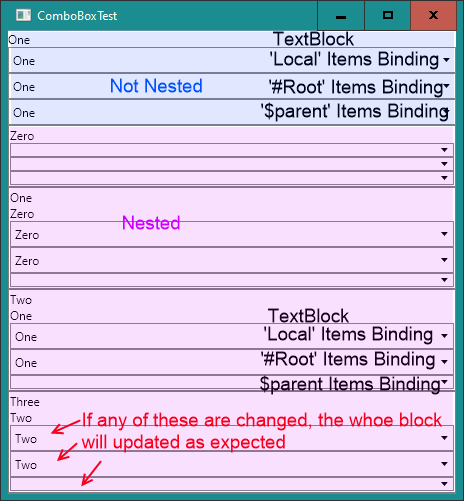
The behaviour is also different depending on how and when you set the DataContext on the main window. If you assign the DataContext before calling InitializeComponent then none of the non-nested components are initialised.

Woah! That behavior is really weird! I could not get SelectedValue binding to work with a ComboBox until I switched to using the element name.
<ItemsRepeater ItemsSource="{Binding CurrentPart.DefaultLocations}">
  <ItemsRepeater.ItemTemplate>
      <DataTemplate>
          <StackPanel Orientation="Horizontal" Spacing="5">
              <TextBlock Text="{Binding LocationGroupName}" />
              <ComboBox
                  ItemsSource="{Binding #_userControl.((inventory:PartsViewModel)DataContext).Locations}"
                  SelectedValue="{Binding LocationId}"
                  DisplayMemberBinding="{Binding Name}"
                  SelectedValueBinding="{Binding Id}">
              </ComboBox>
          </StackPanel>
      </DataTemplate>
  </ItemsRepeater.ItemTemplate>
</ItemsRepeater>
While using $parent, the ComboBox will set the LocationId to null when the view loads. This was tested on 11.1.0-rc2
