

 AvaloniaUI
XAML hot reload support
All of WPF, UWP, Xamarin and Xamarin.Forms support XAML hot reload, which means that you can edit XAML files in debug session and changes will apply immediately on the running app without needs of restarting the debug session. What's more, all binding states and contexts will not lose during hot reload.
I hope that Avalonia could support XAML hot-reload in the future :)

The way it's done in those platforms heavily depends on the separate XAML AST built by IDE services that can produce XAML AST diffs to be applied in the running application. Which we currently don't have.
So probably not this year.

Attempted to bring XAML (and C#) hot reload support to Avalonia desktop applications by relying on dotnet watch build tooling.
https://github.com/AvaloniaUI/Live.Avalonia

I have been working on a POC for this feature for a few days. I have managed to change constant and text properties while the app is running. Of course these are baby steps and before going down the rabbit hole I want to get some feedback. Here is a gif for the POC:

First off, based on my research, the way Visual Studio handles hot reload for WPF is somewhat like this:
- When the application starts up under debugger, Visual Studio injects a dll called
Microsoft.VisualStudio.DesignTools.WpfTap.dllinto the program. - This dll parses the visual tree, application, and resource dictionaries, creates an object graph and sends a copy to Visual Studio. It also tracks all the changes made to these components and updates the Visual Studio side. (This tree is also used to populate the Live Visual Tree window.)
- On Visual Studio side the tree is somehow mapped into the internal XAML AST structure.
- When a change made in XAML, some actions that will mutate the visual tree are created and sent to the application. I am not sure whether they have a XAML diff engine. Probably they map the changes directly to actions since they control the AST via the editor.
- The changes are applied on application side and object graph is updated.
My approach is a bit different than Visual Studio's:
- While compiling the XAML, inject method calls that register the created objects to a weak object storage. This storage maps the XAML info (file, line, position) to a list of objects. When a change is requested for certain XAML node, these objects will be fetched and mutated.
- Again while compiling XAML, a method call is injected to watch the filesystem changes for the XAML file.
- When the XAML file changes, the contents are read into a
XamlDocumentand it is compared to the currentXamlDocument. This creates a set of mutations. According to each mutation's XAML info, the related objects are fetched from object storage and their properties are changed. - XAML infos that map to the objects are updated in the object storage.
- The build method created by the XAML compiler is set to the corresponding type's
!XamlIlPopulateOverridefield. This way the new objects that are created after the changes will have the updated XAML contents.
Here are some advantages and disadvantages compared to the Visual Studio way:
Advantages:
- We do not need to inject a dll while starting the application under debugger.
- Hot reload is independent from IDEs. Watching the XAML files and generating a diff can be done anywhere (including the application itself).
- No need to watch the visual tree and act accordingly. Each XAML file manages its own hot reload operations.
Disadvantages:
- Creating diffs from XAML documents is harder than keeping an AST and emitting changes based on some editor operations.
- Watching the filesystem for changes may be brittle. However, this is not the only way to get the changes. IDE plugins may be written to send the changes via debugger.
What are your thoughts?

@notanaverageman Sounds great. But the approach of watching file system lacks the ability to notify changes when code changed but hasn't been saved into disk yet, which is supported by Visual Studio.
I have managed to create a somehow functional hot reload. Instead of getting diffs from parsed XAML AST I inject some placeholder calls in IL code and parse these calls when XAML file changes. This have a few advantages:
- No need to write code for converting XAML AST nodes to runtime objects. XAML compiler already knows how to do this.
- It is not tied to XAML. Any markup language that is compiled to IL code can have hot reload support.
This requires some compiler support. Actually it can be done solely on compiler side if Avalonia specific tasks, such as clearing a property, can be injected as plugins. I have created a draft PR to get early feedback: https://github.com/AvaloniaUI/Avalonia/pull/5363
Here are some details on how the approach works:
While compiling the XAML code following placeholder calls are inserted:
StartContextInitializationMarkerandEndContextInitializationMarkerat the boundaries of the context initialization code.StartNewObjectMarkerandEndNewObjectMarkerat the boundaries of the code that creates a new object. (Just the construction, does not include initialization or setting properties.)StartObjectInitializationMarkerandEndObjectInitializationMarkerat the boundaries of the code that initializes the created object. This may include other markers inside.StartSetPropertyMarkerandEndSetPropertyMarkerat the boundaries of the code that set a property of an object. This may include other markers inside.AddChildMarkerwhen an object is added to the parent's children collection.
When hot reload is requested, the IL instructions are loaded via XAML compiler and parsed for the diff operation. An object tree is created by parsing the object initialization and property setter markers.
Diffing is done by comparing nodes at the same level and getting a score for each pair. Object scores includes the property scores and child object scores recursively. Different object types result in negative score and do not match. An object is paired with the corresponding object that has the maximum score among other siblings to minimize the edit operations. Old objects that do not match any new object are marked for removal and new objects without a match are marked for addition.
Properties are compared for addition and removal in the same way the objects are compared. Change in the values are detected by comparing the IL codes byte by byte. If there is a difference, the property is marked as changed.
After diffing is done, actions are generated for adding/removing objects and adding/removing/changing properties. Context initialization instructions are given to each action that requires a context. Each action creates a dynamic method on the fly with following content:
- Context initialization instructions, if context is required.
- Property call chain instructions to get the object to mutate or remove.
- Instructions to set/add/clear property or add/remove object.
Method is compiled and called with every object that is registered for that XAML file. At the end the new populate method is assigned to !XamlIlPopulateOverride field.
Here is the non exhaustive list of things to do:
- [ ] A consistent IL structure to improve parsing. One issue I know of is that in some instances a child is added to parent collection before initialization and in other instances after. This results in incorrect object trees.
- [ ] Emit the classes that contain marker methods and weak object storage via compiler. Currently they are defined in a project and this project is referenced by the application. I have tried to emit the classes before compiling methods, but could not get their types from
IXamlTypeSystemobject. - [ ] Better handling of
IXamlLabelandIXamlLocaloperands while emitting the hot reload action instructions. - [ ] Taking index changes into consideration when applying hot reload actions. Currently removing more than one object does not work correctly.
- [ ] Property values that are bindings and have a reference to another object in the tree is not resolved correctly after change is applied. The cause may be some missing instructions for context manipulation.
- [ ] I haven't tried any compiled bindings at all.
- [ ] Property call chain currently expects that the logical tree exactly corresponds to the XAML AST tree. Changes made to the logical tree in code behind may break the hot reload operations.
I suspect that emitted MSIL stage might be a bit too late. It might be better to diff the AST nodes between 2 versions of the AST instead.
One issue I know of is that in some instances a child is added to parent collection before initialization and in other instances after.
That's controlled by UsableDuringInitializationAttribute, see https://docs.microsoft.com/en-us/dotnet/api/system.windows.markup.usableduringinitializationattribute?view=net-5.0 for more details
Emit the classes that contain marker methods and weak object storage via compiler.
We can have hot-reload support classes in regular C# code and place them in Avalonia.Markup.Xaml assembly. There already are some runtime helpers.
Thanks for the feedback. I assume that the diff operations would be very similar on AST level. However, I would like to use the compiler generated IL code to apply the changes. Would it be possible to track which AST node corresponds to which IL block? AST changes a lot after transformation, though the general shape seems similar:
Before transformation:
XamlX.Ast.XamlAstObjectNode
  Avalonia.Markup.Xaml.UnitTests:Avalonia.Markup.Xaml.UnitTests.HotReload.TestControl
  XamlX.Ast.XamlAstXmlDirective
    XamlX.Ast.XamlAstTextNode
      xml!!http://schemas.microsoft.com/winfx/2006/xaml:String
  XamlX.Ast.XamlAstObjectNode
    xml!!https://github.com/avaloniaui:Border
    XamlX.Ast.XamlAstObjectNode
      xml!!https://github.com/avaloniaui:StackPanel
After transformation:
XamlX.Ast.XamlValueWithManipulationNode
  XamlX.Ast.XamlAstNewClrObjectNode
    Avalonia.Markup.Xaml.UnitTests:Avalonia.Markup.Xaml.UnitTests.HotReload.TestControl
  XamlX.Ast.XamlManipulationGroupNode
    XamlX.Ast.XamlObjectInitializationNode
      XamlX.Ast.XamlManipulationGroupNode
        XamlX.Ast.XamlPropertyAssignmentNode
          XamlX.Ast.XamlValueNodeWithBeginInit
            XamlX.Ast.XamlAstLocalInitializationNodeEmitter
              XamlX.Ast.XamlAstNewClrObjectNode
                Avalonia.Controls:Avalonia.Controls.Border
              XamlX.Ast.XamlAstCompilerLocalNode
        XamlX.Ast.XamlAstManipulationImperativeNode
          XamlX.Ast.XamlAstImperativeValueManipulation
            XamlX.Ast.XamlAstCompilerLocalNode
            XamlX.Ast.XamlObjectInitializationNode
              XamlX.Ast.XamlManipulationGroupNode
                XamlX.Ast.XamlPropertyAssignmentNode
                  XamlX.Ast.XamlValueNodeWithBeginInit
                    XamlX.Ast.XamlAstLocalInitializationNodeEmitter
                      XamlX.Ast.XamlAstNewClrObjectNode
                        Avalonia.Controls:Avalonia.Controls.StackPanel
                      XamlX.Ast.XamlAstCompilerLocalNode
                XamlX.Ast.XamlAstManipulationImperativeNode
                  XamlX.Ast.XamlAstImperativeValueManipulation
                    XamlX.Ast.XamlAstCompilerLocalNode
                    XamlX.Ast.XamlObjectInitializationNode
                      XamlX.Ast.XamlManipulationGroupNode
    Avalonia.Markup.Xaml.XamlIl.CompilerExtensions.Transformers.AvaloniaXamlIlRootObjectScope+HandleRootObjectScopeNode
I'm currently working on an app, and as a non-front-end developer, I found myself in need of some assistance in that department. The challenge lies in the fact that front-end developers are super-used to having a plethora of excessively reach developer tools at their disposal, many of which they rely on extensively. For instance, the ability to simply hit Ctrl+S and witness the changes being instantly applied to the interface they are building is just mandatory nowadays. Unfortunately, Avalonia falls short in this regard, creating unnecessary barriers to entry, even though many web development skills can be smoothly transitioned to Avalonia development. Currently, the only available options for achieving real-time feedback are:
- A bloated Windows-only 20+ GB proprietary bloated IDE
- A paid Java IDE
And neither of these options is particularly appealing, to be quite frankly honest with you, especially for the average front-end developer who doesn't usually possess one of those. While an upcoming Visual Studio Code extension should improve matters somewhat, it still falls short of being an ideal solution since not everyone uses (or wishes to use) VSC. Consequently, when I recommend Avalonia to develop something, I often encounter a lot of pushback because of all that, which is just disheartening because I love Avalonia and have been following its progress for years.
However, I may be no front-end developer, but I'm no coward either. So, if someone requires hot reload functionality for Avalonia to finally stop trying to convince me to rewrite everything with Flutter, then fine, I'll do it myself.
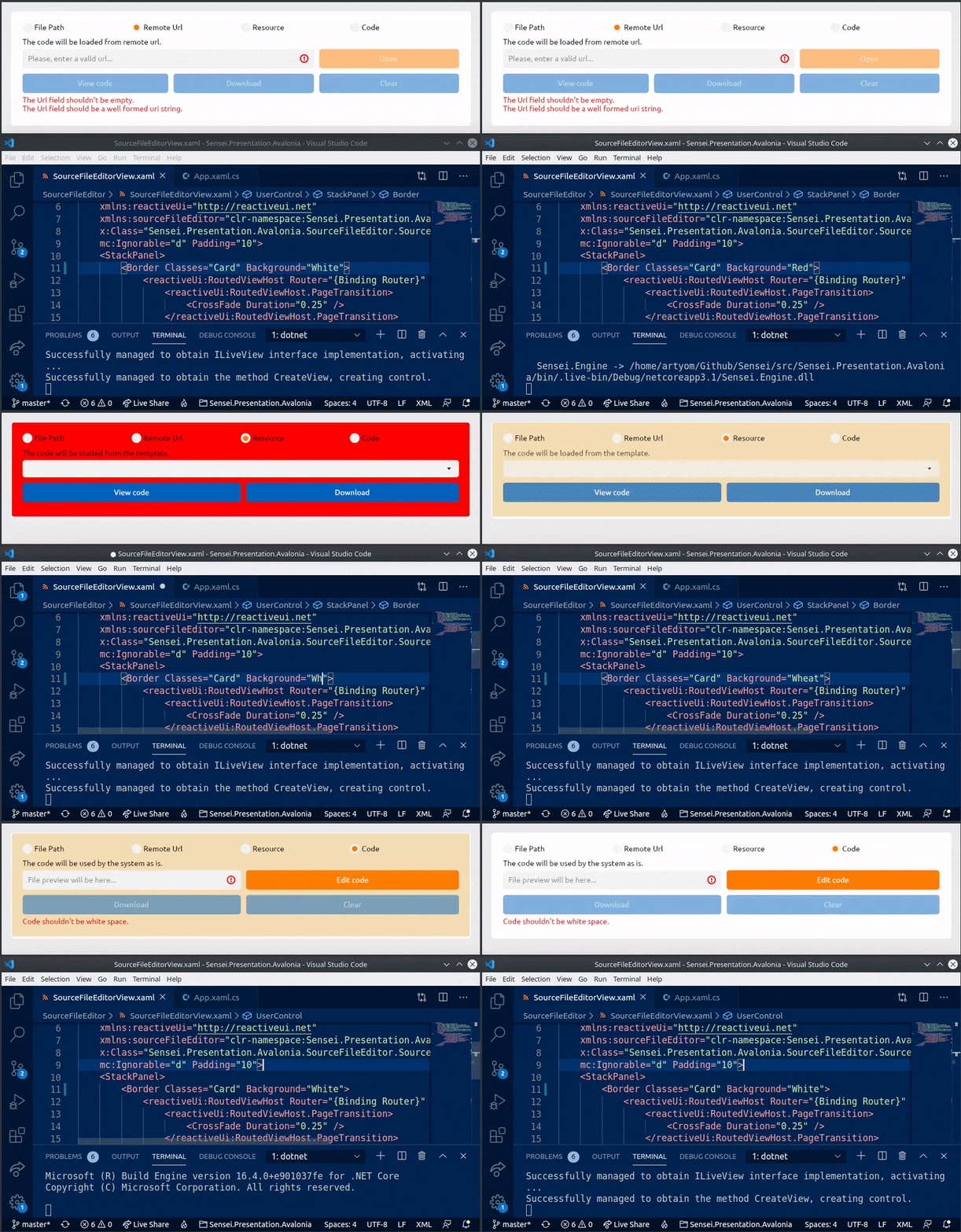
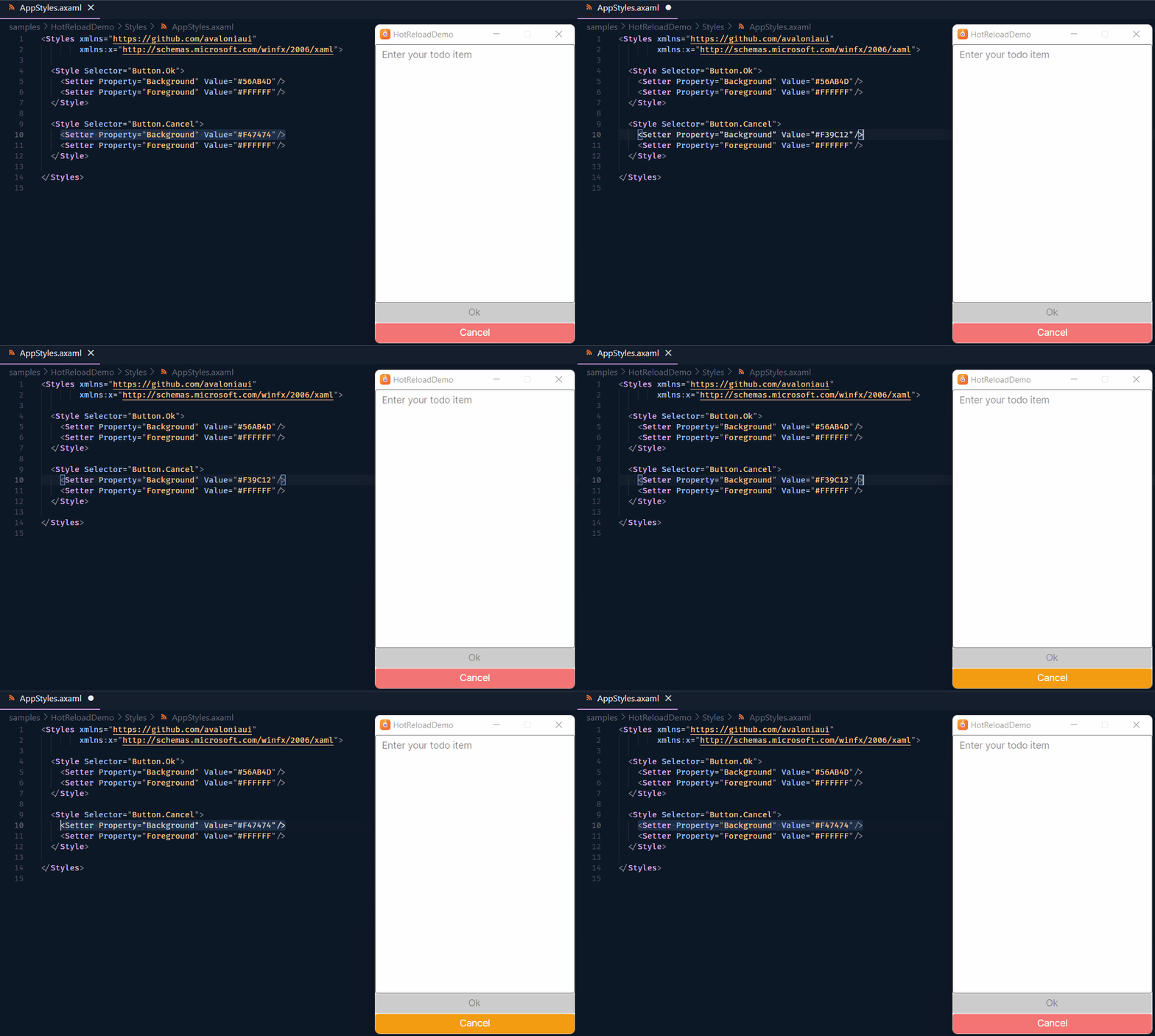
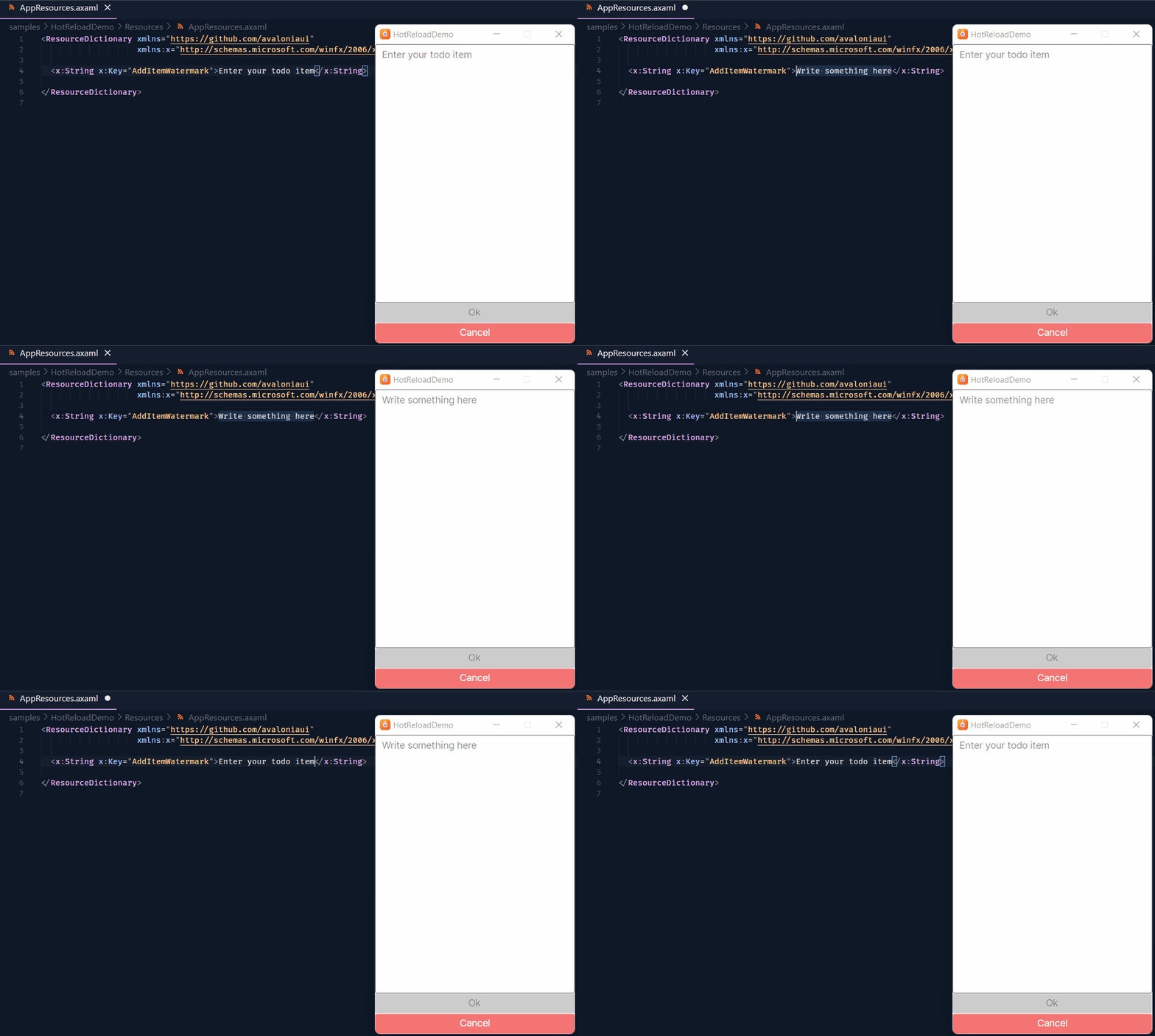
Here are a few examples of what I've managed to accomplish:
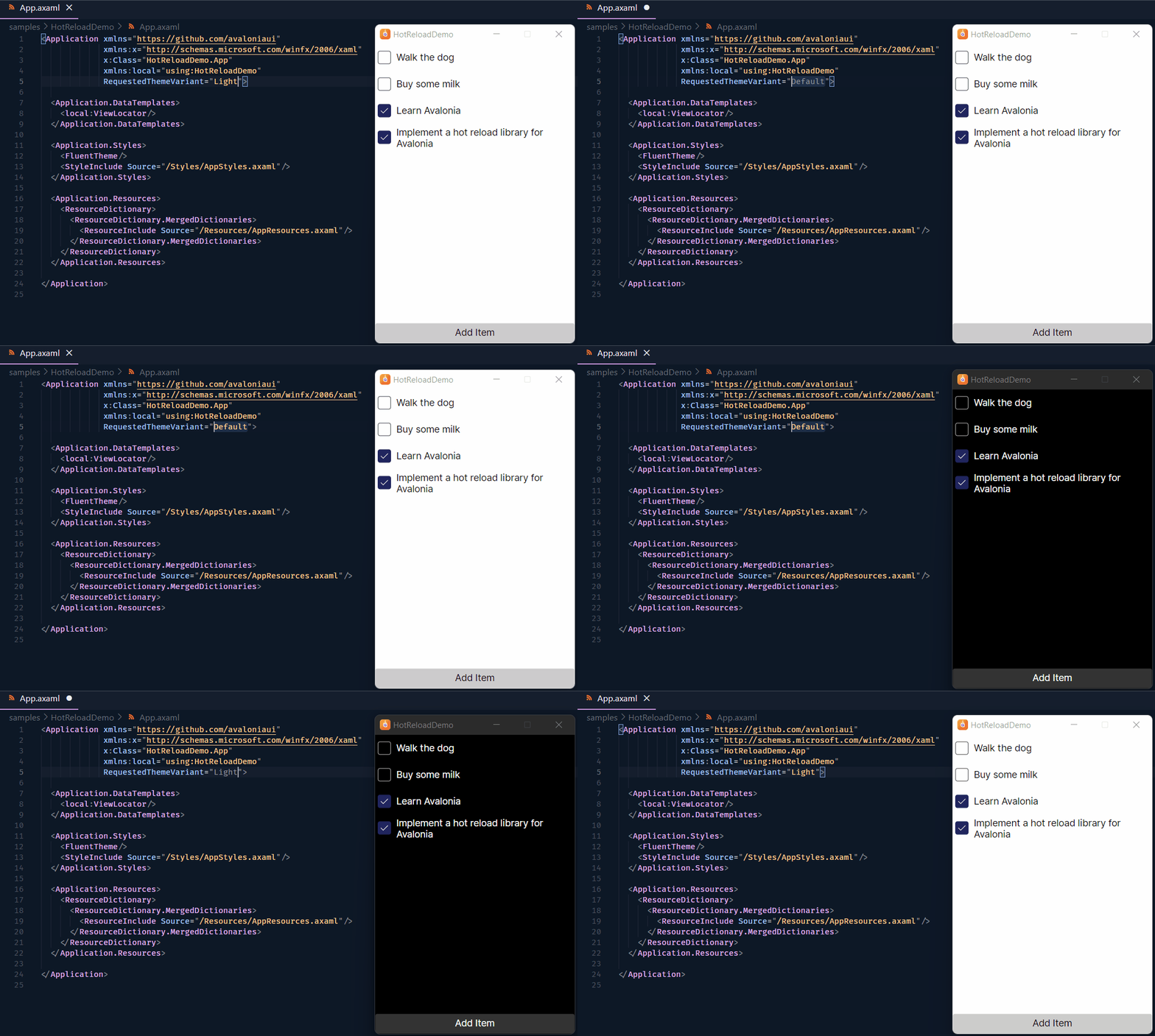 |
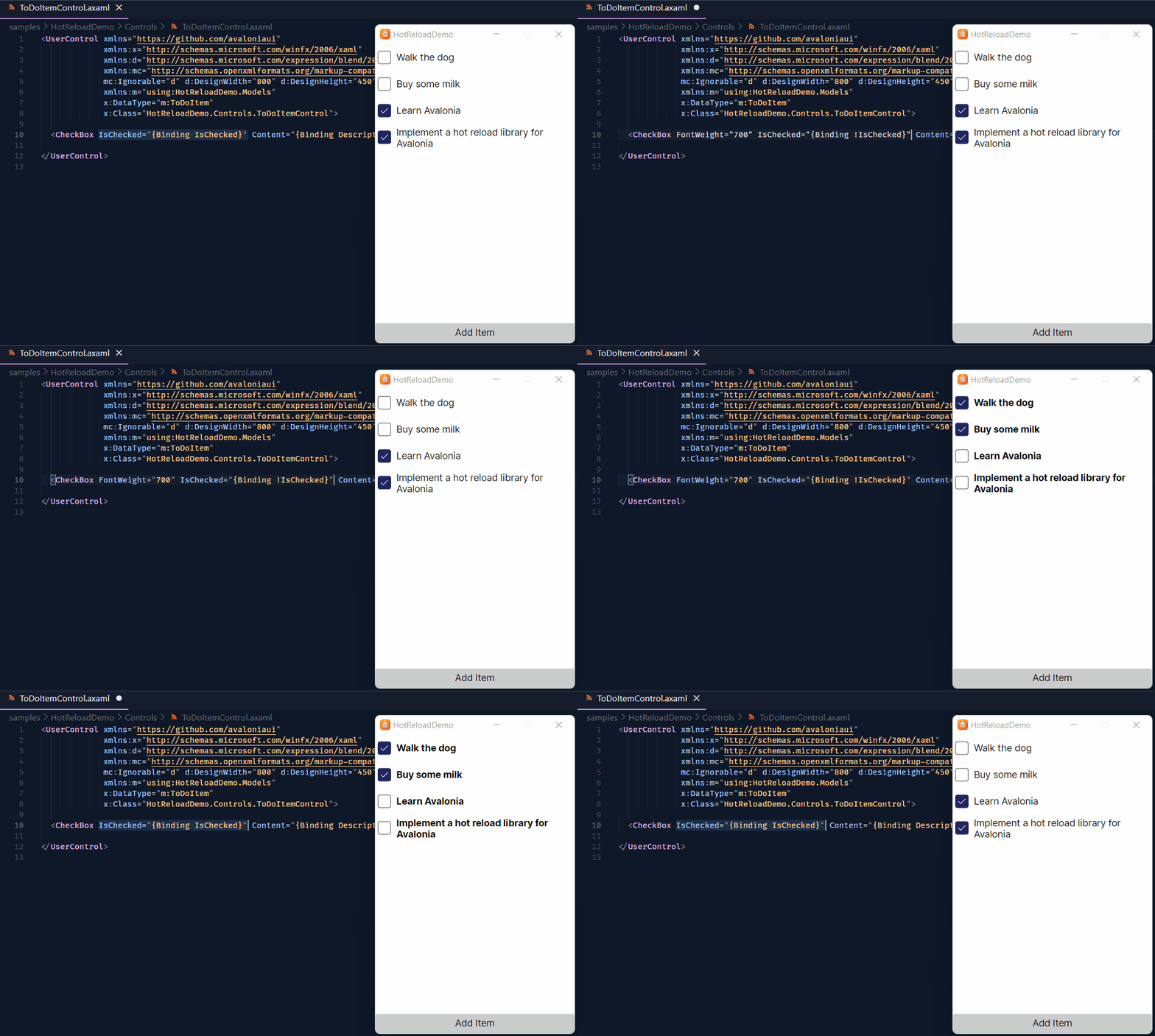 |
|---|---|
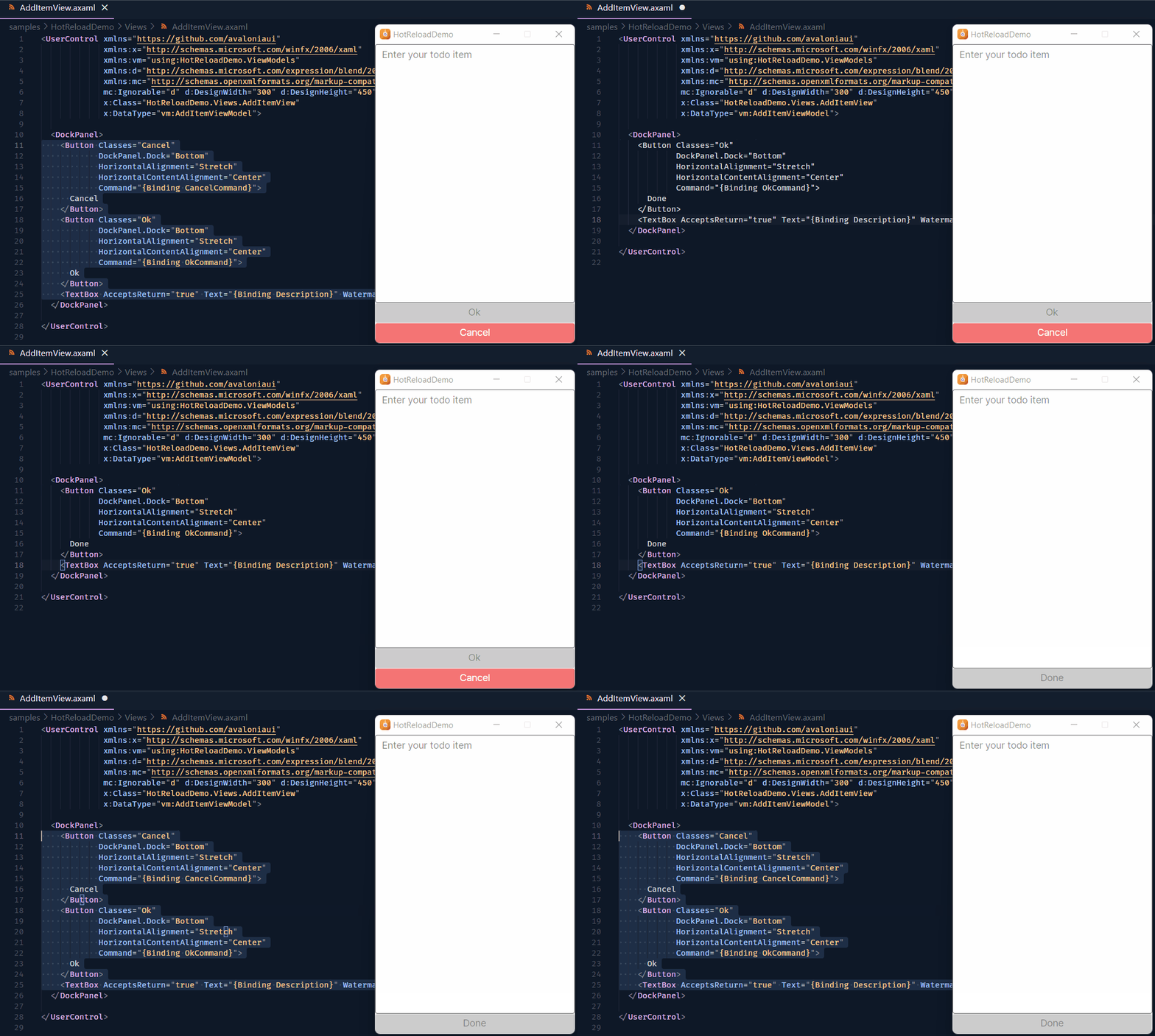 |
 |
 |
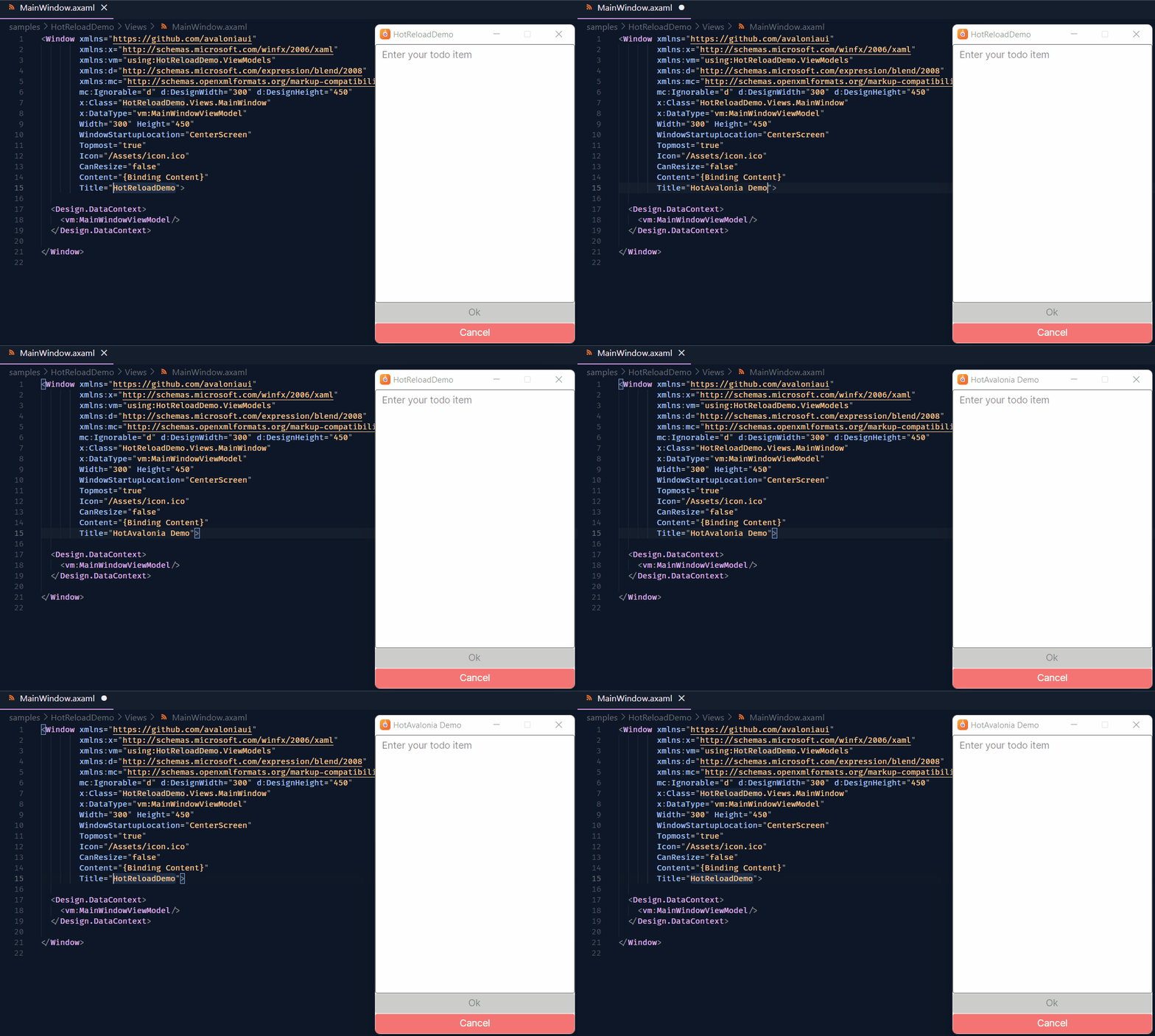 |
If you'd like to try it out, you're more than welcome to visit my Kir-Antipov/HotAvalonia repo.
I understand that there are other priorities at the moment. Nevertheless, I just want to make a point that hot reload capabilities are crucial for enhancing the developer experience and overall accessibility of a UI framework nowadays. This is essential for making it more appealing to developers of all backgrounds. Therefore, it would be fantastic to one day witness the proper implementation of hot reload functionality within Avalonia itself. Alternatively, it would be greatly appreciated if the core team could share their vision on this topic and outline how they envision such functionality being implemented, thereby enabling the community to contribute to this endeavor.


Is there any work being done or any news about supporting Hot Reload in VS? I like some aspects of Avalonia UI and would like to transition to it, however lack of hot reload puts me off. This functionality is crucial nowadays!

https://github.com/AvaloniaUI/Avalonia/discussions/14098#discussioncomment-9145108:
We do not plan to implement HotReload in the foreseeable future as it would require extensive engineering effort.
As grokys said in the previously linked discussion, if we were to implement HotReload, it would have to be a paid feature.
So yeah, there are currently no plans from the core team to implement hot reload. As far as I understand, the best you'll get are IDE-specific designer plugins.
However, there are some good news: I've never stopped working on HotAvalonia, and v3, which is already somewhere around the corner, not only makes it a matter of dotnet add package HotAvalonia to enable hot reload for your project(s), but also brings support for mobile out of the box. Here's a sneak peek showing it already working on the development branch:
So, if the lack of hot reload is the only thing holding you back from adopting Avalonia in your stack, I hope HotAvalonia will solve that problem for you ;)
Thank you @Kir-Antipov looking forward to HotAvalonia v3, most likely last hope before i abandon work with Avalonia all together.
Phew, one +11,959 -2,671 later, and HotAvalonia v3 is finally out! This major release introduces support for Android/iOS, brings hot reload on non-AMD64 devices on par with such on AMD64 ones, and, my personal favorite, makes enabling hot reload for your desktop or mobile apps as simple as installing a single package!
All previously known limitations have been eliminated, so I expect HotAvalonia to work out of the box for most, if not all, users :3
most likely last hope before i abandon work with Avalonia all together
Avalonia definitely deserves being given a proper try, though!
IMHO, it's at the very least the most sensible (and perhaps simply the best) UI framework that we currently have in the .NET world. It's truly astonishing what the Avalonia team has accomplished, especially given their financial situation. They likely earn less from public funding while developing a competent, fully-featured cross-platform UI framework than your average Son Jchlinkert does by flooding the NPM repository with thousands of utility packages (any resemblance to real persons or events is purely coincidental) - and that's just sad. I can only hope that at least their XPF initiative helps to pay the bills somewhat.
So, if there's something missing in Avalonia that you think really, really should be there, it's not because the developers are evil or something, it's simply a budgeting issue. And that's something that can be solved, whether by giving the Avalonia team more funding or time to cook, or through the community efforts. So, there's no reason to abandon the project as a whole over a single missing feature.
Thanks for this! Does it support edition code files as well (.cs) or isXAML only?

It's XAML-only. However, nothing stops you from running your project via dotnet watch to get both HotAvalonia-provided XAML hot reload and .NET-provided code hot reload :)