
themes
 themes copied to clipboard
 Automattic
Varia themes: Gallery Block: 2 columns showing stacked
Describe the bug When a gallery block is added to a page or post and has 2 columns, the images are showing as stacked on desktop instead of side-by-side.
To reproduce Steps to reproduce the behavior:
- Go to Site > Posts (or Pages)
- Click on + to add a Gallery block
- Insert two images
- Set columns to 2 in block settings
Expected behavior Expect the images to display side-by-side (as they show in the editor) on the preview/live site.
Screenshots
In the editor:
Live site:(the image is large so I couldn't get the full thing in a screenshot)
Editor version (please complete the following information):
- WordPress version: 5.5.1
- Does the website has Gutenberg plugin installed, or is it using the block editor that comes by default? default block editor
Desktop (please complete the following information):
- OS: 10.14.6
- Browser Firefox
- Version 80.0.1
Additional context We have a temporary workaround with CSS thanks to Ed!
/* fix 2-column gallery item display on larger screens | #XXXXXX-hc eD */
@media screen and (min-width: 560px) {
	.wp-block-gallery.columns-2 .blocks-gallery-grid {
		flex-wrap: unset;
	}
}
After some testing, this was found in Exford, Mayland, Aleves, Leven, Balasana.
This issue did not persist in Seedlet or Radcliffe2 which leads me to believe it is a Varia bug.
Related issue: #25156

Another report here: 23934217-hc
I can confirm that it only appears to apply to Varia-based themes. In addition to Seedlet and Radcliffe 2, Twenty Twenty also doesn't have an issue with the block. Barnsbury, Dalston, and Hever all do (in addition to those mentioned above).

Another report here: 23985478-hc / 3301171-zen
Theme: Exford
The CSS solution didn't work for this one so I deactivated the Gutenberg plugin.

In doing a bit more testing, the issue is with the math for the margins between the images -- this will fix that and scale better with more images in the Gallery, too:
/* fix 2-column gallery item display | #XXXXXX-hc/zen eD */
.wp-block-gallery.columns-2 .blocks-gallery-image,
.wp-block-gallery.columns-2 .blocks-gallery-item {
	width: calc( (100% - 1em) / 2);
}


Two more in:
#3305826-zen (reported by @gwensmithx) #3311760-zen (reported by @charliescheer)

| Site | Affected |
|---|---|
| WordPress.com Free Plan | ✅ |
| WordPress.com Personal Plan | ✅ |
| WordPress.com Premium Plan | ✅ |
| WordPress.com Business Plan | ❌ |
| WordPress.com eCommerce Plan | ❌ |
| WordPress.org site | ❌ |
Corresponding code on WordPress.com Free Plan, WordPress.com Personal Plan & WordPress.com Premium plan:
.blocks-gallery-grid .blocks-gallery-image,
.blocks-gallery-grid .blocks-gallery-item,
.wp-block-gallery .blocks-gallery-image,
.wp-block-gallery .blocks-gallery-item {
    margin: 0 1em 1em 0;
    display: flex;
    flex-grow: 1;
    flex-direction: column;
    justify-content: center;
    position: relative;
}
Corresponding code on WordPress.com Business Plan, WordPress.com eCommerce Plan & WordPress.org sites:
.blocks-gallery-grid .blocks-gallery-image,
.blocks-gallery-grid .blocks-gallery-item,
.wp-block-gallery .blocks-gallery-image,
.wp-block-gallery .blocks-gallery-item {
    margin: 0 16px 16px 0;
    display: flex;
    flex-grow: 1;
    flex-direction: column;
    justify-content: center;
    position: relative;
}
Please note the different margin definitions between the plans.
Deactivated Gutenberg to fix in #23618331-hc before I found this issue


This should now be fixed on wpcom.
The fix doesn't seem to work on wpcom, see https://greersrental.wordpress.com/explore-locally/. Would you mind taking another look, @scruffian. Is it possible that the change hasn't been deployed yet?
Another issue in #23457559-hc
I can also confirm the issue persists on a personal test site of mine at https://premiumpeaeb.wordpress.com/ Screenshot: https://d.pr/i/mZH9cX

The issue is in all Varia child themes, but I only fixed the parent theme. I'm gradually getting the fix into all the child themes. I'll let you know when it's done.
This should now be fixed on WPCOM for all varia child themes. Let me know if you're still having issues.
@scruffian this issue still persists for the Maywood theme.
A user is reporting this in 3319080-zen. Maywood theme is active and the site is on a Premium plan. Screenshot of the gallery block within the editor: https://d.pr/i/vmKbGc .gif of the published post: https://d.pr/v/fC6QGx
I'm also able to replicate this issue on my test site on the same plan and theme as the user: Within the editor: https://d.pr/i/h7HVge .gif of the published post: https://d.pr/v/9OW9GV
The CSS @nielslange mentioned in https://github.com/Automattic/themes/issues/2455 gets things working though.

@scruffian Feel free to test your fix against the following testing sites:
- https://simple.nielslange.blog/2020/09/13/test-2437-gh-themes/ → Simple site and affected by this bug
- https://atomic.nielslange.blog/2020/09/test-2437-gh-themes/ → Atomic site and not affected by this bug
⚠️ Please note that only simple sites are affected by this issue, while atomic and self-hosted sites are not affected.
Sorry about that, I forgot to bump the version numbers for these themes. This should be fixed. Please let me know if it's not!
Thanks for the fix, @scruffian. I can confirm that the fix is now live on wpcom. 🙌
Today I had a chat with a user who had a similar issue. When the gallery block is set to 2 columns the images are stacked. As a workaround, I provided the CSS code provided on this thread earlier on: https://github.com/Automattic/themes/issues/2437#issuecomment-691669662 it worked.
The user's site is Atomic and they’re using the Anemone theme The user reported this here 30618829-hc and the follow-up is at 4220128-zen
I also tested on a personal site https://ps2345com.wordpress.com/gallery-with-description-and-a-button/ Screenshot or page without CSS code: https://d.pr/i/GJqvfR and Screenshot with CSS code: https://d.pr/i/XWiYJn

Ran into this similar issue here: 32435222-hc | Follow up: 4410159-zd-woothemes User is on Premium Plan and Retired theme Arcane
Providing user with CSS workaround and noting that this likely won't be fixed in their theme, and we might not be able to provide such support in the future.

Ran into a similar issue here: #4912843-zen
It's an Atomic Site and the user is currently using the dyad-2 theme
Tweaked the CSS shared above, confirmed that it worked on the user's site, and shared the following with them:
/*Workaround for issue where 2-column gallery is showing with stacked images | #4912843-zen(zy)*/
.wp-block-gallery.has-nested-images.columns-default.is-cropped {
    flex-wrap: unset;
}

5257135-zd
Applied custom CSS. Theme: Arcane Child.
.wp-block-gallery.has-nested-images.columns-default.is-cropped {
    display: flex;
    gap: 1em;
}

@mrfoxtalbot I don't believe this one still needs fixing.
I tested on Varia, the original source of the issue, and it appears fine:
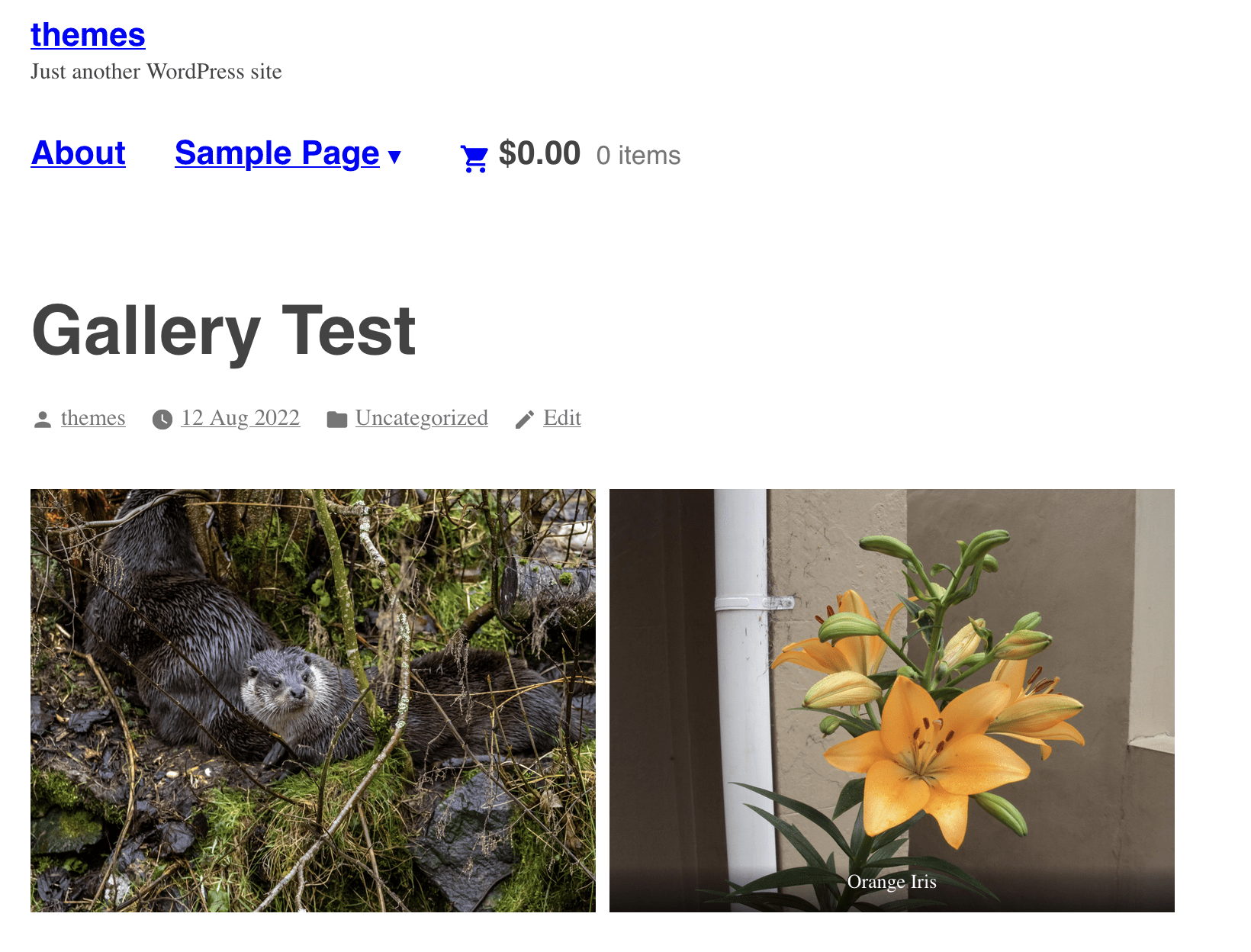
The Varia child theme Maywood was mentioned in the issue but that is also now working fine:

The last theme to be mentioned that wasn't retired is Dyad 2 but it looks okay there:


