sensei

sensei copied to clipboard
 Automattic
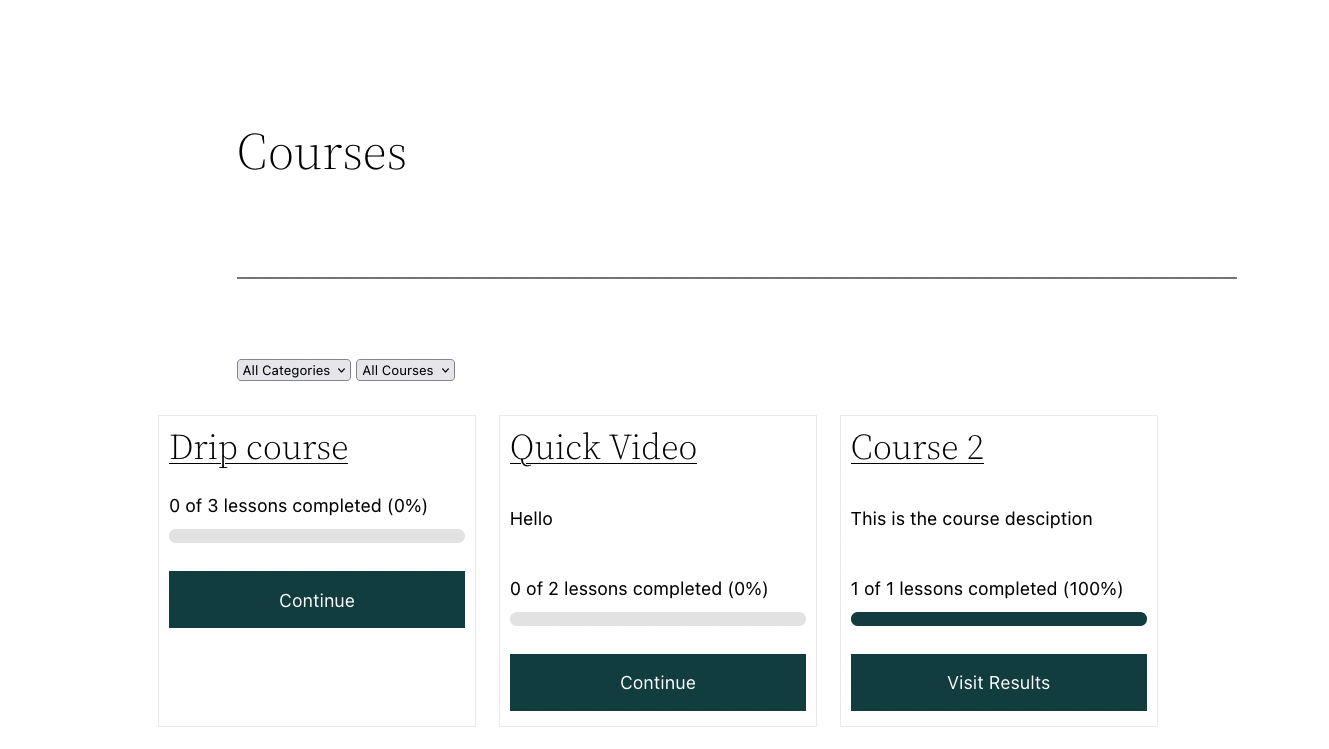
Course List Block alignment broken on Twenty Twenty Two theme
Steps to Reproduce
- Enable the Twenty Twenty Two theme
- Add a post or page
- Add the Course List block to that page, either Grid or List is fine.
- Visit the page
The problem comes from this CSS from the theme:
.wp-site-blocks .alignfull,
.wp-site-blocks > .wp-block-group.has-background,
.wp-site-blocks > .wp-block-cover,
.wp-site-blocks > .wp-block-template-part > .wp-block-group.has-background,
.wp-site-blocks > .wp-block-template-part > .wp-block-cover,
body > .is-root-container > .wp-block-cover,
body > .is-root-container > .wp-block-template-part > .wp-block-group.has-background,
body > .is-root-container > .wp-block-template-part > .wp-block-cover,
.is-root-container .wp-block[data-align="full"] {
	margin-left: calc(-1 * var(--wp--custom--spacing--outer)) !important;
	margin-right: calc(-1 * var(--wp--custom--spacing--outer)) !important;
	width: unset;
}
Specifically, the margin-left there.
What I Expected
That it would be aligned.
What Happened Instead
It's not aligned.
Screenshot / Video