
sensei
 sensei copied to clipboard
 Automattic
Add pagination screen option to admin pages
Context
Admin pages like Courses and Lessons display the Screen Options tab, where Pagination can be set on a per screen basis:
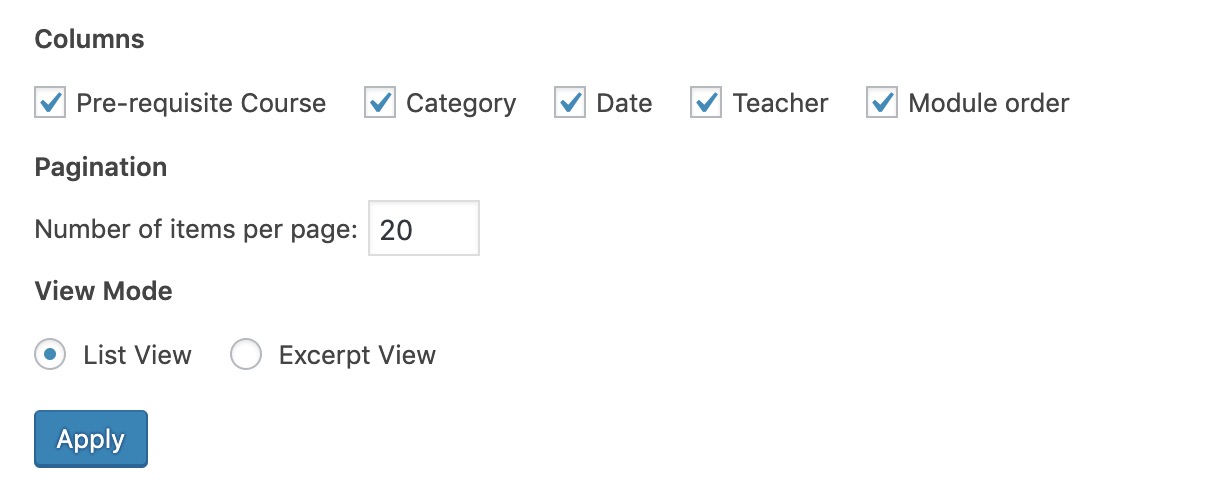
However, the following screens don't display the Screen Options tab:
- Analysis
- Grading
- Learner Management
This means that 20 items are displayed per page by default, and this value can't be customized.
What Changes Are Needed?
The Screen Options tab with a Pagination option (as per the above screenshot) should be added to the following screens and sub-screens (i.e. drilling down to another screen within these areas should also show the Screen Options tab):
- Analysis
- Grading
- Learner Management


Do we have a deadline for this feature as it's critical for us for reporting purposes (currently we have to print dozens of page PER learner to prove they attend the training)? Thanks a lot!

@AiramMontessori we don't have a deadline for this yet. You can subscribe to this issue to get email updates when there are any changes.
Hi @donnapep 👋 @danjjohnson @AiramMontessori ,
I’d love to help out with this enhancement. I can work on adding the Screen Options tab with pagination settings to the following admin screens:
Analysis

Grading

Learner Management
This would follow the same implementation pattern as used on the Courses and Lessons screens, ensuring consistency across the admin UI.
Please let me know if it’s alright to proceed. Happy to contribute and open a PR once ready!
Thanks!

Support References
This comment is automatically generated. Please do not edit it.
- [ ] 2799197-zen
![github-actions[bot] avatar](https://avatars.githubusercontent.com/in/15368?v=4 "Published by a pub.dev verified publisher")
Hi @vk17-starlord. 👋🏻
Please let me know if it’s alright to proceed. Happy to contribute and open a PR once ready!
Absolutely, go for it! One thing to be mindful of is that all the checks that run for your PR need to be green. 🙂
Hi @donnapep – I'm facing an issue while trying to set up the plugin locally for contribution:
-
I cloned the GitHub repository successfully.
-
I'm using LocalWP as my development environment.
-
However, when I try to activate the plugin in my local WordPress environment (using LocalWP), I encounter the following fatal error:
Could you please advise on what might be causing this error or share any additional steps required for a proper local setup?
Hi @vk17-starlord. Have you run composer install and npm install as well as npm run build or npm run start? Noting that you may need to switch to PHP 7.4 if you get an error running the composer command. Perhaps our Contributing doc could use some updates. 😉