

 Automattic
Feature Request: Add Mac Catalyst support
Expected behavior
Adding Mac Catalyst support, users like me could run the iPad version of the app on an M1/2 Mac.
Actual behavior
At this moment there's no way to run the app on desktop instead of paying for a subscription. I understand that web version could require a subscription but if there's an iPad version created that could be used by more people without changing nothing, it could be awesome.
Steps to reproduce the behavior
N/A
Tested on [device], iOS [version], Pocket Casts [version]
N/A

I also would really appreciate this. Especially since some features like Trim Silence are not available on the Web version.

I'd love to have the Pocket Casts iPad app on mac! I also wish it supported keyboard shortcuts for previous/next chapters.

I would love to see this as well.
I am not an Apple Developer but I tried to build it in Xcode to see if there are any issues that I could help with. But unfortunately, it looks like I am only allowed to build and run the project in iPhone and iPad simulators.
I think it's up to @pocketcasts themselves to implement this if it is desired.

I would love to see this as well.
I am not an Apple Developer but I tried to build it in Xcode to see if there are any issues that I could help with. But unfortunately, it looks like I am only allowed to build and run the project in iPhone and iPad simulators.
I think it's up to @pocketcasts themselves to implement this if it is desired.
You only have to check "Catalyst" on the publish section. And the iPad version would run on M1/2 Mac
I would love to see this as well. I am not an Apple Developer but I tried to build it in Xcode to see if there are any issues that I could help with. But unfortunately, it looks like I am only allowed to build and run the project in iPhone and iPad simulators. I think it's up to @pocketcasts themselves to implement this if it is desired.
You only have to check "Catalyst" on the publish section. And the iPad version would run on M1/2 Mac
I figured it should be easy to get it to run on macOS. So it should be an easy change for them?
When I add Mac Catalyst as a "Supported Destination" (I suppose this is what you meant) I still cannot build and run it because it wants to sign it or something?
No profile for team 'PZYM8XX95Q' matching 'Pocket Casts Development' found.
When run in a simulator it treats this as a warning and runs anyway. But when I choose Mac or Mac Catalyst it is regarded as an error.
Or are you saying that I can actually build and run it myself?
In theory you should be able to change these to your own profiles and at least be able to run locally. I started unpicking things but ran out of time, will keep trying and report progress.

So all and I guess @pocketcasts I dug into this, and sadly it's not so "simple". I'll try and summarise the steps and hope that maybe a future release might fix this, or I get further time to do it. It was actually an interesting investigation.
First, and I think this a more general issue:
# gem 'fastlane', '~> 2.210.0'
# gem 'fastlane-plugin-sentry', '~> 1.14'
# gem 'fastlane-plugin-wpmreleasetoolkit', '~> 5.4'
All the fastlane gems seem to have build issues relating to "bigdecimal", there's many discussions in their repo about this, but commenting them out fixes it for me anyway, and I don't want to release anything.
I personally changed all bundle identifiers and provisioning profiles, but I am not actually sure if I needed to.
Now you can go to target settings and add mac catalyst as an option.

Then you build and get some errors about certain entitlements/flags:
-
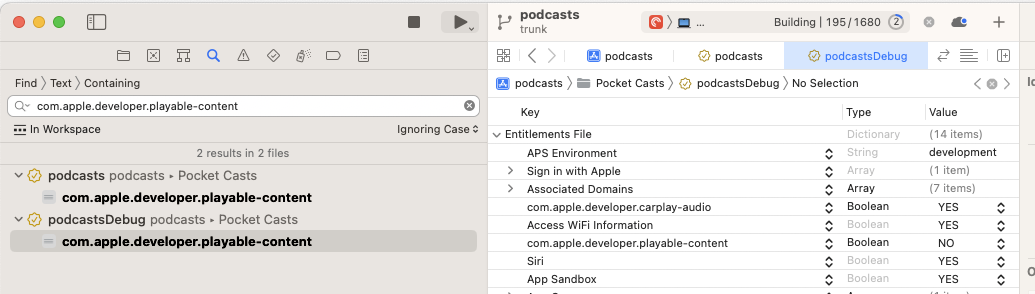
com.apple.developer.playable-content: Is actually deprecated and I think OS versions that support catalyst need it disabled, so set it to "no"
-
LSSupportsOpeningDocumentsInPlaceneeds to be set to "YES", that seems to be OK.
Then you hit build and… FAIL.
"~/pocket-casts-ios/podcasts/TraceHelper.swift:1:8 No such module 'FirebasePerformance'"
OK… Do some searching… That doesn't exist with Catalyst support… So… Stuck without some reasonable amount re-plumbing of code for now :(
https://github.com/firebase/firebase-ios-sdk/issues/8734