

 Automattic
Google Fonts: discrepancies between Literata font hosted in Pendant theme and Literata font loaded from Google Fonts API
Impacted plugin
Jetpack
Steps to Reproduce
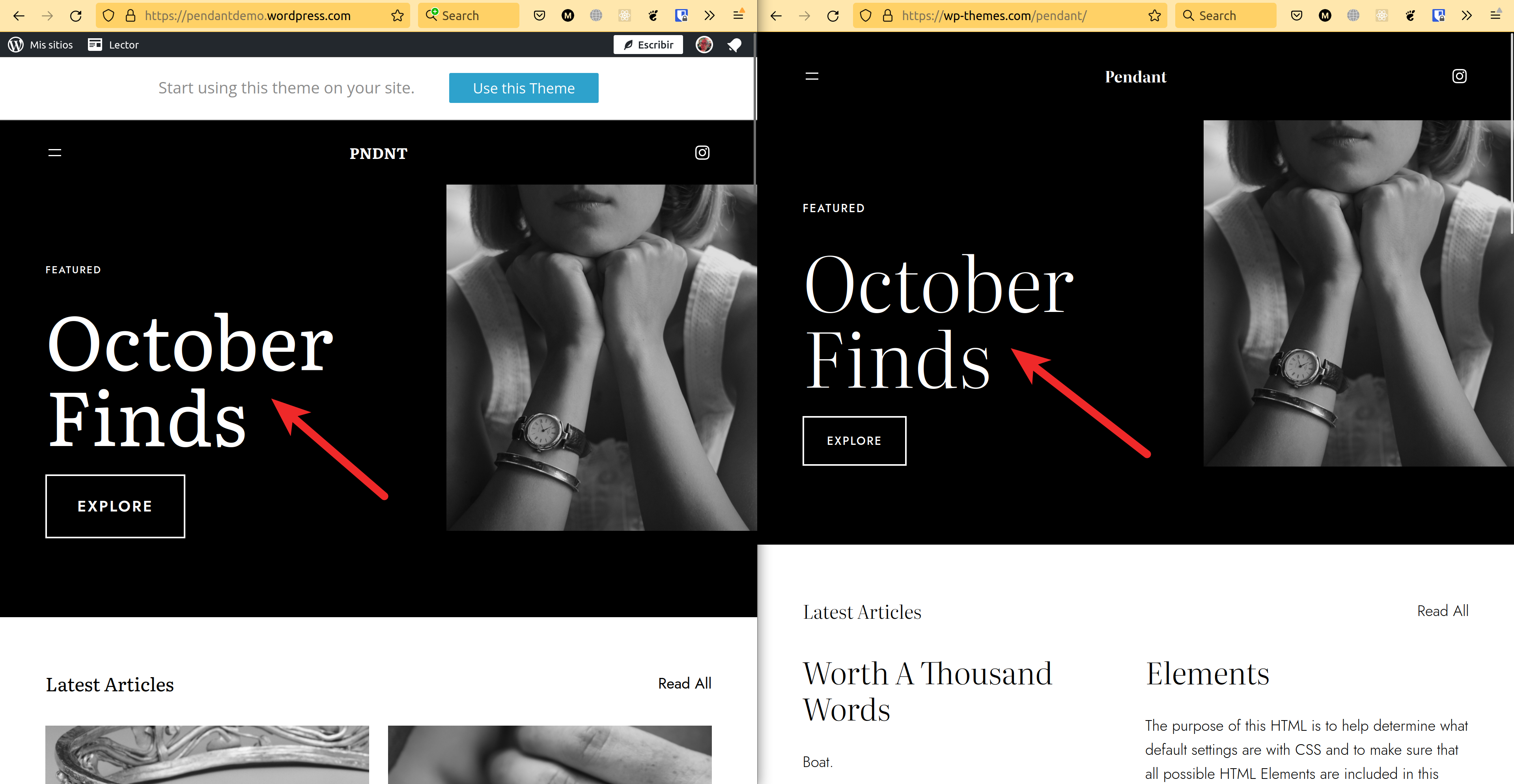
- Go to any site WPCOM using 'Literata' typography and loading the font file from Jetpack such as https://pendantdemo.wordpress.com/
- Compare to a site not loading 'Literata' from Jetpack: https://wp-themes.com/pendant/
- See that the fonts are different because font assets loaded by Jetpack are wrong or outdated.
A clear and concise description of what you expected to happen.
The typography on WPCOM sites should look like Literata: https://fonts.google.com/specimen/Literata
What actually happened
The typographies are not looking as expected because the assets are not the correct/updated ones.
Browser
Google Chrome/Chromium, Mozilla Firefox, Microsoft Edge, Apple Safari, iOS Safari, Android Chrome
Other information
Facts:
- Pendant theme source code includes Literata font assets.
- WPCom loads the theme font assets + more font assets coming from Google CDN. So Literata is defined twice with different assets.
- As the WPCom/Jetpack Literata font face definitions are after the theme ones, they are used by the browser as the right font asset.
The problem:
- What we thought was an error loading Literata font on dotCom is actually that the dotCom/Jetpack font asset and the theme one are different assets and possibly different fonts or versions of the font.
- The font assets linked by WPCom/Jetpack seem to be outdated. Visually it seem to be more 'Literata Book' than 'Literata'.
- This is not a Pendant Theme problem and it affects all WPCom sites using Literata. Just is more notable in Pendant because we know it is using Literata and how the font should look.
Platform (Simple, Atomic, or both?)
Simple, Atomic
Reproducibility
Consistent
Severity
All
Available workarounds?
No response
Workaround details
No response

It looks like what is actually going on here is that the Pendant declares a "Light" weight of the font using "Optical Size" for the CSS "normal" weight, using its own copy of the font file
@font-face{
  font-family:Literata;
  font-style:normal;
  font-weight:400;
  font-display:block;
  src:local(Literata), url('/wp-content/themes/pendant/assets/fonts/Literata_72pt-Light.ttf') format('truetype');
  font-stretch:normal;
}
while Jetpack's code declares the "Regular" weight of the font not using "Optical Size" for the CSS "normal" weight and uses a copy downloaded directly from Google
@font-face {
  font-family: 'Literata';
  font-style: normal;
  font-weight: 400;
  font-display: fallback;
  src: url(https://fonts.gstatic.com/s/literata/v30/or38Q6P12-iJxAIgLa78DkrbXsDgk0oVDaDlbJ5W.woff2) format('woff2');
  unicode-range: U+0000-00FF, U+0131, U+0152-0153, U+02BB-02BC, U+02C6, U+02DA, U+02DC, U+2000-206F, U+2074, U+20AC, U+2122, U+2191, U+2193, U+2212, U+2215, U+FEFF, U+FFFD;
}
Further, Jetpack isn't even getting these definitions itself. They're queried from Google's API on the server side (probably this query specifically).
If I go to the specimen page you linked and look at the "Light 300" weight with Optical Size on, I see what looks like the font you're expecting. And if I look at the "Regular 400" weight with Optical Size off, I see what Jetpack is giving.
You might debate over whether the "Optical Size" should be on or off (and, I guess, what values should be passed for it), but you can't claim Jetpack somehow has a "wrong" or "outdated" version of the font when the font is being loaded directly from the publisher.
Anyway, this seems to have been developed by @Automattic/cylon so pinging them.

I overlooked the optical size option in Google fonts so thanks for pointing that out @anomiex!
In summary, the assets loaded by Jetpack are not wrong, they are just different because they are not loading the Optical Size version of the font asset as Pendant theme does.
Loading the optical size asset seems to be a more complete solution because you can fallback to the non-optical size using CSS but you can't do the opposite using the non-optical size. I don't know if this issue justifies changing the assets loaded by Jetpack because the look of existing sites using Literata can be altered if Jetpack starts loading the optical size version without disabling optical sizing in CSS (font-optical-sizing: none).
Other possible solution that we discussed with @pbking and @jeffikus is to avoid loading the Jetpack version of the fonts if the theme includes it. This would avoid this discrepancy problem and also it will avoid loading and defining the font face twice as we are currently doing in these cases.
to avoid loading the Jetpack version of the fonts if the theme includes it.
I think it would make sense, especially given the recent discussions around this: p9dueE-5iZ-p2

Hello, there's another report of this here: https://wordpress.com/forums/topic/cant-change-the-font-of-titles/?view=all
