

 Automattic
[Atomic] Comments not working on password protected posts & pages in some browsers
2023-04-13 Update from recent troubleshooting, thanks @masperber !
- This bug only affects Atomic sites.
- This bug affects both FSE and Classic themes.
- This bug affects the Chrome and Opera browsers.
- This bug does not affect the Firefox and Safari browsers.
Steps to Reproduce
WordPress.com
- On an AT site create a password protected post
- Attempt to comment on that post
Self-hosted WordPress
- Enable Jetpack
- From Jetpack > Settings > Discussion enable 'Let visitors use a WordPress.com, Twitter, Facebook, or Google account to comment'
- Create a password protected post
- Attempt to comment on that post
What I expected to happen
Comments should be accepted and added to the post when a comment is typed and 'post comment' is clicked.
What actually happened
After writing a comment and clicking 'post comment' there is a pause and then the comment box disappears. No comment is visible on the post itself nor in the site owner's list of comments.
Context
This was reported here: 4266004-zd-woothemes
I tested on my own site with user's illustratr theme and twenty twenty. I also tested with all user plugins disabled. Neither affected this issue. I could not post a comment.
I was able to post a comment when attempting to post as the site owner while using the healthcheck plugin in troubleshooting mode.
Deactivating the Jetpack comments module on the WordPress.com site allowed the comment to be posted.
Disabling 'Let visitors use a WordPress.com, Twitter, Facebook, or Google account to comment' from Jetpack > settings > discussion on the self hosted site allowed a comment to be posted.
Operating System
macOS
OS Version
11.5.2
Browser
Chrome/Chromium
Browser Version(s)
92.0.4515.159
Is this specific to applied theme? If so, what is the theme name?
No
Simple/Atomic
Atomic
Console and/or error logs
No response
Number of Users Impacted
Some users (<50%)
Available Workarounds
Deactivating the Jetpack comments module on the WordPress.com site allowed a comment to be posted.
Disabling 'Let visitors use a WordPress.com, Twitter, Facebook, or Google account to comment' from Jetpack > settings > discussion on the self hosted site allowed a comment to be posted.
Reproducibility
Consistent
Other information
No response

Thank you for reporting this!
I can confirm the same behavior is happening on my end. The key thing to have in perspective is the 'Let visitors use a WordPress.com, Twitter, Facebook, or Google account to comment' to be turned on. Once that's on, the comment won't be posted.

Another case in 4356898-zen
More details from the user that could help track down the cause:
1. The ability to send and have comments approved works well with the Firefox browser

2. The ability to send and have comments approved does not seem to work with the Google Chrome browser

3. The ability to send and have comments approved does not seem to work with the Microsoft Edge browser
Looks like we have an internal report for this at p9F6qB-7MJ-p2
Potentially third-party cookie issues?

Reproduced again on another site. Discovered by @kspilarski.
Cannot comment with Chrome on private pages.
Internal discussion: p1644336168185329-slack-C3GP81E05 Case: 4751185-zd-woothemes
Workaround
One workaround is to deactivate the Jetpack comments module.
Error
As noted in my last comment, seems like a potential cookie issue. I did notice the following error logged.
Indicate whether to send a cookie in a cross-site request by specifying its SameSite attribute
Because a cookie’s SameSite attribute was not set or is invalid, it defaults to SameSite=Lax, which prevents the cookie from being sent in a cross-site request. This behavior protects user data from accidentally leaking to third parties and cross-site request forgery
Resolve this issue by updating the attributes of the cookie: Specify SameSite=None and Secure if the cookie should be sent in cross-site requests. This enables third-party use. Specify SameSite=Strict or SameSite=Lax if the cookie should not be sent in cross-site requests.
AFFECTED RESOURCES 10 cookies 1 request:
wp-comments-post.php?for=jetpack
Another case here: 4842177-zd-woothemes I was also able to replicate this in one of my test sites.

27685631-hc
Disabling Jetpack comments module/'Let visitors use a WordPress.com, Twitter, Facebook, or Google account to comment' resolved the issue.


Support References
This comment is automatically generated. Please do not edit it.
- [ ] 4266004-zen
- [ ] 4356898-zen
- [ ] 4751185-zen
- [ ] 4842177-zen
- [ ] 5237227-zen
- [ ] 5711929-zen
- [ ] 6030854-zen
- [ ] 6347931-zen
- [ ] 9827496-zen
- [ ] 10526188-zen
![github-actions[bot] avatar](https://avatars.githubusercontent.com/in/15368?v=4 "Published by a pub.dev verified publisher")
Another case: 6030854-zen
I have tested this extensively on my end.
My findings:
- This bug only affects Atomic sites.
- This bug affects both FSE and Classic themes.
- This bug affects the Chrome and Opera browsers.
- This bug does not affect the Firefox and Safari browsers.

📌 SCRUBBING : RESULT - Replicated / Could Not Replicate / Uncertain
- Tested on Atomic – Replicated
📌 FINDINGS/SCREENSHOTS/VIDEO
- Replicated in Chrome browser.
Screenshots/Recordings
Here are my comment settings on the test site: 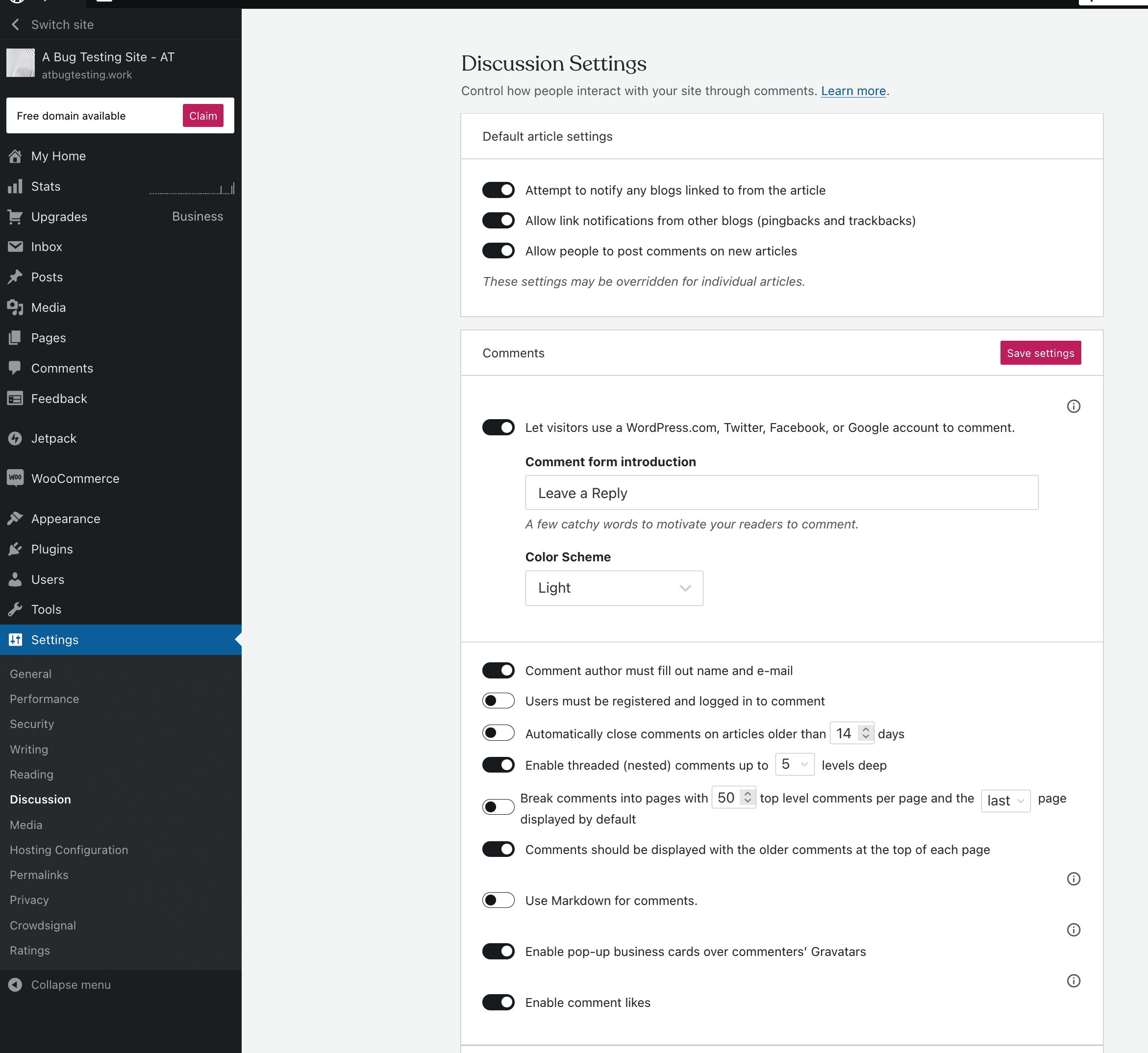
https://user-images.githubusercontent.com/27249804/231895074-4841d8c0-98bf-472f-8dd6-a2643a48b6cf.mp4 Midway through the video, when the reply form returns, that is after my refreshing the browser tab.
📌 ACTIONS
- Assigned to Loop
- CC @jeherve as this one's a bit older and seems to have been floating around for a while. Anything here Jetpack can help with?

cc @ebinnion, who had worked on D86706-code at the time. Is that something you had run into at the time?

Hi folks! The user who originally brought this up has checked in to see if there has been any progress: 6347931-zd-woothemes

