

 AutomaApp
Custom User-Agent in New Tab block not support mustache tag
Is your feature request related to a problem? Please describe.
In New tab block , User-Agent do not support mustache tag. hope can fix it.
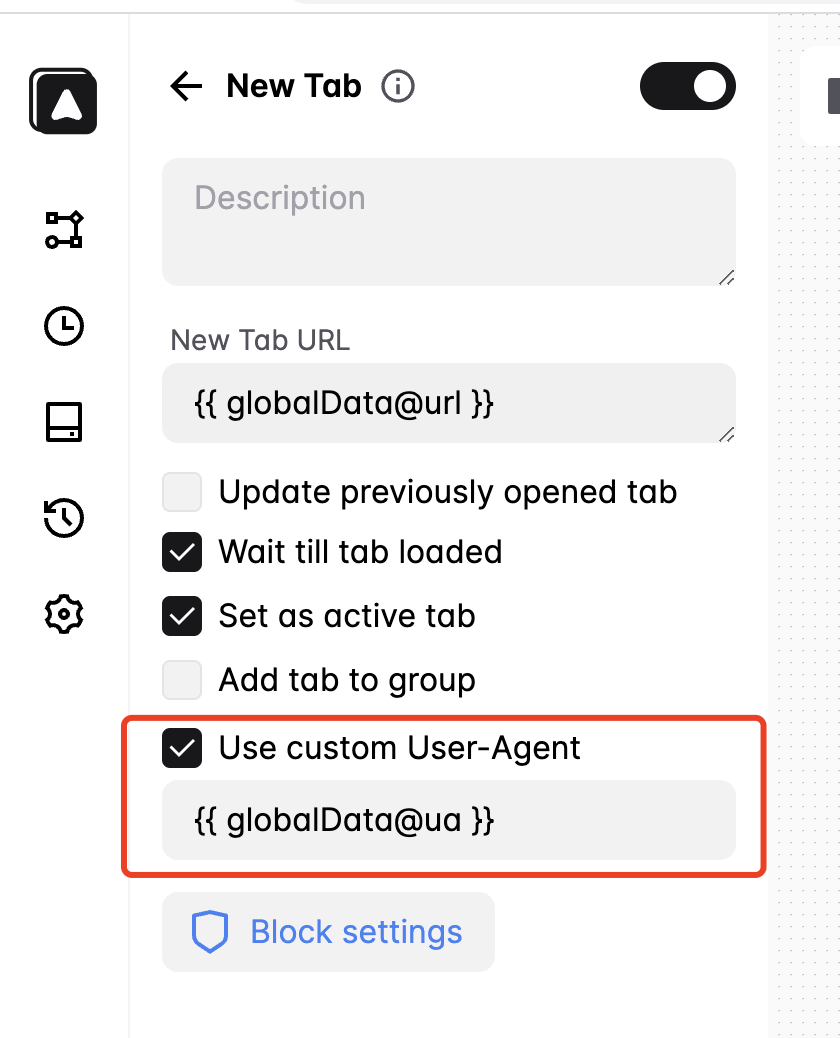
Describe the solution you'd like
- add mustache tag support in User-Agent.
- Automa could consider a plugin to obfuscate features to avoid being identified as a robot and thus better automate operations.
https://github.com/UltrafunkAmsterdam/undetected-chromedriver https://github.com/berstend/puppeteer-extra/tree/master/packages/puppeteer-extra-plugin-stealth#readme
Describe alternatives you've considered
by the way, i don't think use chrome.debugger.sendCommand to add extra headers is a good idea. it need to detach a debugger and user can see "Automa is debugged this browser ..." tips at the browser . maybe you can try declarativeNetRequest, it's more powerfull and automa can proiver a Header Block for users.
https://developer.chrome.com/docs/extensions/reference/declarativeNetRequest/#type-ModifyHeaderInfo
Additional context :)

In New tab block , User-Agent do not support mustache tag. hope can fix it.
I'll fix it
by the way, i don't think use chrome.debugger.sendCommand to add extra headers is a good idea. it need to detach a debugger and user can see "Automa is debugged this browser ..." tips at the browser . maybe you can try declarativeNetRequest, it's more powerfull and automa can proiver a Header Block for users.
https://developer.chrome.com/docs/extensions/reference/declarativeNetRequest/#type-ModifyHeaderInfo
I agree with this, I'm using the debugger because Automa already has the debugger permission which if I'm using the declarativeNetRequest API will require additional permission.
Hopefully, I can change this in the future.
