

 Autodesk
IFC to Revit (shared coordinates)
Hello,
thank you for possibility to ask for sollution here on this web and share experiances :)
Dear friends, we have big BIM project so collaborations needed in different levels and between different softwares.
We use still Revit 2022 and i would like to join IFC files (with shared coordinates) to my Revit file but it does not work properly.
If i link all models together in Trimble, Bim vision, whatever it works well and i see georereferenced models in right position.
I googled it, seen many videos but i am still not sure about proper way how to link/work with IFC in Revit.
Does exist some easy way to join IFC file with shared coordinates?
Or i need to manually fix it, or i need to import to new revit then georeference it. still manual work.
Thank you very much for advise.
Best regards
JP

Hi JP, I know a few ways:
- Mach your project coordinates with other IFC models, then link
- Ask everyone to export their IFCs to your desired coordinate
- Use 3rd party software (Such as simpleBIM) and correct IFC model coordinates (Difficult and very time consuming way, because you will have to do this on every single IFC update)

Hi JP, I know a few ways:
- Mach your project coordinates with other IFC models, then link
- Ask everyone to export their IFCs to your desired coordinate
- Use 3rd party software (Such as simpleBIM) and correct IFC model coordinates (Difficult and very time consuming way, because you will have to do this on every single IFC update)
Thank you ERBRZ for reaction:)
Option 1, may i ask you how do you do "match" of coordinates between revit and ifc?
Rather asking, cause there is no any straight way (publish to IFC or get coordinates option from RVT) when i link ifc to revit, so do you think manually move to proper position in new revit and then link? Or is there any quick option how to match this coordinates? thank youu
Tried option 2 with Tekla, and it works, but in general there is so many people to ask, not posiblle for all project members :/
Never tried option 3, thank you for info.
In order to recommend the workflow for the first option, I want to be clear - is your model now on 0,0,0 project coordinate or geolocated shared coordinate? Im not 100% sure if it will work but give it a try.
If your project is on 0,0,0:
a) Get DWG of the original topography or siteplan (usually it has Geolocation data), link it (as CAD) to your revit project, use Center to center option, adjust the DWG XYZ and rotation so it will match you model, press acquire coordinates and press on the linked CAD.
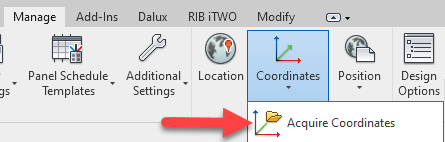
b) Set true "True North" angle in your Revit project, open any geolocated IFC model, which has the same construction element (Somebody could also create an orentation cube, which is related to shared grids) as there is in your model, get any specific point coordinate (You could use BIMVision (Freeware)). Use that coordinate while using this function in your project, on the same point:
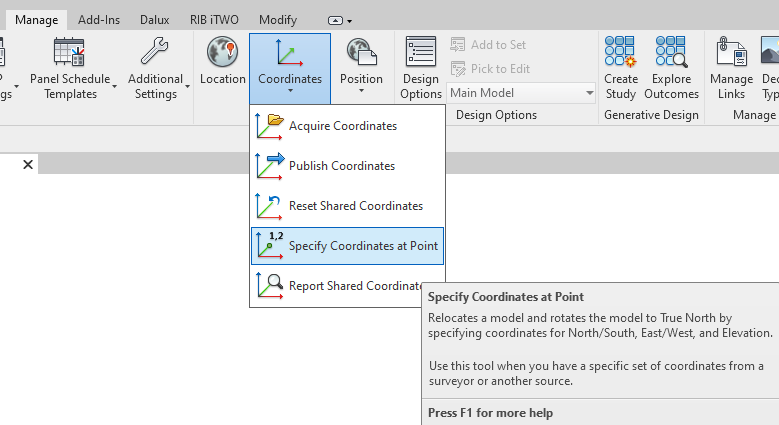
If your project is on specific coordinate system:
Use Reset Shared Coordinates.

In order to recommend the workflow for the first option, I want to be clear - is your model now on 0,0,0 project coordinate or geolocated shared coordinate? Im not 100% sure if it will work but give it a try.
If your project is on 0,0,0:
a) Get DWG of the original topography or siteplan (usually it has Geolocation data), link it (as CAD) to your revit project, use Center to center option, adjust the DWG XYZ and rotation so it will match you model, press acquire coordinates and press on the linked CAD.
b) Set true "True North" angle in your Revit project, open any geolocated IFC model, which has the same construction element (Somebody could also create an orentation cube, which is related to shared grids) as there is in your model, get any specific point coordinate (You could use BIMVision (Freeware)). Use that coordinate while using this function in your project, on the same point:
If your project is on specific coordinate system: Use Reset Shared Coordinates.
Thank you. But i am not sure where do you open the IFC? do you mean open IFC in Revit and set up coordinates in this model right???
I have architectural model with coordinates and ankle and also have "coordination" model where i have coordinates from cad but with no ankle.
Thank youuu
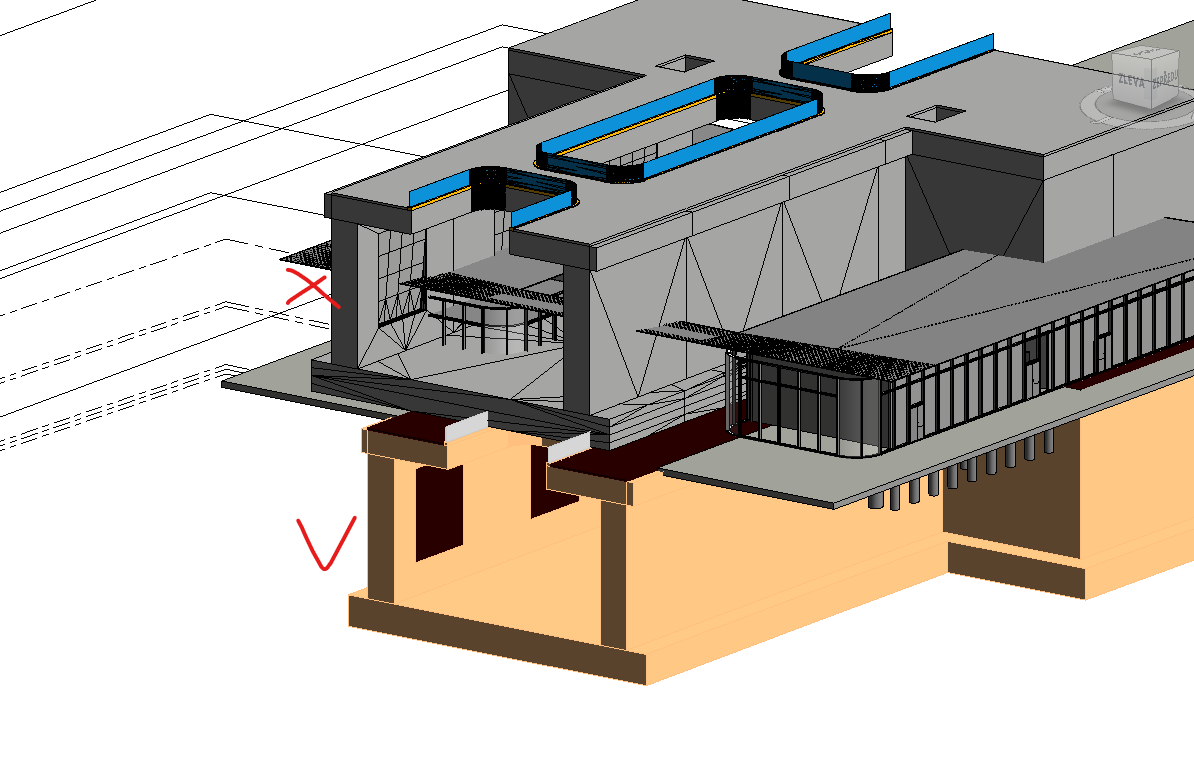
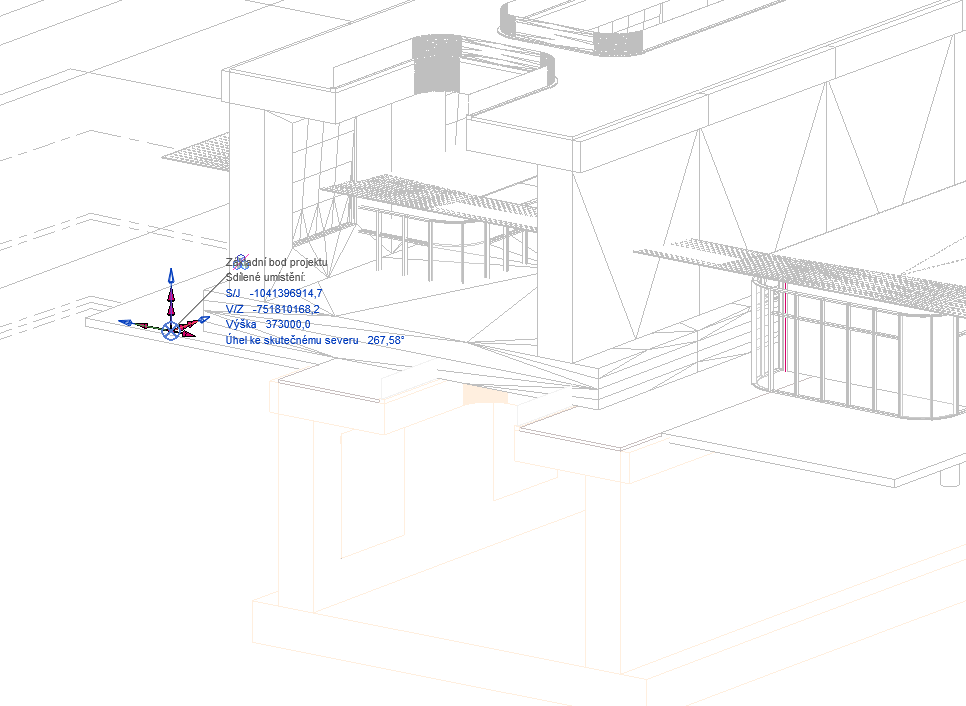
AS i said. if i link all model to bim vision its okey. but revit is really stupid in this linking, and the window for ifc import is very poor. so you set coordinates in revit (where you opened IFC) right? Thank you JP
Does exist some easy way to join IFC file with shared coordinates?
"Shared coordinates" is an Autodesk specific concept, an IFC does not have "shared coordinates".
I might recommend to "unlearn" how you think coordinates work for a moment in Revit, and read through this document: https://blenderbim.org/docs/users/georeferencing.html - it will help explain how coordinates and surveying works in general, and only then once you've confirmed that your IFC is valid, then look at how to "bring it into Revit".

Does exist some easy way to join IFC file with shared coordinates?
"Shared coordinates" is an Autodesk specific concept, an IFC does not have "shared coordinates".
I might recommend to "unlearn" how you think coordinates work for a moment in Revit, and read through this document: https://blenderbim.org/docs/users/georeferencing.html - it will help explain how coordinates and surveying works in general, and only then once you've confirmed that your IFC is valid, then look at how to "bring it into Revit".
Thank you for your reaction :) Okey, i will take a look on this link. Have a good day.
Hello @jipisek,
Thank you for reporting this issue.
In recent Revit releases, several improvements have been made to IFC import and coordinate handling, including better alignment with georeferenced models. Since no sample file was provided, we were unable to reproduce the issue based on the available description.
Could you please confirm whether this problem still occurs on your side in the latest version of Revit and the IFC for Revit exporter? If it does, please share a sample RVT file and detailed steps to reproduce the issue — this will greatly help us identify the root cause and speed up the investigation.
If we do not receive additional information, this ticket will be closed. However, please feel free to reopen it at any time if the problem persists, providing any relevant files or details for continued analysis.
