

 Autodesk
IFCs with "sharp" triangulated faces cannot have spot elevations or spot coordinates
We get IFCs from 12D of terrain and various civil things which naturally have TINs. Portions of the triangulated meshes which are fairly regular triangles work fine and we can use the Revit spot elevation / spot coordinate tool fine on them. However if even a portion of the TIN has very obtuse triangles (e.g. triangles where one of the three internal angles is < 0.3 degrees) then the entire mesh "breaks" in that although you can see the mesh, you cannot use the spot elevation / spot coordinate tool on it.
Right now to fix this consultants are running a custom script which detects all faces in the BReps (these are IFC2X3 files coming from 12D) and calculates the angles of each triangle, and if any angle is less than 0.3, the face gets deleted.

In the screenshot you can see a portion of a linked IFC selected in Revit. Portion circled in B is an IFC element which has fairly regular triangles. You can see the edges of the triangles very clearly in Revit and the spot annotation tools work. Portion cirlced in A is another IFC element which contains portions of highly squashed triangles. As a result you will notice instead of seeing triangle edges throughout, only portions of the triangles are displayed, and the rest of the triangle edges are invisible for some reason. The spot annotations won't work on portion A.

This may be because Breps don't allow such sharp triangle edges vs meshes do, but Revit meshes may not allow spot elevations. Let me check with the geometry people on this.

For anyone else running into this issue I've now bundled a patch with the BlenderBIM Add-on: https://github.com/IfcOpenShell/IfcOpenShell/blob/v0.7.0/src/ifcpatch/ifcpatch/recipes/Fix12DToRevitTINs.py
You can run it graphically in Blender - specify an input IFC, an output IFC, and press run.
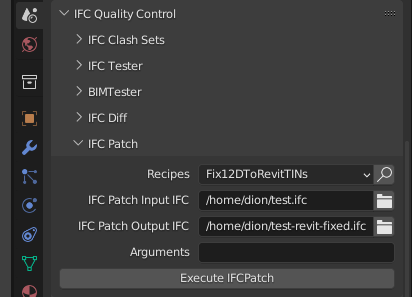
Any feedback on this? I recently realised what it's not just the angle sharpness of the triangles which makes a difference, it's specifically the XY (2D) angle. So if you have a triangle that looks alright in 3D but is sharp when viewed from above (i.e. XY) it creates issues.
My expert was out when I asked the first time so I just pinged him again to remind him of the issue. Will get back to you as soon as I hear from him.
OK I've recently encountered this issue on a project again in Revit 2025. The behaviour is similar enough, slightly improved, but still broken.
Here is a sample file you can use to recreate the problem:
It contains three objects that look like innocent squares seemingly with 2 triangles each.
The first truly is innocent. The second and third have an additional almost degenerate triangle at the top. Let's zoom in. I've added some coloured circles to see. The degenerate triangles are not identical. One is even more degenerate (i.e. obtuse) than the other. At a particular threshold of degeneracy, Revit 2025 exhibits different symptoms.
The first and second object behave identically. You can use the spot coordinate (or spot elevation, etc) tool to hover over the object anywhere and spot a coordinate. However, you cannot snap to a vertex or edge. This is a problem because vertices and edges are ... well, the most significant part!
The third object behaves differently, you can snap to a vertex or edge, but you cannot spot coordinate anywhere else. Both are problematic. What we need is to spot coordinate everywhere, and also be able to snap everywhere.
I've created a new workaround for anybody else encountering this in Bonsai here: https://github.com/IfcOpenShell/IfcOpenShell/commit/cfb7d026d1f4818de7cd5a4c30da8278b77aa751
This issue is also reported in Jira as "REVIT-239168" and is currently in the "Open" status.
