

 Autodesk
Pipe/Duct Fittings material bug
In Revit you normally use the same Duct and Fitting types for different system types like "Supply Air" and "Return Air". "Supply Air" one color and "Return Air" another color. In the bottom picture blue is Supply an orange is Return.
And system types are inherited from the equipment connectors. So it wouldnt make sense to separate ducts and fitting types by systemtype in Revit.
The color of fittings is determined by the Material parameter on the system.
And this is fine.

But when exported this color is associated with the fitting type.
So any fitting of the same type will get the same color regardless which system type it belongs to:
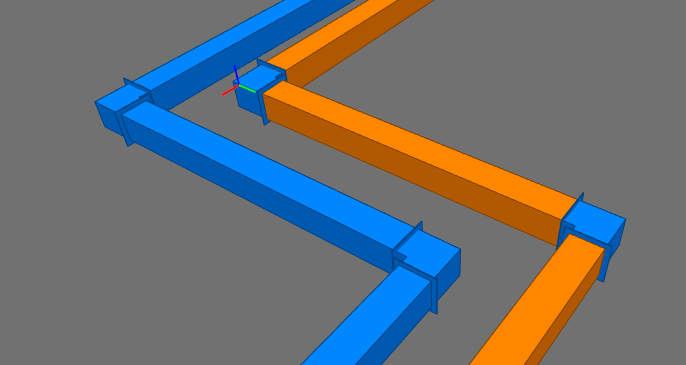
Thats why the fitting in the orange system has the same color as in the blue system. The exporter gets to the first fitting (which happens to be the blue system), cache the type and color. And then resuse that color on the next fitting of that type. This is probably just a small bug in a cache somewhere.


Hi! Mr. Ouellette,
Maybe I can help here, I guess have a similar issue ...
When I export a model to IFC format, the color of the pipes in the IFC file are not colored as configured in Revit.
Here the IFC: FM.0101.R20_stripped_detached_modifed.zip
The pipes should be brown like below:

I tried to fix this on a section of pipe by editing the line 2681 of the IFC file to change the second parameter from #1521 to #1557.
from
#4456= IFCSTYLEDITEM(#4455,(#1521),$);
to
#4456= IFCSTYLEDITEM(#4455,(#1557),$);
The lines below demonstrate that the IFCSURFACESTYLE 'V-VACUUM' (based on his brown color) should be set to IFCPRESENTATIONSTYLEASSIGNMENT instead of 'Geberit_Stainless Steel'
from
#1517= IFCCOLOURRGB($,0.741176470588235,0.733333333333333,0.725490196078431); #1518= IFCSURFACESTYLERENDERING(#1517,0.,$,$,$,$,IFCNORMALISEDRATIOMEASURE(0.5),IFCSPECULAREXPONENT(64.),.NOTDEFINED.); #1519= IFCSURFACESTYLE('Geberit_Stainless Steel',.BOTH.,(#1518)); #1521= IFCPRESENTATIONSTYLEASSIGNMENT((#1519));
to
#1553= IFCCOLOURRGB($,0.419607843137255,0.337254901960784,0.270588235294118); #1554= IFCSURFACESTYLERENDERING(#1553,0.,$,$,$,$,IFCNORMALISEDRATIOMEASURE(0.5),IFCSPECULAREXPONENT(64.),.NOTDEFINED.); #1555= IFCSURFACESTYLE('V-VACUUM',.BOTH.,(#1554)); #1557= IFCPRESENTATIONSTYLEASSIGNMENT((#1555));
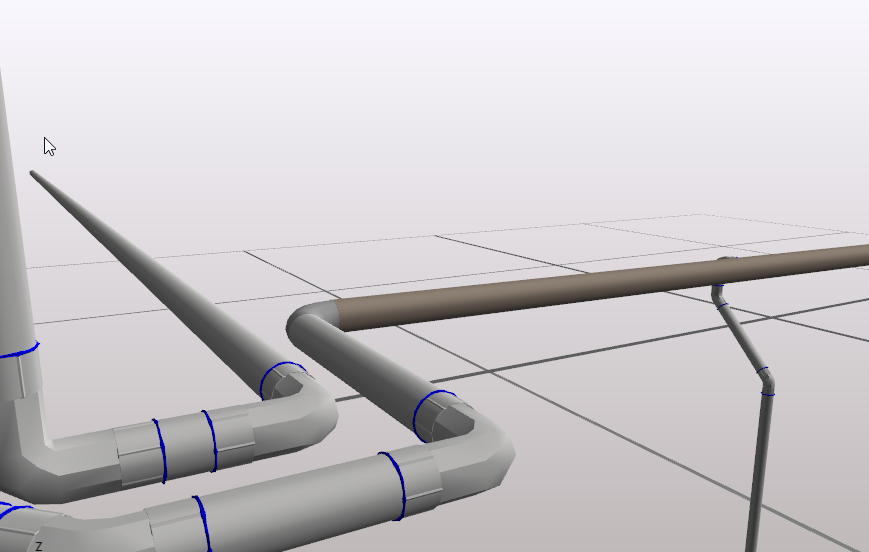
So I hope that can be fixed :)
Thanks
Simon

In the repository, there is a shared parameter file . https://github.com/Autodesk/revit-ifc/blob/master/Source/RevitIFCTools/IFC%20Shared%20Parameters-RevitIFCBuiltIn_ALL_grouped.txt
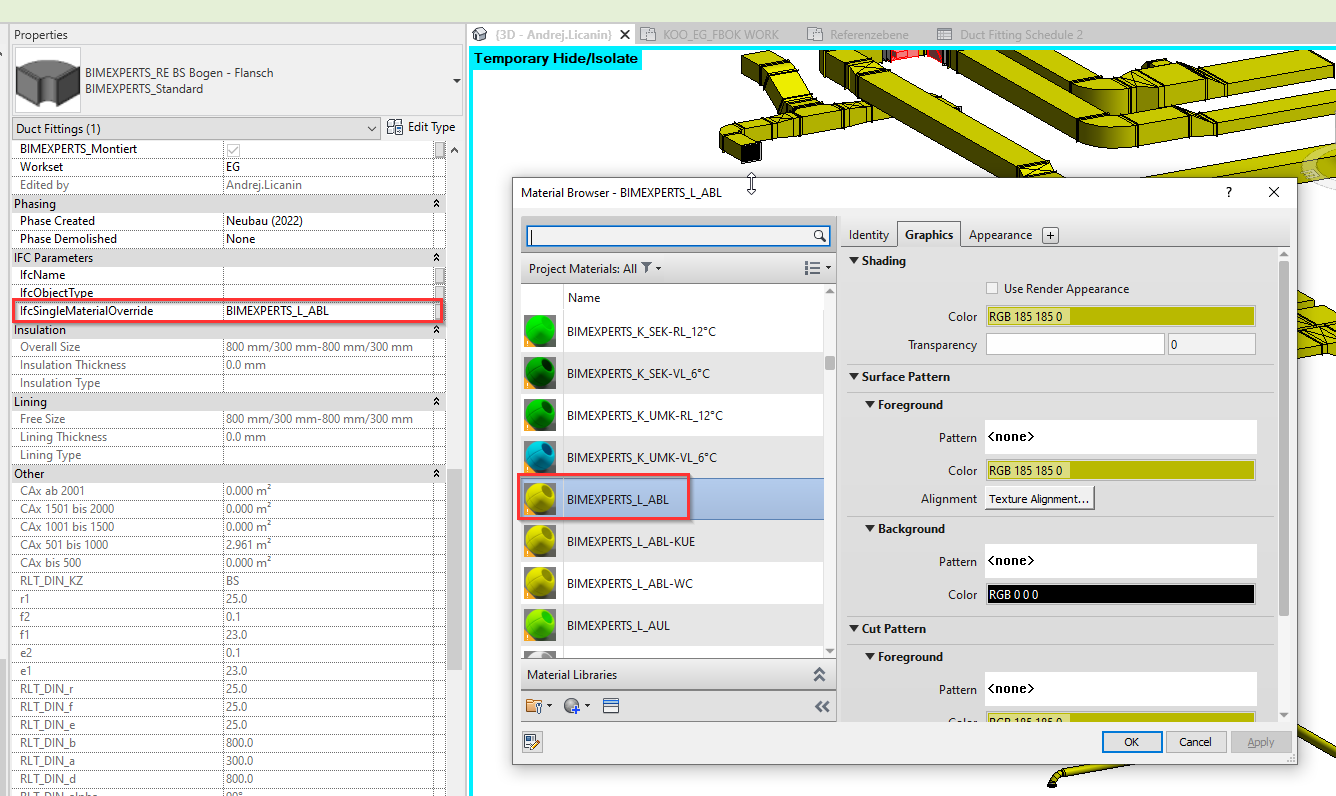
inside this file is a shared paremter IfcOverrideSingleMaterial. You can attach this paremter to fittings, then write in the name of the material that you want to has that color. So you should prepare a material with the same color as the system.
You write in the name of the material as Text, and ifc exporter will recognize it on export to assigned it that material
See atached photo of result.
Just as a side comment, i dont think this is a bug. Fitting are user made components and they can have multiple solids in them, each with their own material (color) . IF you want for them to color you could have assigned those materials with an instance parameter, but this usually means you have to alter every family to do this efficiently through schedules.

seems this parameter didn't work at all, here is my test file: test-projects.zip
first of all the parameter should be IfcSingleMaterialOverride, you can add it as project/shared parameter,
then I set the parameter value to the material name, and changed the wall and column's material to a totally different color.
In exported ifc, no matter what version/mvd I selected, the final color is always the original material color.
Tested with Revit 2023.1.1


i took another look on a larger project. It does not work the way i thought it would. It basically adds material to the whole family, its not instance based. So you get mixed result which family was edited last. This would really be awesome if the override would be instance based, it could give us much freedome. Still a legit way to give material to cable trays and cable tray fittings.
seems this parameter didn't work at all, here is my test file: test-projects.zip
first of all the parameter should be
IfcSingleMaterialOverride, you can add it as project/shared parameter,then I set the parameter value to the material name, and changed the wall and column's material to a totally different color.
In exported ifc, no matter what version/mvd I selected, the final color is always the original material color.
Tested with Revit 2023.1.1
For this, i dont think it will override if you already have a set material. You have to set the material in the families to by category or something, so it will know it can override it ( i think atleast). But it will still do it on a level of entire family, not single instance (which one would think from the name)
In Revit you normally use the same Duct and Fitting types for different system types like "Supply Air" and "Return Air". "Supply Air" one color and "Return Air" another color. In the bottom picture blue is Supply an orange is Return.
And system types are inherited from the equipment connectors. So it wouldnt make sense to separate ducts and fitting types by systemtype in Revit.
The color of fittings is determined by the Material parameter on the system. And this is fine.
But when exported this color is associated with the fitting type. So any fitting of the same type will get the same color regardless which system type it belongs to:
Thats why the fitting in the orange system has the same color as in the blue system. The exporter gets to the first fitting (which happens to be the blue system), cache the type and color. And then resuse that color on the next fitting of that type. This is probably just a small bug in a cache somewhere.
Currently, we don't support colouring of fittings by System material during FIC export Fittings are families and they have their own materials.
I suppose the fittings in your model have the same material as the blue system.

Hi! Mr. Ouellette,
Maybe I can help here, I guess have a similar issue ...
When I export a model to IFC format, the color of the pipes in the IFC file are not colored as configured in Revit.
Here the IFC: FM.0101.R20_stripped_detached_modifed.zip
The pipes should be brown like below:
I tried to fix this on a section of pipe by editing the line 2681 of the IFC file to change the second parameter from #1521 to #1557.
from
#4456= IFCSTYLEDITEM(#4455,(#1521),$);
to
#4456= IFCSTYLEDITEM(#4455,(#1557),$);
The lines below demonstrate that the IFCSURFACESTYLE 'V-VACUUM' (based on his brown color) should be set to IFCPRESENTATIONSTYLEASSIGNMENT instead of 'Geberit_Stainless Steel'
from
#1517= IFCCOLOURRGB($,0.741176470588235,0.733333333333333,0.725490196078431); #1518= IFCSURFACESTYLERENDERING(#1517,0.,$,$,$,$,IFCNORMALISEDRATIOMEASURE(0.5),IFCSPECULAREXPONENT(64.),.NOTDEFINED.); #1519= IFCSURFACESTYLE('Geberit_Stainless Steel',.BOTH.,(#1518)); #1521= IFCPRESENTATIONSTYLEASSIGNMENT((#1519));
to
#1553= IFCCOLOURRGB($,0.419607843137255,0.337254901960784,0.270588235294118); #1554= IFCSURFACESTYLERENDERING(#1553,0.,$,$,$,$,IFCNORMALISEDRATIOMEASURE(0.5),IFCSPECULAREXPONENT(64.),.NOTDEFINED.); #1555= IFCSURFACESTYLE('V-VACUUM',.BOTH.,(#1554)); #1557= IFCPRESENTATIONSTYLEASSIGNMENT((#1555));
So I hope that can be fixed :)
Thanks
Simon
I haven't managed to reproduce the wrong IfcSurfaceStyle issue. Can you share the model if the issue is still actual?
well, I just tested use system material to assign colors to ifc, it worked as expected. But for the fittings, using IfcSingleMaterialOverride to override the material by system will need more additional work, either by dynamo, or manually.
Obviously, this fitting doesn't go with system material is a bug. Hope this will be fixed.
Just digged more about these fittings, all fittings can have category material, but seems there is no way to set this category material in revit 2023?
Also, the category material might be null, so if the category material is null, the fitting material should be same with the system it belongs.
But there is some cases fitting material is different with the system it belongs, but in most cases it's the same. So by using the IfcSingleMaterialOverride means we have to deal with this parameter for most, not the least. it might be a huge work to do.
@t-vasyi it would be great to have an easy option to do it. Usually you want your system colors to be the same on the pipe/duct/cable trays and its fittings. Every ifc i ever saw that was exported from revit has this problem with the fitting colors. Colleague of mine that works with Revit for much longer (~10years) said that this is always the case in his expirience.
Where can we submit a ticket to try to get the devs to listen? Can I call customer support for this issue?
The sole reason posts like this exist is because the material assignment is so convoluted.
Just to put into perspective. We have 160 families for pipe fittings and ~40 ish for duct fittings. To assign the materials by system would entail to go through all of them and bind the solids to the material parameters one by one so it can be changed in project, or create a copy with an already set material for those fittings by system, which would increase the total size of families by alot.
The easiest way would be to have something like IfcSingleMaterialOverride that works on an instance level, so it overrides the material on each instance it has a value for. The logic is already there i guess because the IfcSingleMaterialOverride does it, just on a family level.
Thank you @t-vasyi , is there any way of tracking the progress of the ticket?

This issue is also reported in Jira as "REVIT-108352" and is currently in the "Open" status.
