

 Autodesk
Link IFC: Easier way to turn off generic models created from openings and rooms

Link IFC:
Problem 1: Doors and windows are not linked, only the opening element.
Problem 2: The generic models for rooms/spaces and openings are not easy to hide/turn off in views.
Problem 3: Subcategory under generic model is not creataded for rooms/spaces:
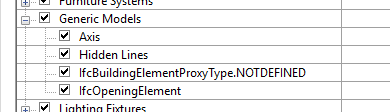 Problem 4: Turning of the subcategory "IfcOpeningElement" does not hide the opening element in plan views (works in 3D).
Workarounds: Copy the room and opening to the current document and use filters on "IfcExportAs" equals "IfcOpeningElement". The issues with this method is that a shared parameter files is generated each time, thus we need to increase the number of "IfcExportAs" parameters each time.

Other questions: Why does the opening element need to bee that large? Is this a default size or is it determined by something in the families?
Does anyone have a better way to handle this that I haven't thought of. We can always import the IFC of cource, but I need this to be as quick and effort less as possible as it is done several times each week.


Partial. In general, there should be no "grey" boxes from voids, but you will still see translucent ones. Setting filters in the template will still work. In general, though, this is part of a bigger project to change how IfcSpaces come into Revit in the first place. Should they stay as 3D objects that maintain complete fidelity to the original data, should we use a heuristic to convert them to Revit rooms (or MEP spaces), which would maintain the 2D outline (at some level) but may not have the same 3D shape? Do we need one of the other, depending? If we convert to rooms, should the be inside the link? There are a lot of details we are working on figuring out.

If we depend on IFC (from other companies) I tend to link the IFC. And then open this generated IFC.rvt. In this IFC.rvt I run a Dynamo script to solve a few 'problems', related to performance and visibility/appearance on our sheets. I add a specific string to the Comments Parameter if I do not want to see that specific kind of objects. For whatever reason. And in my project I simply filter and hide all objects with that specific string in the Comments. I also tend to delete really small objects if they are not essential for my piece of work (bolts and nuts etc.). And also delete duplicate geometry when there are IfcAssemblies in the IFC. (and in 1 occasion I needed to change the Name) Changing the Material appearance might sometimes be a part in a second manual workflow.
Running this script does smoothen at least my link IFC experience. And I believe sharing some workflows will help all of us in the end. The attached Dynamo script needs at least the IronPython2.7 package so it might break in Revit 2025 and upwards.
