
Windows-Auto-Night-Mode
 Windows-Auto-Night-Mode copied to clipboard
 AutoDarkMode
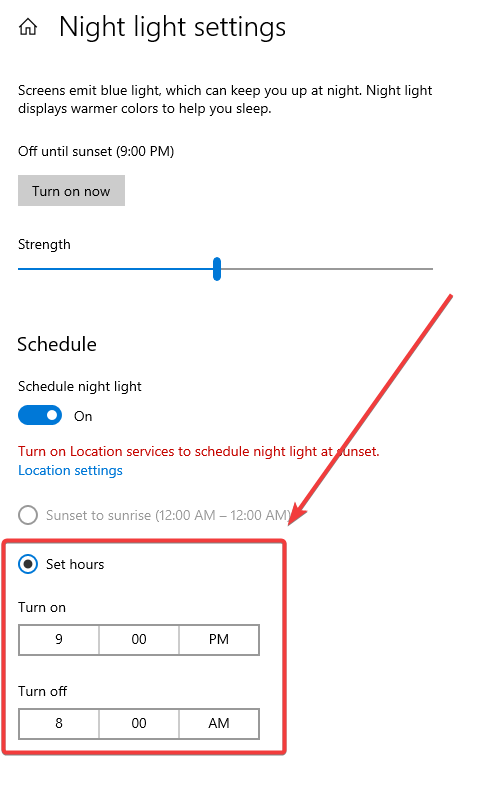
Match set hours settings with Windows' Night light settings
The images should speak for itself:) Would be great to have that feature!
New radio button in Auto Dark-Mode:

Windows Settings (of Night Light):

thats a good idea, but probably this will be not implemented, because Windows saves all the night light data as complex binary file(!)

editing these binary registry keys of windows is like playing minesweeper. You have many fields and if you click on the wrong field, you gonna die.
That's a shame! The only reason I've created this issue is because every time I format my PC and install Auto Dark Mode, I have to specify my hours everywhere:) same goes during winter and summer time change.
Well, it's not a big deal though.
Thanks for response!
@Jedrzej94 In theory this should be possible now. @thebigsmileXD has laid out the groundwork and we talked about this in #256. If the code in #257, specifically https://github.com/AutoDarkMode/Windows-Auto-Night-Mode/blob/e82b1e435b8d75b4d20ce05e52c6536841fd40c6/AutoDarkModeSvc/Handlers/RegistryHandler.cs#L80 still works then we would be able to determine whether the night light filter is enabled or disabled.
I will look into it soon-ish, a lot of the foundation is already there to get this to work.
It's still not an easy/quick implementation tho. Assuming everything works, we need to have:
- [x] ability to reconfigure governors in the ThemeManager (think of code like timeswitchmodule that is coupled with geodata/time, just for windows night light)
- [x] night light filter handler module that is able to handle postpones
- [x] WMIC registry listener to update the theme state within the module
- [x] add offset support

I'm very happy to see you are still even interested in my GitHub issue (after all this time). Absolutely great team.
Thank you for your update.
ADM dev cycle is kinda like Tolkien's elves. A few months of no activity on an issue is but the blink of an eye for us :D
To be completely serious, it took a while to make the changes to ADM that allow für such features to be implemented. Time was/is scarce and the new features were tested in beta for a long time (like the windows 11 fixes) to make sure we don't change too much at a time when there were critical issues outstanding such as the classic mode completely breaking.
Available in Beta 10.3.0.15
Awesome! Where can I get this version to test this? Do I have to compile it myself?
Available in Beta 10.3.0.15
Awesome! Where can I get this version to test this? Do I have to compile it myself?
Simply switch to the beta channel in the Auto Dark Mode settings
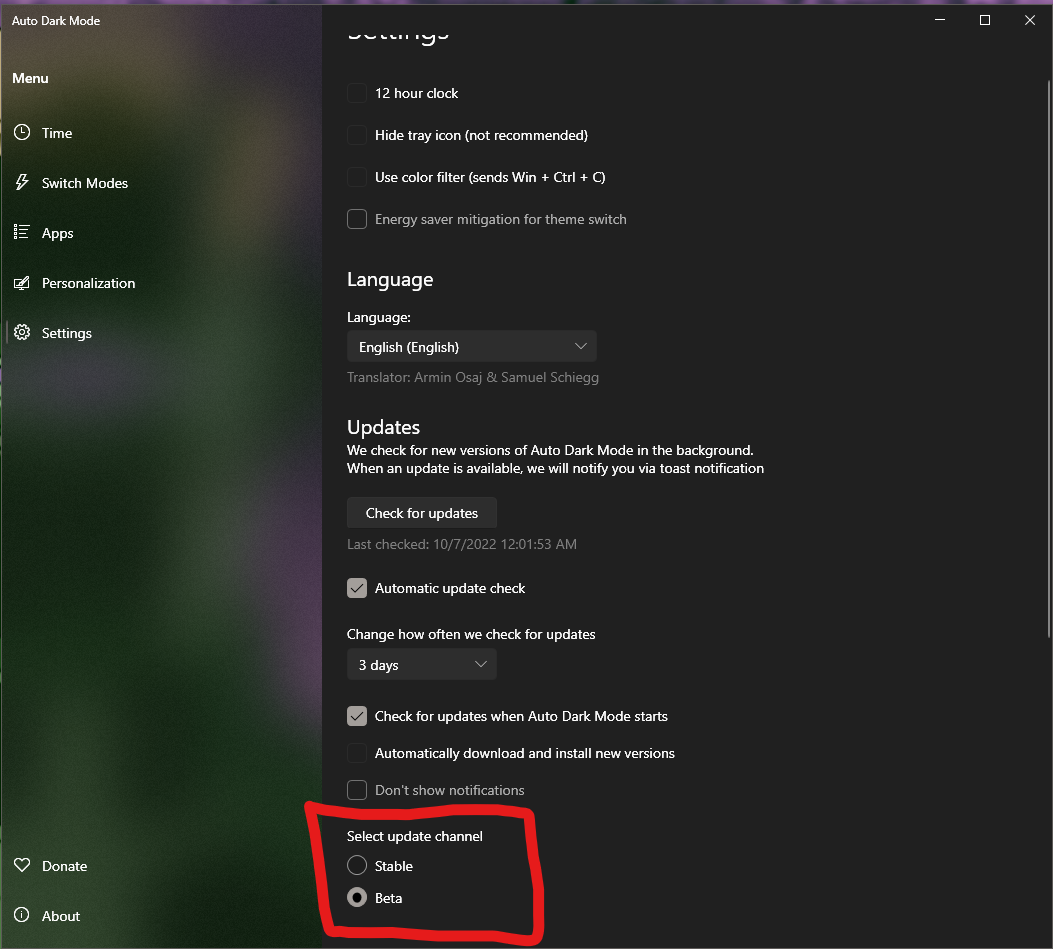
Then click on "check for updates" A notification will apear, click update and it will take care of switching you over to the beta channel
Just tested it. Works like a charm so far. I will create another issue if I find any issues!
So much better to have that option available (instead of scrolling through hours manually in Night Light & Auto Dark Mode).
Thanks so much!
@Spiritreader , so the functionality works great. But... I have some issue which forced me to go back to the stable branch.
Whenever I turn on my PC, my background image goes to Solid color option (in Windows Personalize menu) && I'm loosing my color's schema.
That's a shame I had to go back to the stable branch. Hope to see that fixed soon!
P.S Yes, it doesn't do that on the stable branch.
@Spiritreader , so the functionality works great. But... I have some issue which forced me to go back to the stable branch.
Whenever I turn on my PC, my background image goes to
Solid coloroption (in Windows Personalize menu) && I'm loosing my color's schema.That's a shame I had to go back to the stable branch. Hope to see that fixed soon!
P.S Yes, it doesn't do that on the stable branch.
Stable branch is unmaintained (until 10.3 release) and you didn't tell me which beta version you're using. That's crucial. There have been 62 beta versions since night light was introduced where many of them addressed the black screen issue step by step.
What you're experiencing is also unrelated to the night light feature. Please update to the latest beta (10.3.0.77), turn on debug and trace logs in the settings and post your results and precise description in the appropriate issue thread here if you still experience black wallpapers. https://github.com/AutoDarkMode/Windows-Auto-Night-Mode/issues/547
Without a full scale but report the only thing I can say is "OK too bad not my problem"