
Windows-Auto-Night-Mode
 Windows-Auto-Night-Mode copied to clipboard
 AutoDarkMode
sometimes fail to change wallpapers when automatically switching mode
Description
fails to change wallpapers when automatically switching mode, and maybe happened when screen was locked switching time is often or so 17~18 pm
Expected behavior
Log Data
Commit Hash and Version
- Commit:
5e6ea8a - Service:
10.1.0.10 - Updater:
2.4.2 - App:
10.0.1.0 - Shell:
1.3.1.0 - .Net:
6.0.0
Screenshots

Hmm, you have the Windows built-in theme switcher enabled. We're using a hidden API which has been discovered by the community.
I have personally experienced this once, but didn't occur anymore. If it happens very frequently, please update us.

I'm experiencing this, sort of. For me, it's only when the change was initially set for sunrise/sunset and my PC Windows session was locked.
Eg, if sunrise occurs prior to me unlocking my Windows session for the morning, although dark mode is turned off and most of my 'Theme' is switched to 'Light' upon me entering Windows, my dark mode wallpaper remains. It's not until I manually change the Theme, that the wallpaper changes.

I'm experiencing this, sort of. For me, it's only when the change was initially set for sunrise/sunset and my PC Windows session was locked.
Eg, if sunrise occurs prior to me unlocking my Windows session for the morning, although dark mode is turned off and most of my 'Theme' is switched to 'Light' upon me entering Windows, my dark mode wallpaper remains. It's not until I manually change the Theme, that the wallpaper changes.
could you also provide log and config files please?
@cableghost could you toggle this option and check back if this updates the theme correctly?
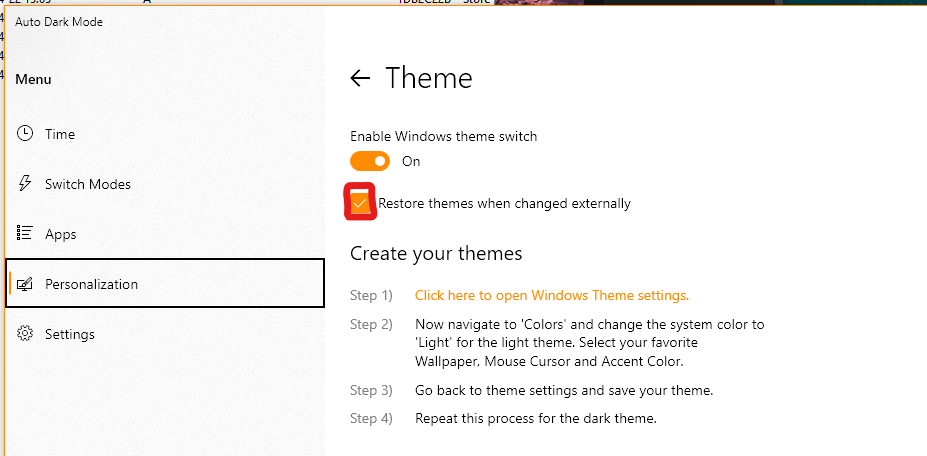
Update: Spoke to soon; woke up to PC wallpaper not changed, with that option enabled.
Enabling that option worked... Wallpaper changed. No difference in log reading though.
Moreover, this problem appeared and was repeated repeatedly only with the release of version 10.1.0.10. Personally, I have it only when changing from a light to a dark theme. When I work, there is a light theme, but as soon as the computer comes out of sleep mode in the evening, then after unlocking everything changes from the dark theme, except the wallpaper (they remain from the light one). Previously, this problem did not exist. Yes, you can check the box "Restoring themes with external changes", but this option probably (I haven't checked, so I assume) consumes more system resources. In short, I'm also waiting for this bug to be fixed.

Moreover, this problem appeared and was repeated repeatedly only with the release of version 10.1.0. Personally, I have it only when changing from a light to a dark theme. When I work, there is a light theme, but as soon as the computer comes out of sleep mode in the evening, then after unlocking everything changes from the dark theme, except the wallpaper (they remain from the light one). Previously, this problem did not exist. Yes, you can check the box "Restoring themes with external changes", but this option probably (I haven't checked, so I assume) consumes more system resources. In short, I'm also waiting for this bug to be fixed.
I cannot reproduce this, I have the exact same scenario almost every day, and it switches properly with he same settings the others posted.
Also the argument of "consumes more resources" is a moot point. It does not. There are no long running resource intensive tasks within AutoDarkMode, and if there were we would warm users about them. This setting monitors registry keys and initiates a theme switch if the selected theme doesn't match the currently active one, regardless of time. Previously, this setting was forced to be always enabled and hard-checked the active theme every 5 minutes. Which is probably why the issue occurred less, or wasn't reported. So by all means, the new setting, being toggled on, consumes less resources than before.
I can't say yet whether the setting actually does something, whether this is a windows or auto dark mode bug and how or why it occurs because I need more data.
Hmm, you have the Windows built-in theme switcher enabled. We're using a hidden API which has been discovered by the community.
I have personally experienced this once, but didn't occur anymore. If it happens very frequently, please update us.
hmmm,now i am using “Pick a wallpaper” mode instead of “Pick a theme”,and it seems to be normal
I need more data.
Ok. In Windows 11, I have the "Captured Motion" theme installed on a dark theme. On the light side - "Flow". Under these circumstances:
When I work, there is a light theme, but as soon as the computer comes out of sleep mode in the evening, then after unlocking everything changes from the dark theme, except the wallpaper (they remain from the light one).
I get this in the system:

I think the important point is that after the manifestation of this bug, the file appears "Custom.theme" (in %LocalAppData%\Microsoft\Windows\Themes folder), which is the theme with the artifact. If you delete this file, then after the bug reappears, it will be created again.
I need more data.
Ok. In Windows 11, I have the "Captured Motion" theme installed on a dark theme. On the light side - "Flow". Under these circumstances:
When I work, there is a light theme, but as soon as the computer comes out of sleep mode in the evening, then after unlocking everything changes from the dark theme, except the wallpaper (they remain from the light one).
I get this in the system:
I think the important point is that after the manifestation of this bug, the file appears "Custom.theme" (in %LocalAppData%\Microsoft\Windows\Themes folder), which is the theme with the artifact. If you delete this file, then after the bug reappears, it will be created again.
Perfect, this is exactly what I needed. This appears to be a Windows issue where it doesn't correctly apply the theme. Please report back whether the "restore themes when changed externally" setting works for you. If not, AutoDarkMode needs more mitigation to make sure Windows is applying the theme correctly such that it doesn't create a Custom.theme file
I am also having this issue. I do not use themes, just wallpaper switch. It will switch from dark to light mode just fine on its schedule. But light to dark, it switches everything except the wallpapers. I have to open up AutoDarkMode and click a time option for it to trigger the wallpaper.

@StereogramStudios Could you try again with the latest beta? (>=10.2.0.2)
Found the origin on Win11 to be theme switching no longer working during lockscreen. Since 10.3.0.23 theme switching on Win11 can only occur during unlock, which allows for proper wallpaper synchronization and theme switching again.