

 Audiveris
Prevent separation into movements in batch mode?
Using the CLI -batch mode, is there an option to disable separation into movements?
Running ./Audiveris.bat -batch -export -output "path/to/output/folder" -- "score_linked_below.pdf"
erroneously yields a new movement for every page -- maybe because of the word "violin" at the top of each page?
Example score: single violin staff. https://s9.imslp.org/files/imglnks/usimg/2/2d/IMSLP49678-PMLP04931-Mendelssohn_-Violin_Concerto_in_E_Minor(Auer)_Op64_violin.pdf
Is it possible to force a single xml document to be output?
I understand that Audiveris is meant to be used interactively, but this would be quite a useful nevertheless.

Your input file contains 14 sheets of rather low quality and very crowded. If I were you, I would not directly try to "transcribe & export", because very likely the MusicXML output will be rather poor, and moreover you won't have any material available to check and correct. You would have to restart from scratch!
My approach is generally to transcribe the input file, in batch or not, and to save the result. Thus, you have the .omr file available for an interactive review and correction of this raw material. And only when you are satisfied with the result (or just a part of it), you can export to MusicXML format. This is what I did to be able to review the processing of your example.
To answer your initial question, the input file seems to contain a single movement, and thus the transcription should have produced just one output file. But the result is not 1 but 5 scores. How come? In fact the engine has wrongly "detected" a few system indentations.
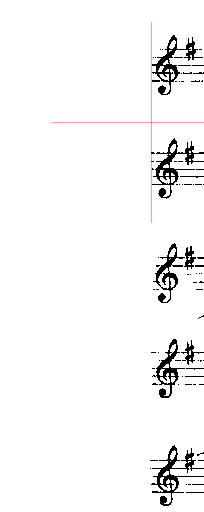
Here below is a snapshot taken from sheet number 2, which presents the left part of systems/staves 5 through 9:
| Binary input | Data output |
|---|---|
 |
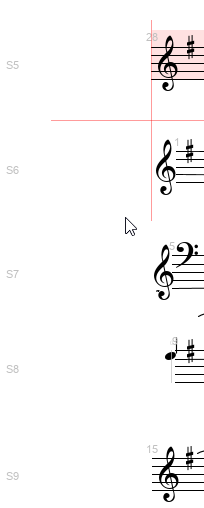 |
As you can see in the "binary input" column, many black pixels are missing in the staff lines on the left side. This resulted in a wrong detection of the precise left abscissa of some staves, starting with staff 6, that you can see in the "data output" column. This (false) system indentation was interpreted by the OMR engine as the start of a new movement.
So what can we do to improve the output?
-
An easy workaround for the case at hand is simply to disable the feature called "Use of system indentation". To do so, use the menu
Book | Set Book Parametersand in the opened dialog disable this feature for the current book. -
The real solution would be to manually modify the poorly detected staves so that their left side get correctly aligned with the other staves. This manual "staff edition" feature is not yet available, but it is on our TODO list with high priority. It might even be provided for Christmas! :-)

Thank you for the response!
An easy workaround for the case at hand is simply to disable the feature called "Use of system indentation". To do so, use the menu
Book | Set Book Parametersand in the opened dialog disable this feature for the current book.
How would I pass this via a CLI flag? From the documentation, I see -option KEY=VALUE, but no concrete example of the actual syntax (not complaining; just unsure). Source: https://audiveris.github.io/audiveris/_pages/advanced/options/
To respond to your suggestion of manual correction, I'll describe my priorities better:
-
I don't need perfect transcription; just moderate is okay -- however, fully automated is essential.
-
Rather than edit the OMR, I'd prefer to edit the .xml in a notation editor like Musescore or Sibelius afterward.
Hope that helps, and thanks again for taking the time to respond.
You are right, on CLI you can use:
-option org.audiveris.omr.sheet.ProcessingSwitches.indentations=false
Very low-level, not very convenient, but possible :-(
Thank you! Am I correct that there is no option to prevent separation of movements altogether?
This is true, there is no explicit option to prevent movement separation. A separation occurs when:
- Indentation detection is enabled (it is enabled by default) and a system indentation is detected
- An invalid sheet is encountered between two valid sheets
Manual staff edition is now available in recent Audiveris 5.3 release. I will make sure this allows to fix your problem. Stay tuned.
This is true, there is no explicit option to prevent movement separation. A separation occurs when:
- Indentation detection is enabled (it is enabled by default) and a system indentation is detected
- An invalid sheet is encountered between two valid sheets
I also met movement wrong separation, can I edit where to separate manually?
