
AtsumeruManager
 AtsumeruManager copied to clipboard
 AtsumeruDev
Manager app for Atsumeru self-hosted manga/comics/light novels server
AtsumeruManager
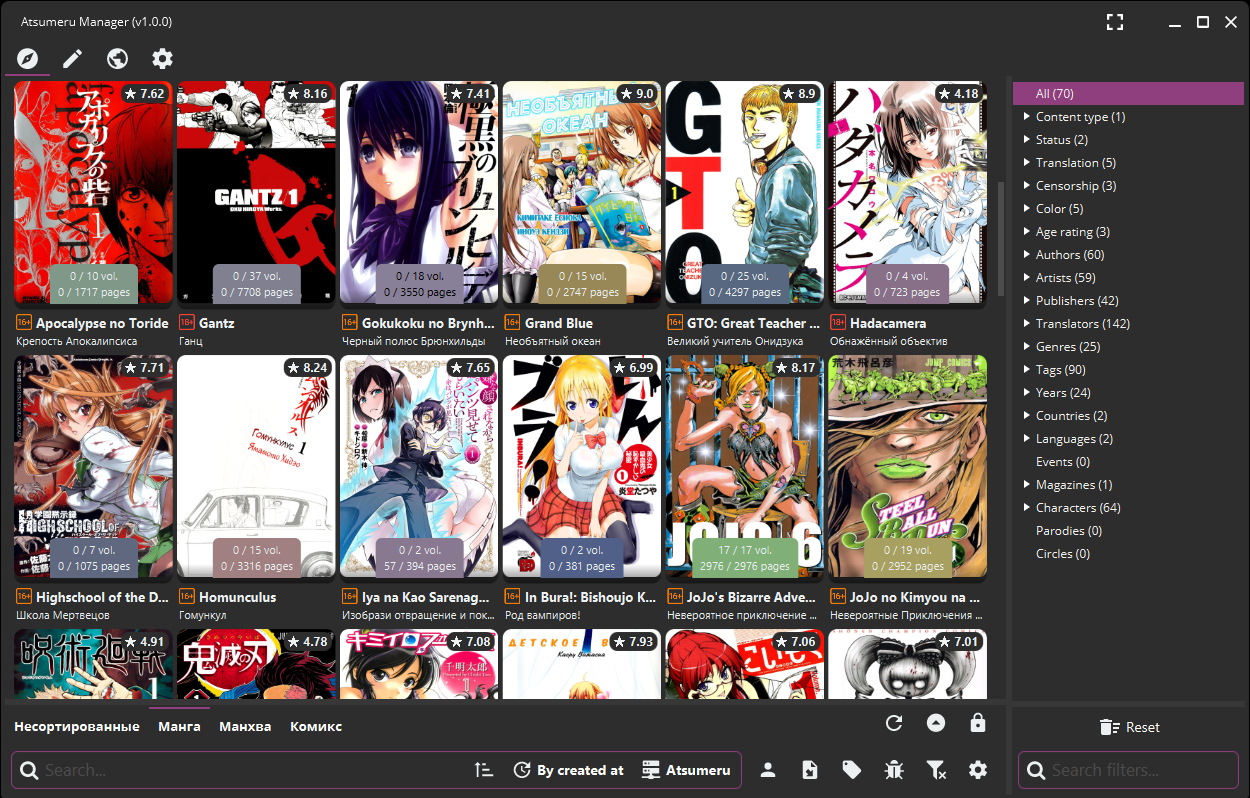
Standalone app (Windows/Linux/MacOS) and WebUI for Atsumeru self-hosted manga/comics/light novels server managing and content reading
Release types
App can be built into three different distributions:
- Native Image App
- Fat JAR file
- WebApp
Native Image App is self-contained and doesn't need JRE/JDK on target system to run, while Fat Jar and WebApp requires JRE/JDK 11+ to be installed
Those types doesn't contains any metadata parsing functionality
Note: exists fourth type of release: Native Image App with metadata parsing functionality. This release is always prebuild from these sources with addition of metadata parsing engine
Download
Download actual version of release type from Releases section
Launching
Native Image App with or without metadata parsing functionality
Windows
You will need additional files installed. Check them here Then just launch file as normal app
Linux
Execute command from terminal:
./AtsumeruManager_linux_vx.y
make sure to mark file as executable
MacOS
Execute command from terminal:
open -a AtsumeruManager_macos_vx.y
make sure to mark file as executable
Fat JAR file
- Install
JRE/JDK 11+as default Java in your system - Download
Fat Jarfile from Releases section - Execute command from terminal:
java -jar --add-opens=javafx.graphics/javafx.css=ALL-UNNAMED --add-opens=javafx.graphics/com.sun.javafx.css=ALL-UNNAMED --add-opens=javafx.controls/javafx.scene.control=ALL-UNNAMED --add-opens=javafx.controls/javafx.scene.control.skin=ALL-UNNAMED --add-opens=java.base/java.lang.reflect=ALL-UNNAMED --add-opens=java.base/sun.nio.ch=ALL-UNNAMED --add-opens=java.base/java.io=ALL-UNNAMED --add-opens=javafx.controls/javafx.scene.control.skin=ALL-UNNAMED --add-opens=javafx.graphics/javafx.scene=ALL-UNNAMED --add-opens=javafx.base/com.sun.javafx.runtime=ALL-UNNAMED --add-opens=javafx.base/com.sun.javafx.collections=ALL-UNNAMED --add-opens=javafx.graphics/com.sun.javafx.css=ALL-UNNAMED --add-opens=javafx.graphics/com.sun.javafx.scene=ALL-UNNAMED --add-opens=javafx.graphics/com.sun.javafx.scene.traversal=ALL-UNNAMED --add-opens=javafx.graphics/javafx.scene=ALL-UNNAMED --add-opens=javafx.graphics/com.sun.glass.ui=ALL-UNNAMED --add-opens=javafx.graphics/com.sun.javafx.util=ALL-UNNAMED --add-opens=javafx.controls/com.sun.javafx.scene.control=ALL-UNNAMED --add-opens=javafx.controls/com.sun.javafx.scene.control.behavior=ALL-UNNAMED --add-opens=javafx.controls/javafx.scene.control.skin=ALL-UNNAMED --add-exports=javafx.base/com.sun.javafx.event=ALL-UNNAMED --add-exports=javafx.controls/javafx.scene.control=ALL-UNNAMED --add-exports=javafx.controls/com.sun.javafx.scene.control.behavior=ALL-UNNAMED --add-exports=javafx.controls/com.sun.javafx.scene.control.inputmap=ALL-UNNAMED --add-exports=javafx.graphics/com.sun.javafx.scene.traversal=ALL-UNNAMED --add-exports=javafx.controls/com.sun.javafx.scene.control=ALL-UNNAMED --add-exports=javafx.base/com.sun.javafx.binding=ALL-UNNAMED --add-exports=javafx.graphics/com.sun.javafx.stage=ALL-UNNAMED --add-exports=javafx.base/com.sun.javafx.event=ALL-UNNAMED --add-exports=javafx.graphics/com.sun.javafx.scene=ALL-UNNAMED --add-exports=javafx.graphics/com.sun.javafx.scene.traversal=ALL-UNNAMED --add-exports=javafx.graphics/com.sun.javafx.util=ALL-UNNAMED --add-exports=javafx.controls/com.sun.javafx.scene.control.behavior=ALL-UNNAMED --add-exports=javafx.controls/com.sun.javafx.scene.control=ALL-UNNAMED --add-exports=javafx.controls/com.sun.javafx.scene.control.inputmap=ALL-UNNAMED --add-exports=javafx.base/com.sun.javafx.event=ALL-UNNAMED --add-exports=javafx.base/com.sun.javafx.collections=ALL-UNNAMED --add-exports=javafx.base/com.sun.javafx.runtime=ALL-UNNAMED AtsumeruManager_vx.y.jar
Note: it is necessary to launch app with that looooong command. Some dependency libraries doesn't use Java 9+ Jigsaw modularization, so it's necessary to provide module opens/exports configuration explicitly
WebApp
Warning: for launching on Linux, check PREPARING LINUX FOR JPRO page first!
- Install
JRE/JDK 11+as default Java in your system - Make sure to set variable
JAVA_PATHto installedJRE/JDK 11+ - Download
WebAppzip-file from Releases section - Unpack it into desired location
- Find
install/start/stop/uninstallscripts inbinfolder and run one that you need (Note: You can edit this scripts to change default port) - App will be accessible from
ip:port
Note: this type of distribution requires at least 1Gb of available RAM to work. Also, app state will be shared to all active connections
Building
Create gradle.properties file in project root and define JDK path for each system (unused may be blank):
WINDOWS_GRAALVM_SDK_PATHLINUX_GRAALVM_SDK_PATHMACOSX_GRAALVM_SDK_PATH
Native Image App
Documentation is WIP. Current source code is lack of necessary GraalVM Native Image configuration files
Fat JAR file
Just execute shadow:shadowJar Gradle task. Result file will be in {source_code_location}/build/libs folder
WebApp
Just execute jpro:jProRelease Gradle task. Result zip-file will be in {source_code_location}/build/distribution folder
Note: you need to manually edit scripts after build and add launch Java arguments:
--add-opens=javafx.graphics/javafx.css=ALL-UNNAMED --add-opens=javafx.graphics/com.sun.javafx.css=ALL-UNNAMED --add-opens=javafx.controls/javafx.scene.control=ALL-UNNAMED --add-opens=javafx.controls/javafx.scene.control.skin=ALL-UNNAMED --add-opens=java.base/java.lang.reflect=ALL-UNNAMED --add-opens=java.base/sun.nio.ch=ALL-UNNAMED --add-opens=java.base/java.io=ALL-UNNAMED --add-opens=javafx.controls/javafx.scene.control.skin=ALL-UNNAMED --add-opens=javafx.graphics/javafx.scene=ALL-UNNAMED --add-opens=javafx.base/com.sun.javafx.runtime=ALL-UNNAMED --add-opens=javafx.base/com.sun.javafx.collections=ALL-UNNAMED --add-opens=javafx.graphics/com.sun.javafx.css=ALL-UNNAMED --add-opens=javafx.graphics/com.sun.javafx.scene=ALL-UNNAMED --add-opens=javafx.graphics/com.sun.javafx.scene.traversal=ALL-UNNAMED --add-opens=javafx.graphics/javafx.scene=ALL-UNNAMED --add-opens=javafx.graphics/com.sun.glass.ui=ALL-UNNAMED --add-opens=javafx.graphics/com.sun.javafx.util=ALL-UNNAMED --add-opens=javafx.controls/com.sun.javafx.scene.control=ALL-UNNAMED --add-opens=javafx.controls/com.sun.javafx.scene.control.behavior=ALL-UNNAMED --add-opens=javafx.controls/javafx.scene.control.skin=ALL-UNNAMED --add-exports=javafx.base/com.sun.javafx.event=ALL-UNNAMED --add-exports=javafx.controls/javafx.scene.control=ALL-UNNAMED --add-exports=javafx.controls/com.sun.javafx.scene.control.behavior=ALL-UNNAMED --add-exports=javafx.controls/com.sun.javafx.scene.control.inputmap=ALL-UNNAMED --add-exports=javafx.graphics/com.sun.javafx.scene.traversal=ALL-UNNAMED --add-exports=javafx.controls/com.sun.javafx.scene.control=ALL-UNNAMED --add-exports=javafx.base/com.sun.javafx.binding=ALL-UNNAMED --add-exports=javafx.graphics/com.sun.javafx.stage=ALL-UNNAMED --add-exports=javafx.base/com.sun.javafx.event=ALL-UNNAMED --add-exports=javafx.graphics/com.sun.javafx.scene=ALL-UNNAMED --add-exports=javafx.graphics/com.sun.javafx.scene.traversal=ALL-UNNAMED --add-exports=javafx.graphics/com.sun.javafx.util=ALL-UNNAMED --add-exports=javafx.controls/com.sun.javafx.scene.control.behavior=ALL-UNNAMED --add-exports=javafx.controls/com.sun.javafx.scene.control=ALL-UNNAMED --add-exports=javafx.controls/com.sun.javafx.scene.control.inputmap=ALL-UNNAMED --add-exports=javafx.base/com.sun.javafx.event=ALL-UNNAMED --add-exports=javafx.base/com.sun.javafx.collections=ALL-UNNAMED --add-exports=javafx.base/com.sun.javafx.runtime=ALL-UNNAMED
Documentation
All info is available on Atsumeru website
Metadata
Owner
 AtsumeruDev
Metadata
Manager app for Atsumeru self-hosted manga/comics/light novels server