

 AtlassianPS
New-JiraIssue throws "Reporter is required" error.
Description
Attempting to run New-JiraIssue throws a "reporter is required", no matter the value passed in. This is run against a blank Service Desk project with the IT Service Desk template created on Jira Cloud.
Steps To Reproduce
- Authenticate with credentials
- Attempt to run New-JiraIssue against a next-gen project (not tried on classic) with either no Reporter field or any other value in the Reporter field, such as PS custom object with Account ID.
Expected behavior
Creates Issue.
Screenshots
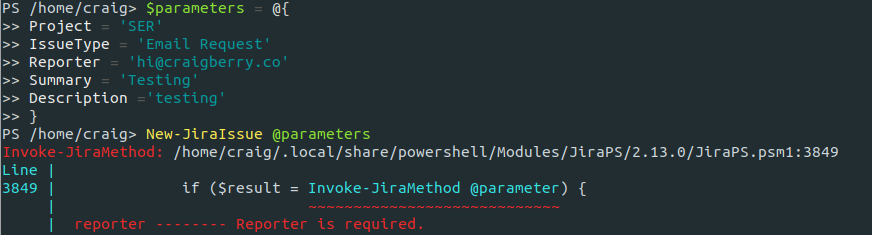

Your Environment
PS /home/craig> Get-Module JiraPS -ListAvailable | Select Name, Version

Name   Version
----   -------
JiraPS 2.13.0

PS /home/craig> $psVersionTable

Name                           Value
----                           -----
PSVersion                      7.0.0
PSEdition                      Core
GitCommitId                    7.0.0
OS                             Linux 4.15.0-88-generic #88-Ubuntu SMP Tue Feb 11 20:11:34 UTC 2020
Platform                       Unix
PSCompatibleVersions           {1.0, 2.0, 3.0, 4.0…}
PSRemotingProtocolVersion      2.3
SerializationVersion           1.1.0.1
WSManStackVersion              3.0
Possible Solution
This seems to be due to the API no longer accepting an object consisting of a name as a valid value for reporter? Changing L96 of https://github.com/AtlassianPS/JiraPS/blob/master/JiraPS/Public/New-JiraIssue.ps1 from $requestBody["reporter"] = @{"name" = "$Reporter"} to $requestBody["reporter"] = @{"accountId" = "$Reporter"} and supplying an account ID solved the problem for me.


I fixed this issue by modify the reporter check.
    if ($Reporter) {
        $jiraUserData = get-jirauser -UserName $Reporter -Credential $Credential -exact | Select-Object *
        $requestBody["reporter"] = @{"id" = $jiraUserData.accountId}
    }

This appears to be related to internal changes to the way Jira handles account names and IDs. I don’t see any open pull requests to address this issue, but I can verify that New-JiraIssue also fails on classic projects if -Reporter is set. I’ll create and submit a pull request to resolve this. It will appear to be a breaking change in the JiraPS module, but I think it would be broken for anyone now anyway, based on the Jira API changes.


This is still a problem and since we can't use the -username switch in strict GDPR mode, the only solution is to implement @fryiee solution. that means manually editing the JiraPS module on every machine that uses it.

This weirdly happens on some but not all issues I try to create with the api. If I omit -Reporter some of them just use the session's username as the reporter and it works fine, then other ones will give this error. I'm on jiraps version 2.14.6 If I find any more specific patterns that cause the issue I will share them

It may have let me create some number of issues and then the behavior changed. I found this https://community.atlassian.com/t5/Confluence-questions/Get-user-account-ID-via-API-from-email-username/qaq-p/1197704 which insinuates that if you have verified your domain then you can get use get-jirauser to get the accountID and that change can work more dynamically. We are in process of migrating to cloud so we haven't verified the domain just yet
It seems that you do indeed need a verified domain and then you have to make a separate api key for your organization under settings organization (https://support.atlassian.com/organization-administration/docs/manage-an-organization-with-the-admin-apis/) Then you can use that key to get your org id and then your users from said org
$apiKey = "Your organization level api key"
$orgID = (invoke-restmethod -Uri "https://api.atlassian.com/admin/v1/orgs" -Headers @{Authorization= "Bearer $apiKey"}).data.id
$users = (invoke-restmethod -Uri "https://api.atlassian.com/admin/v1/orgs/$orgID/users" -Headers @{Authorization= "Bearer $apiKey"}).data
Once you have the users object, you can embed getting that into your scripts using jiraps to get the matching user account_id property that matches a user's email property.
i.e instead of $Reporter = [email protected] you'd do $reporter = $users | ? email -eq [email protected] | select -expand account_id and then there you have it.
Adding this process into JiraPS more dynamically is a different question.
Just use this: $parameters = @{ Project = 'IT' IssueType = 'Task' Summary = "This is the issue summary" Fields = @{ Reporter = @{ id = '123d6db8f97d180071741234' } } } New-JiraIssue @parameters

I discovered a much easier workaround. In the jira cloud screen configurations for your project(s), remove the 'reporter' field from the screen. Then don't attempt to pass the reporter field in the api. Jira cloud will handle adding the reporter automatically like it does when you create an issue in the web gui
This is an issue apparently across the board with the current version of JiraPS, New-JiraIssue fails with the same issue regarding Reporter missing, which is akin to issue #411

The only workaround I've found is to write my own PowerShell functions that leverage invoke-jiramethod underneath just to get a user, or even create issues.