

 AskEdith
Different Prompts
I want to start off by saying how much I love this program.
tl;dr (of this section) - Basically tried to get the AI to generate unique names for basketball teams, and instead either came up with a story for 1 team, or listed numerous teams. The last time it just generated the history of a fictional league with different existing NBA teams joining the league.
I would ask the AI something along the lines of "It's 1937, the NBA is never formed, and instead a league called the National Association of Basketball (or the NAB) is formed. The league is looking for 8 cities to host teams." The AI likes this and decides to go with, in my case, the Baltimore Bullets. It would go along and generate a story of them, and how they beat the Celtics to win the championship. It's neat, but in certain cases, like this one, it would generate a story. I tried wording it different and told it to be creative and this time it came up with 3 teams. The New York Rens, an all-black team, the Boston Celtics, an all-Irish team, and the Philadelphia Warriors, an all-Native American team. Again these are all historic teams. I tried prompting it again, and it gave me a list of 8 teams, Bucks, Celtics, Bulls, Knicks, Trailblazers, etc. The last time I asked, it started with the first season, I think it was Boston being the champions, then it would go on through the decades and saying what new teams joined the league, which they were all existing NBA teams.
I was looking through the code and found prompts.py that had the different things that the AI is told. I thought, wow I could use this to better fit my prompts (Also, it would be cool to have numerous random prompts instead of just the children's story). There currently is no way to change the story expander and the illustrations.
I think it would be cool to have the user have the option to edit the story expander and the illustration prompt that the AI gets. Wether it be by a button or a secret shortcut (Like ctrl+space+z, or something). I made a mockup of it and it's demonstrated below
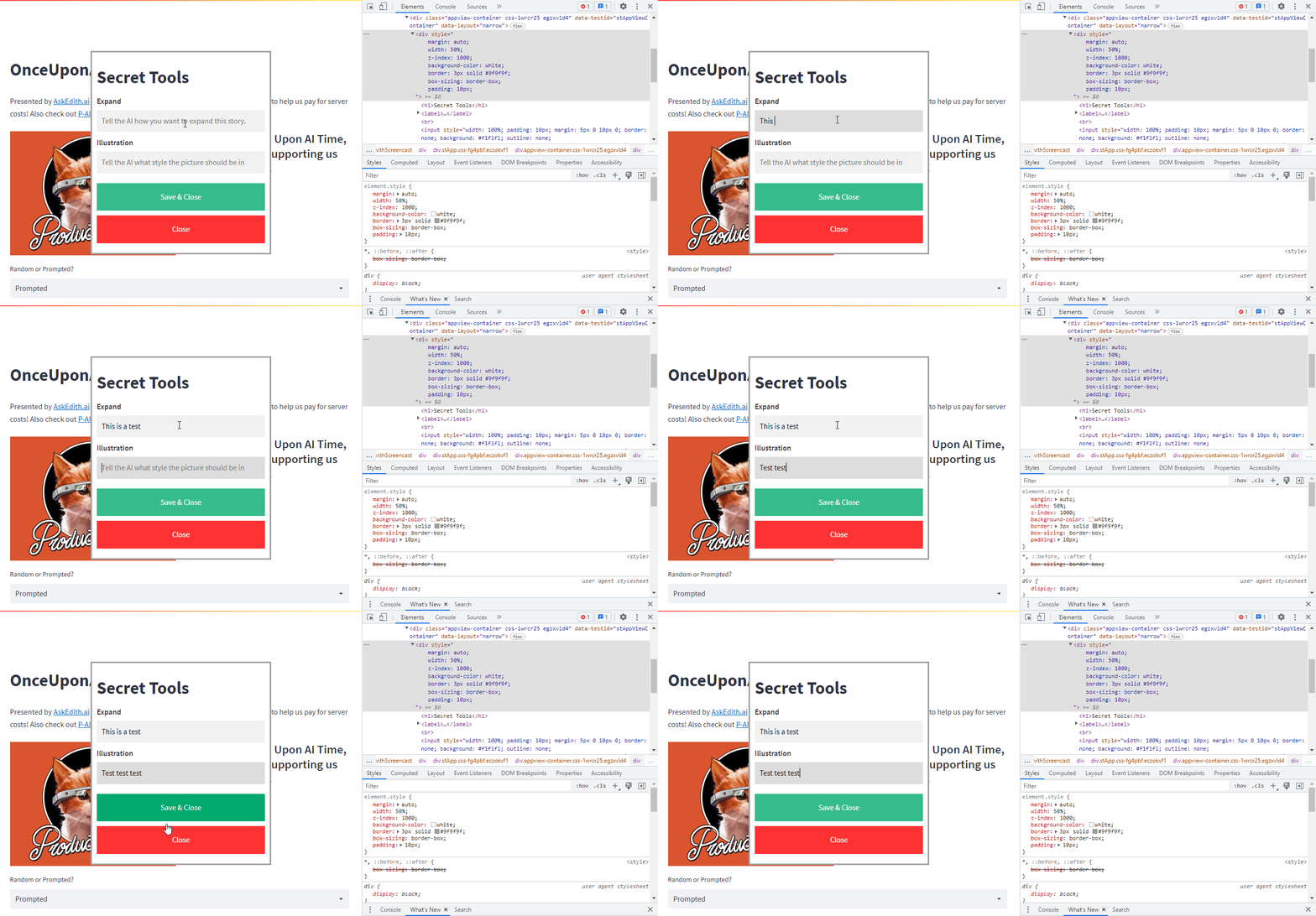
Like if I wanted the story to not have a climax and instead just be a list or something, I could have the option to. Or if I want the pictures to be in a black and white format, I could as well. I think it's really cool, and I wish I knew more python so I can kinda help out.
Here's the code:
<div style="
margin: auto;
width: 50%;
z-index: 1000;
background-color: white;
border: 3px solid #9f9f9f;
box-sizing: border-box;
padding: 10px;
"><h1>Secret Tools</h1>
<label><b>Expand</b></label><br>
<input style="width: 100%; padding: 10px; margin: 5px 0 10px 0; border: none; background: #f1f1f1; outline: none;
" type="text" placeholder="Tell the AI how you want to expand this story.">
<label><b>Illustration</b></label>
<input style="width: 100%;padding: 10px;margin: 5px 0 20px 0;border: none;background: #f1f1f1;outline: none;" type="text" placeholder="Tell the AI what style the picture should be in">
<div><button style="
text-align: center;
background-color: #04AA6D;
color: white;
padding: 16px 20px;
border: none;
cursor: pointer;
width: 100%;
margin-bottom:10px;
opacity: 0.8;
outline: none;
">Save & Close</button><button style="
text-align: center;
background-color: red;
color: white;
padding: 16px 20px;
border: none;
cursor: pointer;
width: 100%;
margin-bottom:10px;
opacity: 0.8;
outline: none;
">Close</button></div>
</div>
