

 Arthur151
I can't use GPU resourece in colab
when i train BEV in colab enviroment, colab GPU resource is not avaliable. So i found that issue but i can't solution.
this is my colab code. and dataset get from google drive sharing link.
from google.colab import drive drive.mount('/content/drive')
!python --version
%cd /content/drive/MyDrive/python/ %ls !wget https://www.python.org/ftp/python/3.8.8/Python-3.8.8.tgz !tar xvfz Python-3.8.8.tgz !Python-3.8.8/configure !make !sudo make install !python --version
%cd '/my_BEV_root/data' %ls
!git clone -b master --single-branch https://github.com/Arthur151/ROMP
!git clone https://github.com/Arthur151/Relative_Human.git
!pip install setuptools==59.5.0 jedi==0.10.0 numpy==1.22
!pip install pip==20.0.2
!pip install --upgrade simple-romp
!pip install --upgrade cython lap %cd '/my_ROMP_root/simple_romp' !python setup.py install
!pip install cython !pip install -U 'git+https://github.com/cocodataset/cocoapi.git#subdirectory=PythonAPI'
if you use Python3.8 (Option 2 or Option 4 with python3.8), please install pytorch3d via
!pip install https://github.com/Arthur151/ROMP/releases/download/v1.1/pytorch3d-0.6.1-cp38-cp38-linux_x86_64.whl
%cd '/my_BEV_roo/'
!wget https://developer.download.nvidia.com/compute/cuda/repos/ubuntu1804/x86_64/cuda-ubuntu1804.pin
!sudo mv cuda-ubuntu1804.pin /etc/apt/preferences.d/cuda-repository-pin-600
!wget http://developer.download.nvidia.com/compute/cuda/10.2/Prod/local_installers/cuda-repo-ubuntu1804-10-2-local-10.2.89-440.33.01_1.0-1_amd64.deb
!sudo dpkg -i cuda-repo-ubuntu1804-10-2-local-10.2.89-440.33.01_1.0-1_amd64.deb
!sudo apt-key add /var/cuda-repo-10-2-local-10.2.89-440.33.01/7fa2af80.pub
!sudo apt-get update
!sudo apt-get -y install cuda
!apt-get install cuda-10.2 !pip install torchtext==0.11.0 torchaudio==0.10.0 torch==1.10.0+cu102 torchvision==0.11.1+cu102 -f https://download.pytorch.org/whl/torch_stable.html
!pip install torch==1.10.0+cu102 torchvision==0.11.1+cu102 -f https://download.pytorch.org/whl/torch_stable.html
!pip install cython !pip install git+https://github.com/philferriere/cocoapi.git#subdirectory=PythonAPI
%cd '/my_ROMP_root/' !pip install -r requirements.txt
import tensorflow as tf device_name = tf.test.gpu_device_name() if device_name != '/device:GPU:0': raise SystemError('GPU device not found') print('Found GPU at : {}'.format(device_name))
go into the path/to/ROMP
!pip install GPUtil
import GPUtil from threading import Thread import time
class Monitor(Thread): def init(self, delay): super(Monitor, self).init() self.stopped = False self.delay = delay # Time between calls to GPUtil self.start()
def run(self):
    while not self.stopped:
        GPUtil.showUtilization()
        time.sleep(self.delay)

def stop(self):
    self.stopped = True
monitor = Monitor(10)
monitor.stop()
import os os.environ['CUDA_VISIBLE_DEVICES'] = '0'
To train BEV, please run
!bash scripts/V6_train.sh
To fine-tuning BEV, please put https://github.com/Arthur151/ROMP/releases/download/V2.1/BEV_HRNet32_V6.pkl to trained_models, and run
%cd '/content/drive/MyDrive/bev/ROMP/' import os os.environ['CUDA_VISIBLE_DEVICES'] = '0'
To train BEV, please run
!sh scripts/V6_train.sh
To fine-tuning BEV, please put https://github.com/Arthur151/ROMP/releases/download/V2.1/BEV_HRNet32_V6.pkl to trained_models, and run
%cd %cd '/content/drive/MyDrive/bev/ROMP/scripts/'
!git clone https://github.com/Arthur151/ROMP/releases/download/V2.1/BEV_HRNet32_V6.pkl
!sh scripts/V6_ft.sh
!sh scripts/V1_train_resnet.sh
and i upload pictures that colab gpu resouece graph
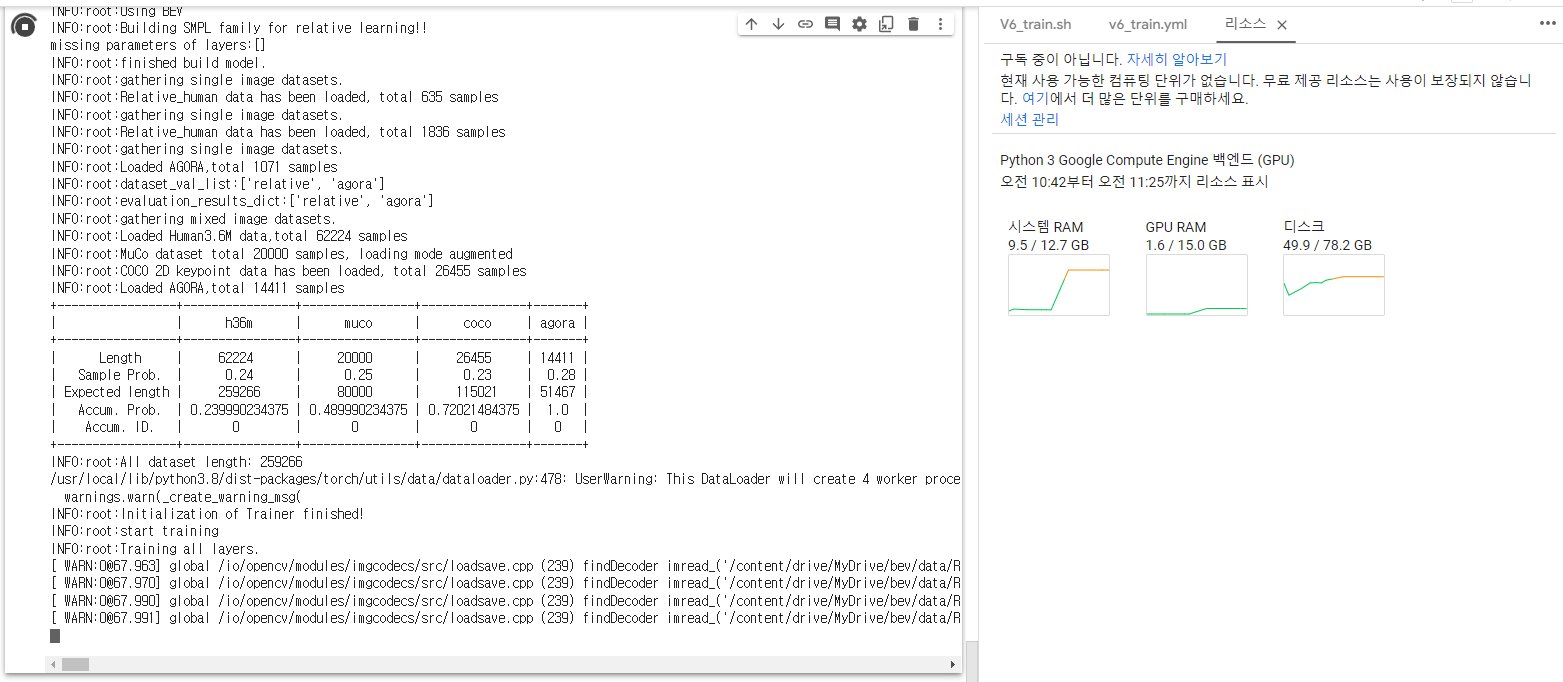

The reason seems to be that you need to properly set the path of each training dataset.
You need to properly set the path of each dataset to enable training. For instance, please properly set the path to the folder of Relative Human at ROMP/romp/lib/dataset/relative_human.py Please let me know if the same errors keep showing.
