

 Artemis-RGB
Installer wont allow install due to .NET Runtime missing
Cant seem to get past the install dependencies step due to the .NET 5 Runtime missing, even though its installed.
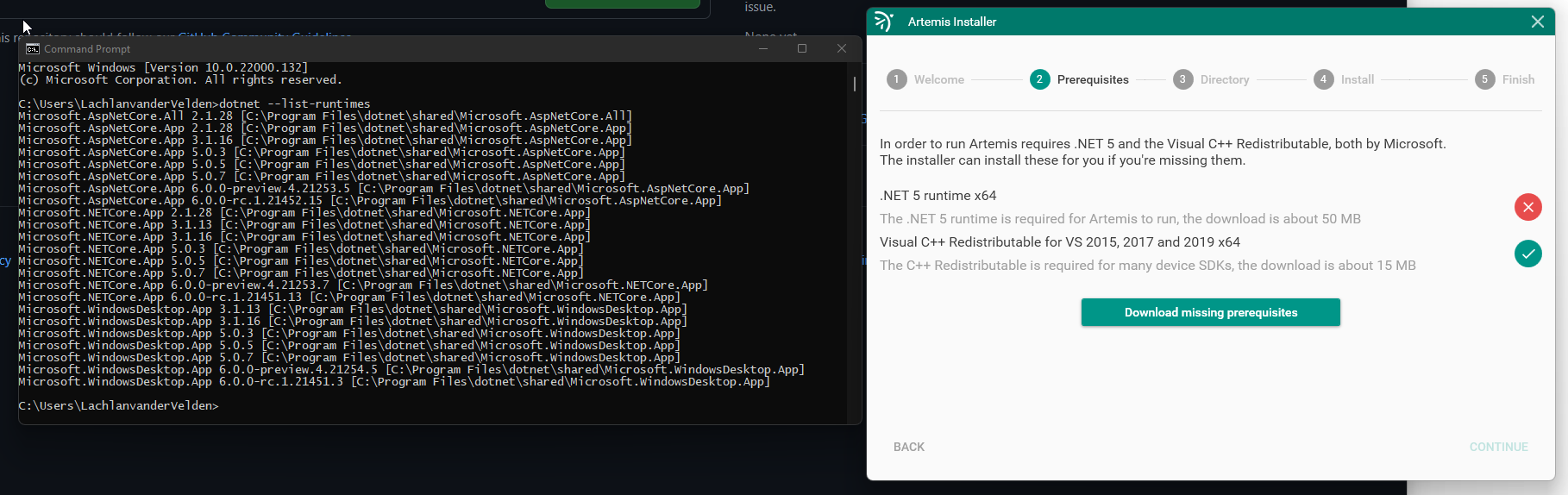
Performing the install just downloads, opens the installer and the installer exits as its already installed.

.NET install logs
[5B04:6084][2021-10-04T22:43:51]i001: Burn v3.14.0.4118, Windows v10.0 (Build 22000: Service Pack 0), path: C:\WINDOWS\Temp\{61B0E6DF-22ED-4E6B-8B60-82F9505C4CBC}\.cr\tmp3944.exe
[5B04:6084][2021-10-04T22:43:51]i000: Initializing string variable 'DOTNETHOME' to value '[ProgramFiles64Folder]dotnet'
[5B04:6084][2021-10-04T22:43:51]i000: Initializing string variable 'BUNDLEMONIKER' to value 'Microsoft Windows Desktop Runtime - 5.0.7 (x64)'
[5B04:6084][2021-10-04T22:43:51]i000: Initializing string variable 'PRODUCT_NAME' to value 'Microsoft Windows Desktop Runtime - 5.0.7 (x64)'
[5B04:6084][2021-10-04T22:43:51]i000: Initializing string variable 'LINK_PREREQ_PAGE' to value 'https://go.microsoft.com/fwlink/?linkid=846817'
[5B04:6084][2021-10-04T22:43:51]i009: Command Line: '-burn.clean.room=C:\Users\LachlanvanderVelden\AppData\Local\Temp\tmp3944.exe -burn.filehandle.attached=736 -burn.filehandle.self=560 -passive'
[5B04:6084][2021-10-04T22:43:51]i000: Setting string variable 'WixBundleOriginalSource' to value 'C:\Users\LachlanvanderVelden\AppData\Local\Temp\tmp3944.exe'
[5B04:6084][2021-10-04T22:43:51]i000: Setting string variable 'WixBundleOriginalSourceFolder' to value 'C:\Users\LachlanvanderVelden\AppData\Local\Temp\'
[5B04:6084][2021-10-04T22:43:51]i000: Setting string variable 'WixBundleLog' to value 'C:\Users\LACHLA~1\AppData\Local\Temp\Microsoft_Windows_Desktop_Runtime_-_5.0.7_(x64)_20211004224351.log'
[5B04:6084][2021-10-04T22:43:51]i000: Setting string variable 'WixBundleManufacturer' to value 'Microsoft Corporation'
[5B04:5DA0][2021-10-04T22:43:51]i000: Setting numeric variable 'WixStdBALanguageId' to value 1033
[5B04:5DA0][2021-10-04T22:43:51]i000: Setting version variable 'WixBundleFileVersion' to value '5.0.7.30113'
[5B04:6084][2021-10-04T22:43:51]i100: Detect begin, 4 packages
[5B04:6084][2021-10-04T22:43:51]i101: Detected package: dotnet_runtime_5.0.7_win_x64.msi, state: Present, cached: None
[5B04:6084][2021-10-04T22:43:51]i101: Detected package: dotnet_hostfxr_5.0.7_win_x64.msi, state: Present, cached: None
[5B04:6084][2021-10-04T22:43:51]i101: Detected package: dotnet_host_5.0.7_win_x64.msi, state: Present, cached: None
[5B04:6084][2021-10-04T22:43:51]i101: Detected package: windowsdesktop_runtime_5.0.7_win_x64.msi, state: Present, cached: None
[5B04:6084][2021-10-04T22:43:51]i052: Condition '((VersionNT > v6.1) OR (VersionNT = v6.1 AND ServicePackLevel >= 1))' evaluates to true.
[5B04:6084][2021-10-04T22:43:51]i052: Condition 'VersionNT64' evaluates to true.
[5B04:6084][2021-10-04T22:43:51]i199: Detect complete, result: 0x0
[5B04:6084][2021-10-04T22:43:51]i200: Plan begin, 4 packages, action: Modify
[5B04:6084][2021-10-04T22:43:51]i201: Planned package: dotnet_runtime_5.0.7_win_x64.msi, state: Present, default requested: Present, ba requested: Present, execute: None, rollback: None, cache: No, uncache: No, dependency: Register
[5B04:6084][2021-10-04T22:43:51]i201: Planned package: dotnet_hostfxr_5.0.7_win_x64.msi, state: Present, default requested: Present, ba requested: Present, execute: None, rollback: None, cache: No, uncache: No, dependency: Register
[5B04:6084][2021-10-04T22:43:51]i201: Planned package: dotnet_host_5.0.7_win_x64.msi, state: Present, default requested: Present, ba requested: Present, execute: None, rollback: None, cache: No, uncache: No, dependency: Register
[5B04:6084][2021-10-04T22:43:51]i201: Planned package: windowsdesktop_runtime_5.0.7_win_x64.msi, state: Present, default requested: Present, ba requested: Present, execute: None, rollback: None, cache: No, uncache: No, dependency: Register
[5B04:6084][2021-10-04T22:43:51]i299: Plan complete, result: 0x0
[5B04:6084][2021-10-04T22:43:51]i300: Apply begin
[5B04:6084][2021-10-04T22:43:51]i010: Launching elevated engine process.
[5B04:6084][2021-10-04T22:43:51]i011: Launched elevated engine process.
[5B04:6084][2021-10-04T22:43:52]i012: Connected to elevated engine.
[6080:4654][2021-10-04T22:43:52]i358: Pausing automatic updates.
[6080:4654][2021-10-04T22:43:52]i359: Paused automatic updates.
[6080:4654][2021-10-04T22:43:52]i371: Updating session, registration key: SOFTWARE\Microsoft\Windows\CurrentVersion\Uninstall\{4545d600-b3a9-467c-a68b-e70ae51c8382}, resume: Active, restart initiated: No, disable resume: No
[6080:4654][2021-10-04T22:43:52]i325: Registering dependency: {4545d600-b3a9-467c-a68b-e70ae51c8382} on package provider: dotnet_runtime_40.28.30105_x64, package: dotnet_runtime_5.0.7_win_x64.msi
[6080:4654][2021-10-04T22:43:52]i325: Registering dependency: {4545d600-b3a9-467c-a68b-e70ae51c8382} on package provider: Dotnet_CLI_HostFxr_40.28.30105_x64, package: dotnet_hostfxr_5.0.7_win_x64.msi
[6080:4654][2021-10-04T22:43:52]i325: Registering dependency: {4545d600-b3a9-467c-a68b-e70ae51c8382} on package provider: Dotnet_CLI_SharedHost_40.28.30105_x64, package: dotnet_host_5.0.7_win_x64.msi
[6080:4654][2021-10-04T22:43:52]i325: Registering dependency: {4545d600-b3a9-467c-a68b-e70ae51c8382} on package provider: windowsdesktop_runtime_40.28.30113_x64, package: windowsdesktop_runtime_5.0.7_win_x64.msi
[6080:4654][2021-10-04T22:43:52]i372: Session end, registration key: SOFTWARE\Microsoft\Windows\CurrentVersion\Uninstall\{4545d600-b3a9-467c-a68b-e70ae51c8382}, resume: ARP, restart: None, disable resume: No
[6080:4654][2021-10-04T22:43:52]i371: Updating session, registration key: SOFTWARE\Microsoft\Windows\CurrentVersion\Uninstall\{4545d600-b3a9-467c-a68b-e70ae51c8382}, resume: ARP, restart initiated: No, disable resume: No
[5B04:6084][2021-10-04T22:43:52]i399: Apply complete, result: 0x0, restart: None, ba requested restart:  No
[5B04:6084][2021-10-04T22:43:52]i500: Shutting down, exit code: 0x0
[5B04:6084][2021-10-04T22:43:52]i410: Variable: BUNDLEMONIKER = Microsoft Windows Desktop Runtime - 5.0.7 (x64)
[5B04:6084][2021-10-04T22:43:52]i410: Variable: DOTNETHOME = C:\Program Files\dotnet
[5B04:6084][2021-10-04T22:43:52]i410: Variable: LINK_PREREQ_PAGE = https://go.microsoft.com/fwlink/?linkid=846817
[5B04:6084][2021-10-04T22:43:52]i410: Variable: PRODUCT_NAME = Microsoft Windows Desktop Runtime - 5.0.7 (x64)
[5B04:6084][2021-10-04T22:43:52]i410: Variable: ProgramFiles64Folder = C:\Program Files\
[5B04:6084][2021-10-04T22:43:52]i410: Variable: VersionNT = 10.0.0.0
[5B04:6084][2021-10-04T22:43:52]i410: Variable: VersionNT64 = 10.0.0.0
[5B04:6084][2021-10-04T22:43:52]i410: Variable: WixBundleAction = 6
[5B04:6084][2021-10-04T22:43:52]i410: Variable: WixBundleElevated = 1
[5B04:6084][2021-10-04T22:43:52]i410: Variable: WixBundleFileVersion = 5.0.7.30113
[5B04:6084][2021-10-04T22:43:52]i410: Variable: WixBundleInstalled = 1
[5B04:6084][2021-10-04T22:43:52]i410: Variable: WixBundleLog = C:\Users\LACHLA~1\AppData\Local\Temp\Microsoft_Windows_Desktop_Runtime_-_5.0.7_(x64)_20211004224351.log
[5B04:6084][2021-10-04T22:43:52]i410: Variable: WixBundleManufacturer = Microsoft Corporation
[5B04:6084][2021-10-04T22:43:52]i410: Variable: WixBundleName = Microsoft Windows Desktop Runtime - 5.0.7 (x64)
[5B04:6084][2021-10-04T22:43:52]i410: Variable: WixBundleOriginalSource = C:\Users\LachlanvanderVelden\AppData\Local\Temp\tmpD5CC.exe
[5B04:6084][2021-10-04T22:43:52]i410: Variable: WixBundleOriginalSourceFolder = C:\Users\LachlanvanderVelden\AppData\Local\Temp\
[5B04:6084][2021-10-04T22:43:52]i410: Variable: WixBundleProviderKey = {4545d600-b3a9-467c-a68b-e70ae51c8382}
[5B04:6084][2021-10-04T22:43:52]i410: Variable: WixBundleSourceProcessFolder = C:\Users\LachlanvanderVelden\AppData\Local\Temp\
[5B04:6084][2021-10-04T22:43:52]i410: Variable: WixBundleSourceProcessPath = C:\Users\LachlanvanderVelden\AppData\Local\Temp\tmp3944.exe
[5B04:6084][2021-10-04T22:43:52]i410: Variable: WixBundleTag =
[5B04:6084][2021-10-04T22:43:52]i410: Variable: WixBundleUILevel = 3
[5B04:6084][2021-10-04T22:43:52]i410: Variable: WixBundleVersion = 5.0.7.30113
[5B04:6084][2021-10-04T22:43:52]i410: Variable: WixStdBALanguageId = 1033
[5B04:6084][2021-10-04T22:43:52]i007: Exit code: 0x0, restarting: No
Hi there, thanks for the report!
This was an issue where if you had an RC build of .NET 6 installed the version couldn't be parsed.
I've pushed a new build of the installer that fixes it, the download link remains the same: https://builds.artemis-rgb.com/binaries/Artemis.Installer.exe

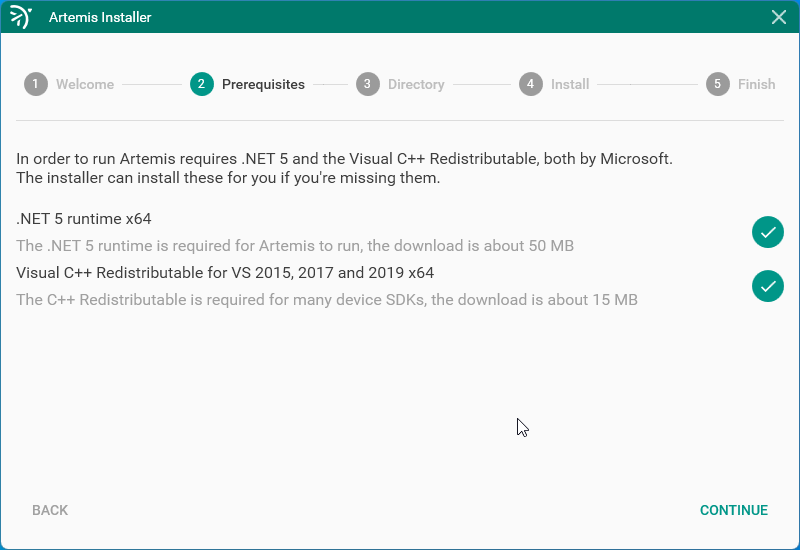
I currently have the same issue, .net 5 will not install .
Edit: i uninstalled ALL .net 5 references including some desktop .net , then the installer ran and updated fine.

I have the .NET 5 runtime installed because I have Visual Studio 2019 installed, but the Artemis installer doesn't recognize it. When I allow it to download the runtime installer, it seemed to install successfully, but the installer still wouldn't recognize it. I tried rebooting my computer as well. I'd rather not uninstall Visual Studio...
Installed runtimes:
Microsoft.AspNetCore.App 3.1.21 [C:\Program Files\dotnet\shared\Microsoft.AspNetCore.App]
Microsoft.AspNetCore.App 5.0.12 [C:\Program Files\dotnet\shared\Microsoft.AspNetCore.App]
Microsoft.NETCore.App 3.1.20 [C:\Program Files\dotnet\shared\Microsoft.NETCore.App]
Microsoft.NETCore.App 3.1.21 [C:\Program Files\dotnet\shared\Microsoft.NETCore.App]
Microsoft.NETCore.App 5.0.10 [C:\Program Files\dotnet\shared\Microsoft.NETCore.App]
Microsoft.NETCore.App 5.0.12 [C:\Program Files\dotnet\shared\Microsoft.NETCore.App]
Microsoft.WindowsDesktop.App 3.1.20 [C:\Program Files\dotnet\shared\Microsoft.WindowsDesktop.App]
Microsoft.WindowsDesktop.App 3.1.21 [C:\Program Files\dotnet\shared\Microsoft.WindowsDesktop.App]
Microsoft.WindowsDesktop.App 5.0.10 [C:\Program Files\dotnet\shared\Microsoft.WindowsDesktop.App]
Microsoft.WindowsDesktop.App 5.0.12 [C:\Program Files\dotnet\shared\Microsoft.WindowsDesktop.App]

It appears that the method that the installer uses -- checking a registry key -- no longer works for .NET 5. Microsoft has a page with various methods of detecting the installed .NET versions: https://docs.microsoft.com/en-us/dotnet/core/install/how-to-detect-installed-versions
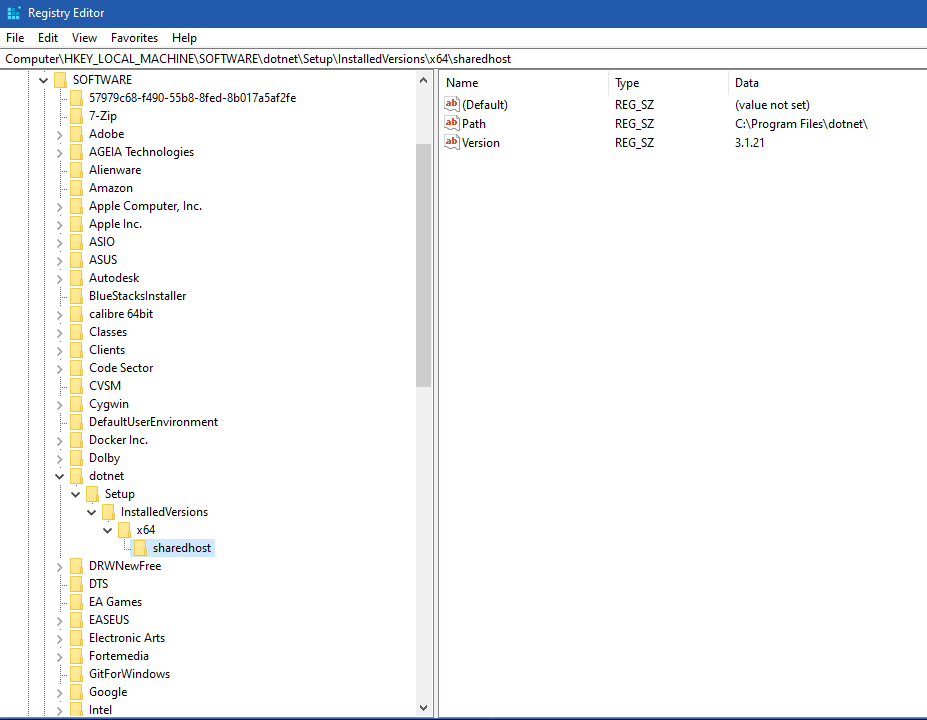
@doxxx, I'll reopen this issue to track this for you as i have been having the same problem with the latest installer as well.
I think checking the directories, as described near the end of the Microsoft page, would work, e.g. C:\program files\dotnet\shared\{runtime-type}\{version}\

Unfortunately the install path can be modified so just checking the folder isn't enough. The latest installer now uses two methods to detect existing .NET installations, hopefully that'll cover it.