

 Arlen22
Integration into a website
Hi, I have a website that is developed out using node.js. I would like to add the wiki in a subdirectory, say http://myweb.com/blog, as a read-only sub to the main site.
I am currently editing the TW via the node.js tiddlywiki module run locally. I just want to be able to copy the directory over to the public server and have it available online.
As the public site is already running node is there anyway I can simply detect the "/blog" route using express and send the request to a TW node module to handle the display? I would like it to be under the same domain for simplicity and SEO purposes.
If it can't run on a sub-path I wonder if it could be implemented as a sub-process or a fork sharing the port with the master.

The original method I used I have detailed in this gist: https://gist.github.com/Arlen22/bbd852f68e328165e49f
That is the basic idea of what I did. The actual code in TiddlyServer is in src/datafolder.ts and you are welcome to take a look at it.
For what you are doing, you should load the Node TiddlyWiki directly into Express rather than using TiddlyServer. I almost wrote TiddlyServer in Express, but it wasn't necessary for what I wanted.
For what you are doing, I would recommend calling boot when express starts, rather than on first access, and implementing authentication in express rather than TiddlyWiki. For read-only access, only allow GET and HEAD requests.
Hope that helps. Let me know if you have any more questions.

Great thanks I will digest and get back to you. I think this could seamlessly integrate note taking into blogging.
Good job
https://www.avast.com/sig-email?utm_medium=email&utm_source=link&utm_campaign=sig-email&utm_content=webmail Virus-free. www.avast.com https://www.avast.com/sig-email?utm_medium=email&utm_source=link&utm_campaign=sig-email&utm_content=webmail <#DAB4FAD8-2DD7-40BB-A1B8-4E2AA1F9FDF2>
On Sat, Nov 25, 2017 at 3:10 PM, Arlen22 [email protected] wrote:
The original method I used I have detailed in this gist: https://gist.github.com/Arlen22/bbd852f68e328165e49f
That is the basic idea of what I did. The actual code in TiddlyServer is in src/datafolder.ts and you are welcome to take a look at it.
For what you are doing, you should load the Node TiddlyWiki directly into Express rather than using TiddlyServer. I almost wrote TiddlyServer in Express, but it wasn't necessary for what I wanted.
For what you are doing, I would recommend calling boot when express starts, rather than on first access, and implementing authentication in express rather than TiddlyWiki. For read-only access, only allow GET and HEAD requests.
Hope that helps. Let me know if you have any more questions.
— You are receiving this because you authored the thread. Reply to this email directly, view it on GitHub https://github.com/Arlen22/TiddlyServer/issues/21#issuecomment-346917430, or mute the thread https://github.com/notifications/unsubscribe-auth/AE-C0b0g9zAOdS9nw2ViaandQa6fxjVbks5s55NIgaJpZM4QqSzH .
So this is what I have (5.1.15)
I have placed the web.js beside the tiddlywiki.js in ./node_modules/tiddlywiki There is a directory ./node_modules/data/fabric/tiddlers
From the main code it executes
app.get( '/blog/fabric/*', tw5serve('fabric', 'fabric' ) );
It is failing when it executes (web.js)
var serverCommand = $tw.modules.execute('./core/modules/commands/server.js').Command;
What is happening is that boot.js has this code
$tw.modules.execute = function(moduleName,moduleRoot) { var name = moduleName; if(moduleName.charAt(0) === ".") { name = $tw.utils.resolvePath(moduleName,moduleRoot) } ....
it fails within utils.resolvePath because moduleRoot is undefined. I need another parameter in the web.js but I don't know what it is supposed to be.
Thanks.
The code I use for TiddlyServer is at https://github.com/Arlen22/TiddlyServer/blob/master/src/datafolder.ts. Please look off of this and make the necessary changes to the gist code.
In this case, you should change ./core to $:/core. You should also copy the rest of the code from the loadTiddlyWiki function datafolder.ts or datafolder.js (according to your preference) and use that instead of the code in the gist. The code in the gist should only be used as a reference for working with Express, it is no longer up to date with TiddlyWiki.
I'm sorry, actually, you should be fine to use the gist, but you can still add the callback to boot to do the rest of the loading as you see in datafolder.js.
I think I am a bit lost. When I look in the boot.js code it doesn't seem to support a callback.
Within datafolder.js I see
require("./boot-datafolder.js").DataFolder(prefix, folder, complete);
is that the callbacks you are referring to? The only reference to
require("tiddlywiki/boot/boot.js").TiddlyWiki();
in datafolder.js is commented out.
Yes, I had to hack the boot code a bit to add a couple features. I'm hoping these will get added to the core in the future. I guess you probably can stick with the gist for now. And just change the string you mentioned from ./core/modules/commands/server.js to $:/core/modules/commands/server.js.
Thanks, I got it to start without errors, which was a good step. At this point though I have no content showing. I am using this line within my main.js
app.get( '/blog/fabric/*', tw5serve('fabric', './data/fabric' ) );
but if I go to
http://localhost/blog/fabric/index.html
it is an empty page
http://localhost/blog/fabric
says "Cannot GET /blog/fabric"
However the main page for the website (http://localhost/index.html) loads without a problem.
Do you have any suggestions? I appreciate your time on this.
Ok, try
app.get( '/blog/fabric/*', tw5serve('blog/fabric', './data/fabric' ) );
Also, the doc for the server.set command is at https://tiddlywiki.com/#ServerCommand. Obviously, that is for command line, but it should correspond.
Try navigating to /blog/fabric/ (with the trailing slash) or remove the trailing slash from https://gist.github.com/Arlen22/bbd852f68e328165e49f#file-web-js-L11 and then just use /blog/fabric.
Nearly there! Using;
app.get( '/blog/fabric/*', tw5serve('blog/fabric', './data/fabric' ) );
and navigating to localhost/blog/fabric/ a page loads :)
Not quite what I was after but getting closer.
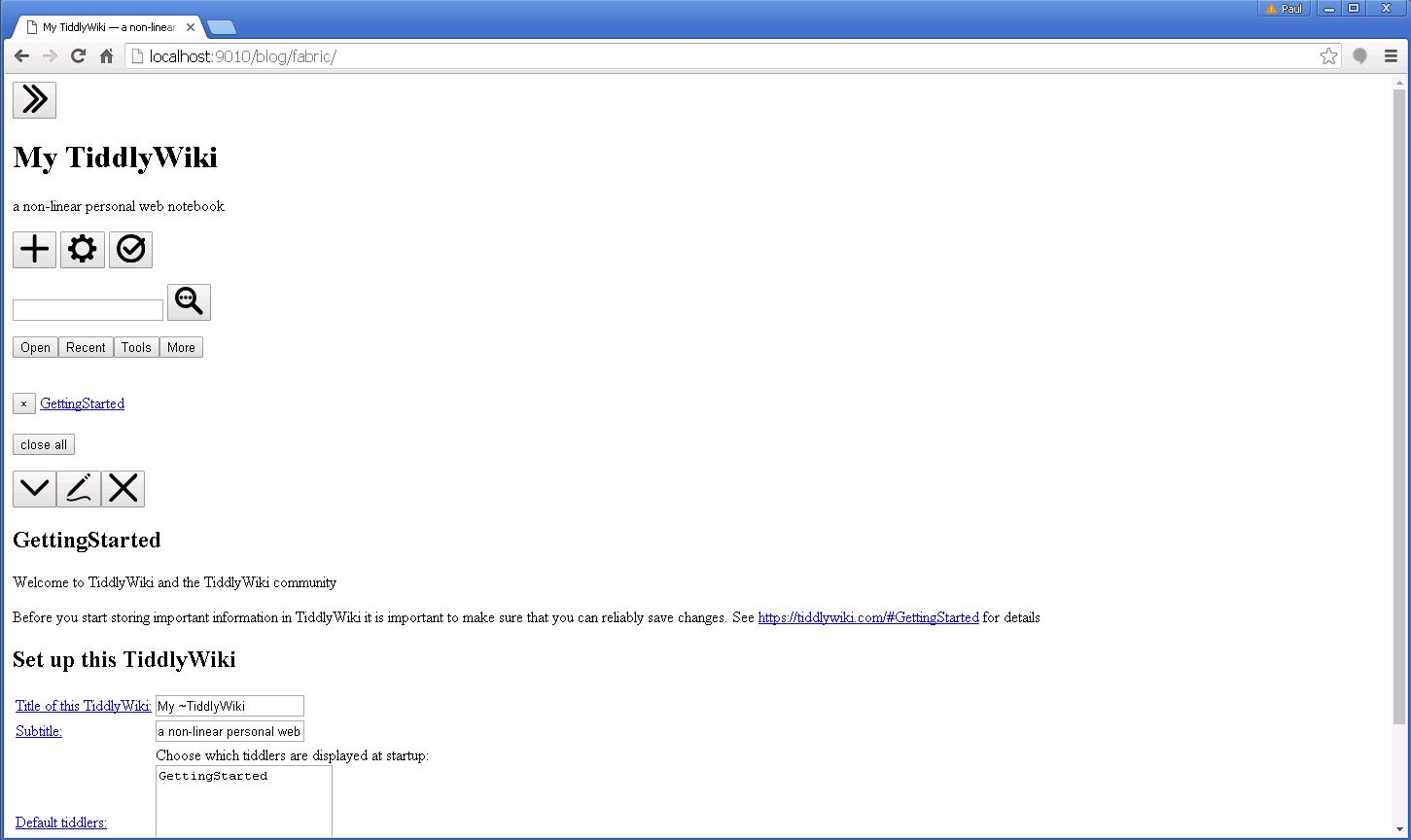
Ok, this is most likely because no themes are specified in the datafolder config file. Try loading the data folder in the TiddlyWiki command line using the server command and see if it looks the same. You should now get identical output from the server command and your app.
Loading via the command line with
tiddlywiki fabric --server
I get this
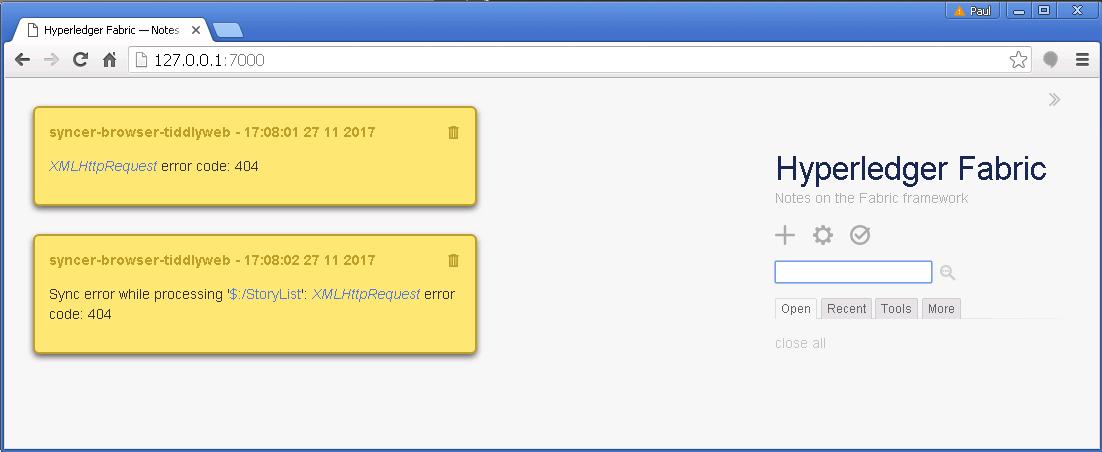 I ran it from the "node_modules\tiddlywiki\data" directory.
I don't know whether this is helpful but this is the contents of the tiddlywiki.info in the node_modules\tiddlywiki\data\fabric folder.
{ "description": "Basic client-server edition", "plugins": [ "tiddlywiki/tiddlyweb", "tiddlywiki/filesystem", "tiddlywiki/highlight" ], "themes": [ "tiddlywiki/vanilla", "tiddlywiki/snowwhite" ], "build": { "index": [ "--rendertiddler", "$:/plugins/tiddlywiki/tiddlyweb/save/offline", "index.html", "text/plain" ], "externalimages": [ "--savetiddlers", "[is[image]]", "images", "--setfield", "[is[image]]", "_canonical_uri", "$:/core/templates/canonical-uri-external-image", "text/plain", "--setfield", "[is[image]]", "text", "", "text/plain", "--rendertiddler", "$:/plugins/tiddlywiki/tiddlyweb/save/offline", "externalimages.html", "text/plain" ], "static": [ "--rendertiddler", "$:/core/templates/static.template.html", "static.html", "text/plain", "--rendertiddler", "$:/core/templates/alltiddlers.template.html", "alltiddlers.html", "text/plain", "--rendertiddlers", "[!is[system]]", "$:/core/templates/static.tiddler.html", "static", "text/plain", "--rendertiddler", "$:/core/templates/static.template.css", "static/static.css", "text/plain" ] } }
Sorry, formatting didn't come out too well with that.
Looking in the browser devtools I am getting
$:/core/modules/utils/dom/http.js:65 HEAD http://localhost:9010/blog/fabric/ 404 (Not Found)
I don't know whether this is a problem or not it's the head request from the client in exports.httpRequest of dom/http.js I used Postman to test it and got back
access-control-allow-headers →X-Requested-With,Content-Type,Authorization access-control-allow-methods →GET,PUT,PATCH,POST,DELETE access-control-allow-origin →* connection →keep-alive date →Mon, 27 Nov 2017 07:17:02 GMT x-powered-by →Express
Status was 404 Not Found
Look for a system tiddler with the title $:/config/tiddlyweb/host and paste its contents here.
When using Node TiddlyWiki, set it to $protocol$//$host$/. Part of the problem is that this gist is slightly out-dated, and it is hard to explain how to change it without just updating the gist or pointing out the datafolder.js file and telling one to trace it from there. If you do that, just use the TiddlyWiki that is bundled with TiddlyServer since it contains the modifications needed and also loads faster.
Or you can just delete the tiddler and it will revert to the shadow tiddler. Then refresh the page.
Thanks for your patience, I changed it to
title: $:/config/tiddlyweb/host
$protocol$//$host$/
but the result was the same. I then deleted the file $__config_tiddlyweb_host.tid and forced a refresh but the result was the same. I don't think it is reading it at all.
I'm sorry, I just realized that the ball is in my court :)
At this point, I don't have much time to look into this, but I will hopefully update the gist or move it to the TiddlyServer repo.
Currently the integrating code is in this function: https://github.com/Arlen22/TiddlyServer/blob/3a1407640fed8b09d0dc443b16155c3f2c00de08/src/datafolder.ts#L171-L231
The code from that function, and the tiddlywiki folder found in the TiddlyServer repo should be all you need to make it work. The fact that I am loading this dynamically makes the code a little more complex. If you are going to load it at startup (which is highly recommended), you could probably just get away with returning a request handler function after the post-start hook is invoked.
//invoke the server start hook so plugins can extend the server or attach to the event handler
$tw.hooks.invokeHook('th-server-command-post-start', server, loadedFolders[mount].events, "tiddlyserver");
return (req, res) => server.requestHandler(req, res);