
QuickAdminGeneratorBundle
 QuickAdminGeneratorBundle copied to clipboard
 Arkounay
QAG - Quick Admin Generator Bundle for Symfony >= 5, a bundle that generates cruds admin for Symfony applications using Doctrine
QAG - Quick Admin Generator Bundle



QAG is a bundle that allows quick and simple generation of administration backends for Symfony applications using Doctrine.
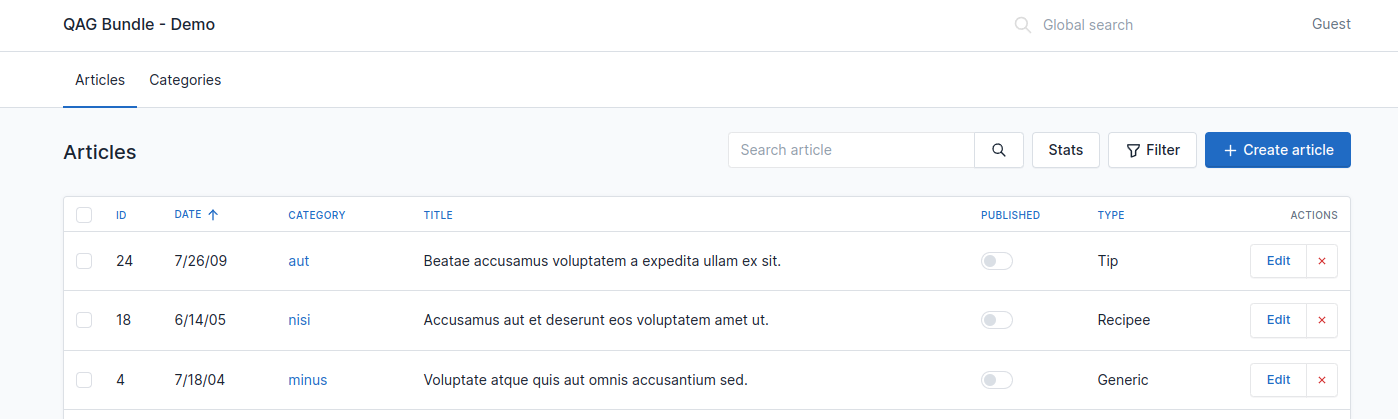
Getting started
Install the dependency:
composer require arkounay/quick-admin-generator-bundle
also, make sure the following line was added in config/bundles.php:
Arkounay\Bundle\QuickAdminGeneratorBundle\ArkounayQuickAdminGeneratorBundle::class => ['all' => true],
and that assets were installed: php bin/console assets:install --symlink.
Finally, add the following route configuration, for example in config/routes.yaml:
qag_routes:
    resource: 'Arkounay\Bundle\QuickAdminGeneratorBundle\Crud\RouteLoader'
    type: service
    prefix: '/admin'
You will probably want to secure the /admin route prefix. To do so, you can add the following line in your security.yaml:
access_control:
     - { path: ^/admin, roles: ROLE_ADMIN }
and that's it, the bundle is ready to be used.
Now, you can add a Controller that extends Arkounay\Bundle\QuickAdminGeneratorBundle\Controller\Crud to add your first crud.
For example, let's say you have a News entity.
!> Make sure your entity implements __toString()!
Create a controller, for instance src/Controller/Admin/NewsController.php, with the following code:
namespace App\Controller\Admin;

use App\Entity\News;
use Arkounay\Bundle\QuickAdminGeneratorBundle\Controller\Crud;

class NewsController extends Crud
{
    public function getEntity(): string
    {
        return News::class;
    }
}
and now refresh /admin in your browser. You should see a new "News" item that appeared in the menu, and you should now be able to create, edit, and delete news.
If you use the symfony command to display routes php bin/console debug:router, you'll see that some routes have been generated for you:
qag.category                       ANY      ANY      ANY    /admin/category/
qag.category_create                ANY      ANY      ANY    /admin/category/create
qag.category_delete                ANY      ANY      ANY    /admin/category/delete/{id}/
qag.category_delete_batch          ANY      ANY      ANY    /admin/category/deleteBatch
qag.category_edit                  ANY      ANY      ANY    /admin/category/edit/{id}/
qag.category_export                ANY      ANY      ANY    /admin/category/export
qag.category_filter_form_ajax      ANY      ANY      ANY    /admin/category/filterFormAjax
qag.category_toggle_boolean_post   POST     ANY      ANY    /admin/category/toggleBooleanPost/{id}/
Next steps
There are multiple ways to configure and override things in QAG Bundle, depending on the complexity of the project. You can use attributes for simple and quick tweaks regarding entity fields, override Twig templates to change the appearance, add listeners to create special rules that apply when parsing entities, and more.
See :
- Fields configuration
- Configure Fields by Attributes
- QAG\Field
- QAG\HideInForm
- QAG\HideInList
- QAG\HideInView
- QAG\HideInExport
- QAG\Ignore
- QAG\Sort
- QAG\Crud
- Configure Fields by overriding controllers
- Configure Fields by using Listeners
- Configure Fields by Attributes
- Controllers, lists, and security
- Changing the URL prefix
- Metadata
- Changing name
- Adding an icon
- Adding a badge with a number
- Adding a description
- Responsive mode
- Permissions
- Security checker
- Filtering the list
- Filtering through Query Builder
- Filtering through Filters
- Dependency injection
- Overriding the default behaviour
- Actions and routing
- Normal actions
- Batch actions
- Global actions
- Customizing how actions are rendered
- Entity actions display mode (dropdown / expanded)
- Routing shorcuts
- Forms
- Overriding the Form Builder directly
- Overriding the automatic Form Builder generation by using Event Subscribers
- Overriding the form type
- Collections
- Overriding the form's twig theme
- Overriding the form's twig theme for a specific entity
- Disabling turbo on form submit
- Configuring menu items and their position
- Overriding the menu through yaml
- Overriding the menu by service
- Overriding the menu through twig
- Changing the menu orientation
- Changing the title
- Enabling global search
- Switch to dark Mode
- Redirect to a specific route instead of the Dashboard
- Overriding the rest of the twigs
- Theme
- Interactive command-line helper
- Overriding creation and edition
- Overriding lists
- Overriding the Dashboard
- Adding custom JavaScript
 Arkounay