

 ArduCAM
Need to compile libarducam_mipicamera.so ?
Hello! I'm trying to build these test programs on my RPi4 running Ubuntu18.04. But when I make I get the error message,
/usr/bin/ld: skipping incompatible //usr/lib/libarducam_mipicamera.so when searching for -larducam_mipicamera
I did run the install and I can see the file there and can ls the above path+name.
Do I need to compile that library because I'm on Ubuntu?
Cheers

I have the exact same problem. we are trying to make the OV9281 running on ubuntu 18.04 on Raspberry pi 4 as well.

I have the exact same problem, too. the reason is, that ubuntu 18.04 server is an 64 bit system and the lib was compiled for 32 bit system, only. That is for me a blocking point. I hope Arducam will compile an deliver a 64 bit version. I have send an email to arducam for several weeks, and get ... no answer ...

Hi, I was just going to reply and say that you should be able to find a 32bit 18.04 for Arm but now when I'm looking I can't find it.
I think that you might be able to hunt if down. Or try some alternative ways. Maybe Mate? https://ubuntu-mate.org/download/armhf/ or (armhf (generic http://ports.ubuntu.com/ubuntu-ports/dists/bionic-updates/main/installer-armhf/current/images/generic/netboot/ , generic-lpae http://ports.ubuntu.com/ubuntu-ports/dists/bionic-updates/main/installer-armhf/current/images/generic-lpae/netboot/)
- For 32-bit ARM (ARMv7)) http://cdimage.ubuntu.com/netboot/18.04/?_ga=2.59110957.1436661849.1595262621-1573412997.1595262621
On Mon, Jul 20, 2020 at 8:58 AM busybeaver42 [email protected] wrote:
I have the exact same problem, too. the reason is, that ubuntu 18.04 server is an 64 bit system and the lib was compiled for 32 bit system, only. That is for me a blocking point. I hope Arducam will compile an deliver a 64 bit version. I have send an email to arducam for several week, and get ... no answer ...
— You are receiving this because you authored the thread. Reply to this email directly, view it on GitHub https://github.com/ArduCAM/MIPI_Camera/issues/42#issuecomment-661128469, or unsubscribe https://github.com/notifications/unsubscribe-auth/ACJPWUQBBXK2PFSI6QKI3MDR4RSSJANCNFSM4NKATORQ .
It run below Rasbian Buster (32Bit) and on RPI4 perfect, but I have trouble to install ROS. That was the reason why I turned to Ubuntu 18.04. I want to let the MIPI cam run inside ROS. Ubuntu Mate is available as 64bit and 32bit , I guess I will try out the 32 Bit version (https://ubuntu-mate.org/download/i386/). At the end I would like to have a 64 Bit version, because of the RPI4 64bit performance. Thx for your help
Let me know if you can't get a 32bit version going. I do have an install .img file That I could send you if you don't have any luck. I don't remember if I tried it but I think maybe it should work.
On Mon, Jul 20, 2020 at 9:52 AM busybeaver42 [email protected] wrote:
It run below Rasbian Buster (32Bit) and on RPI4 perfect, but I have trouble to install ROS. That was the reason why I turned to Ubuntu 18.04. I want to let the MIPI cam run inside ROS. Ubuntu Mate is available as 64bit and 32bit , I guess I will try out the 32 Bit version (https://ubuntu-mate.org/download/i386/). At the end I would like to have a 64 Bit version, because of the RPI4 64bit performance. Thx for your help
— You are receiving this because you authored the thread. Reply to this email directly, view it on GitHub https://github.com/ArduCAM/MIPI_Camera/issues/42#issuecomment-661182588, or unsubscribe https://github.com/notifications/unsubscribe-auth/ACJPWUQV4HTGMLM3S7TLFLDR4RY53ANCNFSM4NKATORQ .
Ubuntu Mate 32 bit 18.04 and 20.04 on RPI4 fail, because both system does not boot. (image files on a 32GB sdcard, via RPI Imager v1.3 imager) I download yet Ubuntu Server 32Bit (https://ubuntu.com/download/raspberry-pi/thank-you?version=20.04&architecture=armhf+raspi) and hope that will work.
Arducam support is now moving to the forum : https://www.arducam.com/forum/ Please post your question there, our engineer will answer your questions soon.

It does not work on Ubuntu Server 32Bit, because it was not possible to enable the I2C. I have try out several ways, but at the end I have didn't see an ID via "i2cdetect -y 1" from the cam.

Sorry, I have write at 21 Jul a entry inside the linked arducam forum. No answer. No support. Would be great, if we could get a 64 Bit version. But I guess the arducam can't manage this.
Thanks. I’m trying to run Ubuntu 20 with stereo 5Mp synchronized cameras on 64 bit OS. Just posted on the forum. If you manage to do it, please share. I’ll do the same here!
They are mostly communicating through the Forum on their website and generally seem to reply in a day or two. I imagine now that the RPi has an official 64bit OS release the'll want to add that?
On Thu, Nov 12, 2020 at 9:14 AM Jeremy Cohen [email protected] wrote:
Thanks. I’m trying to run Ubuntu 20 with stereo 5Mp synchronized cameras on 64 bit OS. Just posted on the forum. If you manage to do it, please share. I’ll do the same here!
— You are receiving this because you authored the thread. Reply to this email directly, view it on GitHub https://github.com/ArduCAM/MIPI_Camera/issues/42#issuecomment-726214666, or unsubscribe https://github.com/notifications/unsubscribe-auth/ACJPWUWWDRMCUQJGNFW4JYTSPQJWDANCNFSM4NKATORQ .
Hello Fredrum, what you say may be, but I can only talk about my experience. I get no answer, no support, no timeline. @Jeremy26:Ubuntu Version 20.10 (64 bit) support RPI4, only. It is recommended to use RPI 4 with 8GB or higher. The new Raspberry Pi OS support 64 bit, too. https://www.raspberrypi.org/software/operating-systems/ You can download the 64-Bit beta version here: https://downloads.raspberrypi.org/raspios_arm64/images/ After a short research I have read, that this version use 64 bit userland version.
Thanks, I want to use it with ROS, and therefore need Ubuntu. I have raspberry pi 4B with 8 Gb. I downloaded Ubuntu Mate with a 64 bit OS. Waiting to see if the support team can help!
An option will be than for you to use Ubuntu Version 20.10 (64 bit).
Before, I have try to run the Arducam on Ubuntu Server(64 bit). By the side I have installed ROS and it was running stable.
Today, I try to install the RPI OS 64 bit beta( 08.2020 ) on 16 GB SD card and install MIPI according to:
https://github.com/ArduCAM/MIPI_Camera/tree/master/RPI
I will report ...
My test: install on RPI4 following OS: https://www.raspberrypi.org/software/operating-systems/ 64-Bit beta version: https://downloads.raspberrypi.org/raspios_arm64/images/
sudo apt-get update sudo apt-get upgrade sudo rpi-update
I start to follow the instruction on: https://github.com/ArduCAM/MIPI_Camera/tree/master/RPI
After: git clone https://github.com/ArduCAM/MIPI_Camera.git cd MIPI_Camera/RPI/lib/ sudo cp aarch64/libarducam_mipicamera.so /
That will overwrite the 32 bit version.
Afterwards continous the install instruction... pi@raspberrypi: cd MIPI_Camera/RPI/ pi@raspberrypi:~/MIPI_Camera/RPI $ make clean && make
I get compiler warning and errors because of mmal
/usr/bin/ld: /usr/lib/gcc/aarch64-Linux-gnu/8/../../lib/libarducam_mipicamera.so: undefined reference to mmal_*
I have add to the Makefile: LDFLAGS ?= "-Wl,-rpath,/opt/vc/lib/" # mmal libs are located there and try LDFLAGS ?= "-Wl,--no-as-needed"
both deliver the same warnings and errors. Perhaps you has an idear.
About your answer; copy to /usr/lib instead of what you wrote.
It does work, then I have the other errors!
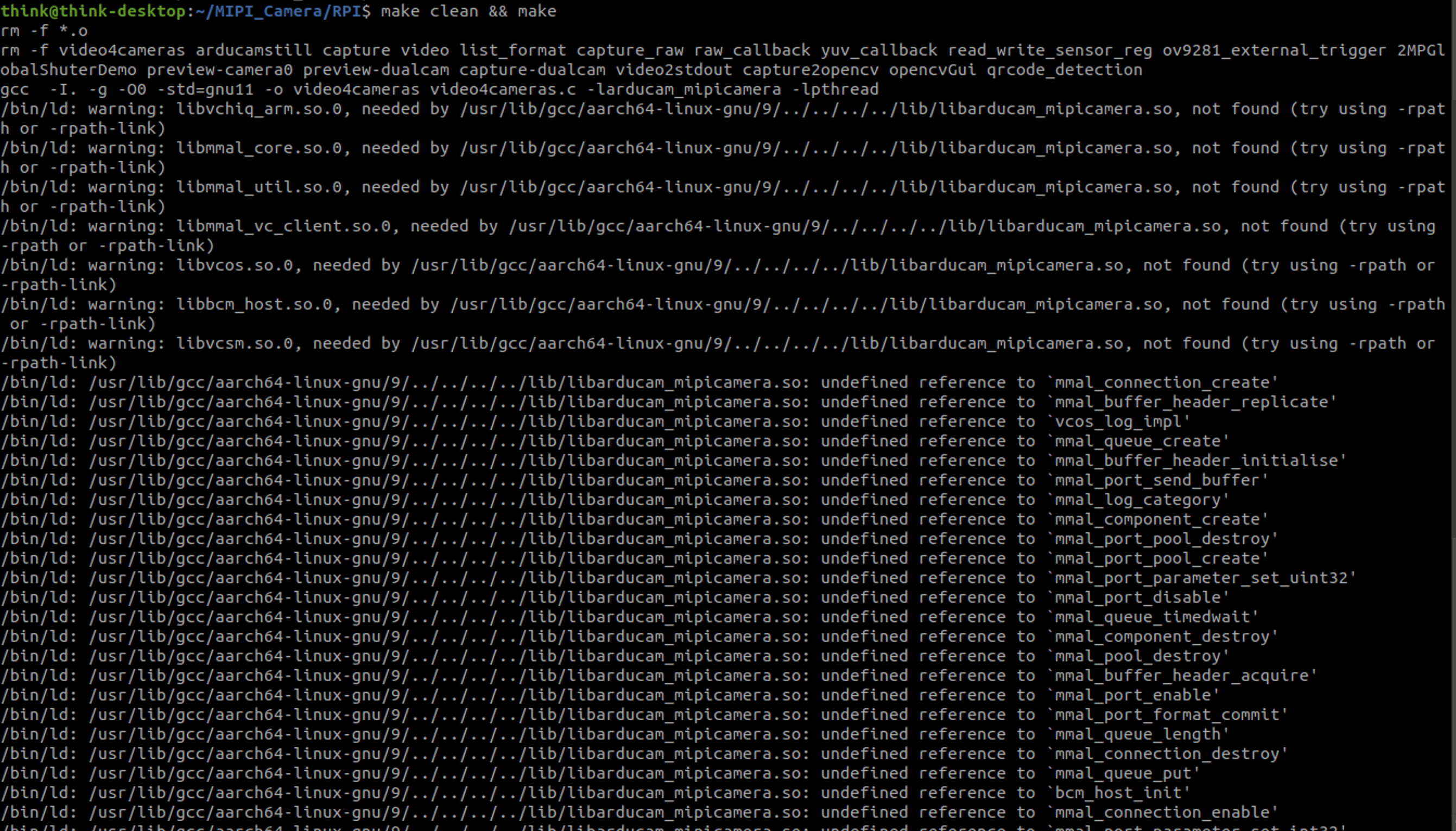
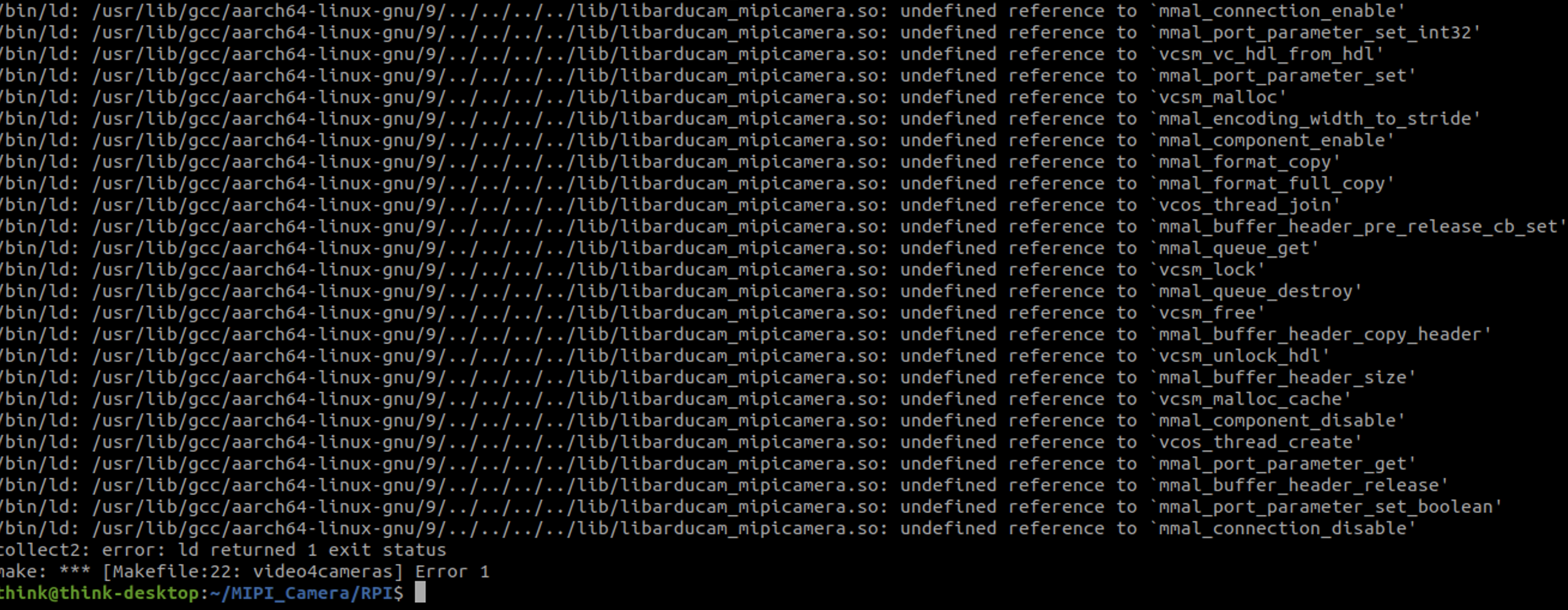
Hello Jeremy, bad news. the mmal is still a 32 bit version. I found and try out first this: https://www.raspberrypi.org/forums/viewtopic.php?t=51925 Than I clone https://github.com/raspberrypi/userland and try to compile the 64 bit version via buildme --aarch64. Afterwards it does not work, because the proof cd /opt/vc/lib readelf -h ./libmmal.so show that the ELF32 bit version is still in use.
Which camera are you guys talking about? There has been some efforts to add better camera support out of the box for the Raspberry but I'm not sure where that's at right now. There was some issue with the ov9281, that might be fixable and I had some chats to a Raspberry engineer about it.
Hello Fredrum, I use the ov9281. It will be great to get here some information.
Hi theres an issue with some arducam ov9281 cameras in that they are only using one mipi lane. That is currently not supported in the linux kernel. It wants two lanes.
Here's from raspi engineer 6by9
"Some of their OV9281 modules only have one data lane wired up, and the kernel driver doesn't support that. A couple of others on these forums have reported this, and Lee has confirmed it. I haven't dug through the register set closely enough yet to find the magic flag."
https://www.raspberrypi.org/forums/viewtopic.php?t=285981
There's a new api called 'libcamera'
http://libcamera.org/
OpenMAX is a dead project since 2012 or something and will not get fixed up for 64bit, at least not by the RPi folks.
They instead point to libcamera or using V4L2.
The problem for you might be if your camera is using onlY one lane then youre stuck with the Arducam software at least until someone fixes up that Linux kernel.
This at least is my current understanding.
On Nov 14, 2020, at 8:21 AM, busybeaver42 [email protected] wrote:
Hello Fredrum, I use the ov9281. It will be great to get here some information.
— You are receiving this because you authored the thread. Reply to this email directly, view it on GitHub, or unsubscribe.
Hello Fredrum, I have done following think to test to run the ov9281 below Rasbian 64Bit OS:
proof from ov9281 via: www.libcamera.org https://www.raspberrypi.org/documentation/linux/software/libcamera/README.md
sudo pip3 install ninja sudo pip3 install meson according to: http://libcamera.org/getting-started.html
sudo pip3 install pyyaml ply jinja2 sudo apt-get install libgnutls28-dev openssl sudo apt-get install libboost-dev
//optional sudo apt-get libudev-dev sudo pip3 install graphviz sudo apt-get install doxygen sudo apt-get install libgstreamer1.0-dev libgstreamer-plugins-base1.0-dev sudo apt-get install gstreamer1.0-tools sudo apt-get install qtbase5-dev libqt5core5a libqt5gui5 libqt5widgets5 qttools5-dev-tools libtiff-dev sudo apt-get install sphinx
git clone git://linuxtv.org/libcamera.git cd libcamera meson build cd build meson configure -Dpipelines=raspberrypi -Dtest=false cd .. ninja -C build install After the compiler done is work ... open new terminal: gst-launch-1.0 v4l2src device=/dev/video0 ! videoconvert ! autovideosink Test result: succesfull, because I see the image from the ov9281, but the frame rate is slow, very slow. I guess, it is at 1 FPS.
What you are doing there is running command line Gstreamer. ( https://gstreamer.freedesktop.org/) And you are invoking it with 'V4L2 as you can see from the first parameter.
This gstreamer command runs realitime and low latency for me (with Raspicam v2), gst-launch-1.0 v4l2src device="/dev/video0" ! video/x-raw,width=640,height=480 ! autovideosink
I tried your command and it's slow for me too.
GStreamer is not a part of libcamera though I'm not sure how they tie together.
Gstreamer seems flexible and you can try different things out on command line. It can be tricky though to find exactly the right set of parameters to make it do what you want. There's also a c/c++ api for gstreamer.
On Sun, Nov 15, 2020 at 9:52 AM busybeaver42 [email protected] wrote:
Hello Fredrum, I have done following think to test to run the ov9281 below Rasbian 64Bit OS:
proof from ov9281 via: www.libcamera.org
https://www.raspberrypi.org/documentation/linux/software/libcamera/README.md
sudo pip3 install ninja sudo pip3 install meson according to: http://libcamera.org/getting-started.html
sudo pip3 install pyyaml ply jinja2 sudo apt-get install libgnutls28-dev openssl sudo apt-get install libboost-dev
//optional sudo apt-get libudev-dev sudo pip3 install graphviz sudo apt-get install doxygen sudo apt-get install libgstreamer1.0-dev libgstreamer-plugins-base1.0-dev sudo apt-get install gstreamer1.0-tools sudo apt-get install qtbase5-dev libqt5core5a libqt5gui5 libqt5widgets5 qttools5-dev-tools libtiff-dev sudo apt-get install sphinx
git clone git://linuxtv.org/libcamera.git cd libcamera meson build cd build meson configure -Dpipelines=raspberrypi -Dtest=false cd .. ninja -C build install After the compiler done is work ... open new terminal: gst-launch-1.0 v4l2src device=/dev/video0 ! videoconvert ! autovideosink Test result: succesfull, because I see the image from the ov9281, but the frame rate is slow, very slow. I guess, it is at 1 FPS.
— You are receiving this because you authored the thread. Reply to this email directly, view it on GitHub https://github.com/ArduCAM/MIPI_Camera/issues/42#issuecomment-727609449, or unsubscribe https://github.com/notifications/unsubscribe-auth/ACJPWUTLP5EDO2VD6J4TAC3SQAIOZANCNFSM4NKATORQ .
Here's a easy to follow introduction to gstreamer
http://www.einarsundgren.se/gstreamer-basic-real-time-streaming-tutorial/
On Sun, Nov 15, 2020 at 12:27 PM Blueroom [email protected] wrote:
What you are doing there is running command line Gstreamer. ( https://gstreamer.freedesktop.org/) And you are invoking it with 'V4L2 as you can see from the first parameter.
This gstreamer command runs realitime and low latency for me (with Raspicam v2), gst-launch-1.0 v4l2src device="/dev/video0" ! video/x-raw,width=640,height=480 ! autovideosink
I tried your command and it's slow for me too.
GStreamer is not a part of libcamera though I'm not sure how they tie together.
Gstreamer seems flexible and you can try different things out on command line. It can be tricky though to find exactly the right set of parameters to make it do what you want. There's also a c/c++ api for gstreamer.
On Sun, Nov 15, 2020 at 9:52 AM busybeaver42 [email protected] wrote:
Hello Fredrum, I have done following think to test to run the ov9281 below Rasbian 64Bit OS:
proof from ov9281 via: www.libcamera.org
https://www.raspberrypi.org/documentation/linux/software/libcamera/README.md
sudo pip3 install ninja sudo pip3 install meson according to: http://libcamera.org/getting-started.html
sudo pip3 install pyyaml ply jinja2 sudo apt-get install libgnutls28-dev openssl sudo apt-get install libboost-dev
//optional sudo apt-get libudev-dev sudo pip3 install graphviz sudo apt-get install doxygen sudo apt-get install libgstreamer1.0-dev libgstreamer-plugins-base1.0-dev sudo apt-get install gstreamer1.0-tools sudo apt-get install qtbase5-dev libqt5core5a libqt5gui5 libqt5widgets5 qttools5-dev-tools libtiff-dev sudo apt-get install sphinx
git clone git://linuxtv.org/libcamera.git cd libcamera meson build cd build meson configure -Dpipelines=raspberrypi -Dtest=false cd .. ninja -C build install After the compiler done is work ... open new terminal: gst-launch-1.0 v4l2src device=/dev/video0 ! videoconvert ! autovideosink Test result: succesfull, because I see the image from the ov9281, but the frame rate is slow, very slow. I guess, it is at 1 FPS.
— You are receiving this because you authored the thread. Reply to this email directly, view it on GitHub https://github.com/ArduCAM/MIPI_Camera/issues/42#issuecomment-727609449, or unsubscribe https://github.com/notifications/unsubscribe-auth/ACJPWUTLP5EDO2VD6J4TAC3SQAIOZANCNFSM4NKATORQ .
And if that is working for you have you tried 'raspivid'? (If you're on a raspberry, I didn't catch that)
raspivid -p 0,0,640,480
On Sun, Nov 15, 2020 at 12:30 PM Blueroom [email protected] wrote:
Here's a easy to follow introduction to gstreamer
http://www.einarsundgren.se/gstreamer-basic-real-time-streaming-tutorial/
On Sun, Nov 15, 2020 at 12:27 PM Blueroom [email protected] wrote:
What you are doing there is running command line Gstreamer. ( https://gstreamer.freedesktop.org/) And you are invoking it with 'V4L2 as you can see from the first parameter.
This gstreamer command runs realitime and low latency for me (with Raspicam v2), gst-launch-1.0 v4l2src device="/dev/video0" ! video/x-raw,width=640,height=480 ! autovideosink
I tried your command and it's slow for me too.
GStreamer is not a part of libcamera though I'm not sure how they tie together.
Gstreamer seems flexible and you can try different things out on command line. It can be tricky though to find exactly the right set of parameters to make it do what you want. There's also a c/c++ api for gstreamer.
On Sun, Nov 15, 2020 at 9:52 AM busybeaver42 [email protected] wrote:
Hello Fredrum, I have done following think to test to run the ov9281 below Rasbian 64Bit OS:
proof from ov9281 via: www.libcamera.org
https://www.raspberrypi.org/documentation/linux/software/libcamera/README.md
sudo pip3 install ninja sudo pip3 install meson according to: http://libcamera.org/getting-started.html
sudo pip3 install pyyaml ply jinja2 sudo apt-get install libgnutls28-dev openssl sudo apt-get install libboost-dev
//optional sudo apt-get libudev-dev sudo pip3 install graphviz sudo apt-get install doxygen sudo apt-get install libgstreamer1.0-dev libgstreamer-plugins-base1.0-dev sudo apt-get install gstreamer1.0-tools sudo apt-get install qtbase5-dev libqt5core5a libqt5gui5 libqt5widgets5 qttools5-dev-tools libtiff-dev sudo apt-get install sphinx
git clone git://linuxtv.org/libcamera.git cd libcamera meson build cd build meson configure -Dpipelines=raspberrypi -Dtest=false cd .. ninja -C build install After the compiler done is work ... open new terminal: gst-launch-1.0 v4l2src device=/dev/video0 ! videoconvert ! autovideosink Test result: succesfull, because I see the image from the ov9281, but the frame rate is slow, very slow. I guess, it is at 1 FPS.
— You are receiving this because you authored the thread. Reply to this email directly, view it on GitHub https://github.com/ArduCAM/MIPI_Camera/issues/42#issuecomment-727609449, or unsubscribe https://github.com/notifications/unsubscribe-auth/ACJPWUTLP5EDO2VD6J4TAC3SQAIOZANCNFSM4NKATORQ .
actually raspivid is probably mmal/omx which is not good for 64bit
On Sun, Nov 15, 2020 at 12:38 PM Blueroom [email protected] wrote:
And if that is working for you have you tried 'raspivid'? (If you're on a raspberry, I didn't catch that)
raspivid -p 0,0,640,480
On Sun, Nov 15, 2020 at 12:30 PM Blueroom [email protected] wrote:
Here's a easy to follow introduction to gstreamer
http://www.einarsundgren.se/gstreamer-basic-real-time-streaming-tutorial/
On Sun, Nov 15, 2020 at 12:27 PM Blueroom [email protected] wrote:
What you are doing there is running command line Gstreamer. ( https://gstreamer.freedesktop.org/) And you are invoking it with 'V4L2 as you can see from the first parameter.
This gstreamer command runs realitime and low latency for me (with Raspicam v2), gst-launch-1.0 v4l2src device="/dev/video0" ! video/x-raw,width=640,height=480 ! autovideosink
I tried your command and it's slow for me too.
GStreamer is not a part of libcamera though I'm not sure how they tie together.
Gstreamer seems flexible and you can try different things out on command line. It can be tricky though to find exactly the right set of parameters to make it do what you want. There's also a c/c++ api for gstreamer.
On Sun, Nov 15, 2020 at 9:52 AM busybeaver42 [email protected] wrote:
Hello Fredrum, I have done following think to test to run the ov9281 below Rasbian 64Bit OS:
proof from ov9281 via: www.libcamera.org
https://www.raspberrypi.org/documentation/linux/software/libcamera/README.md
sudo pip3 install ninja sudo pip3 install meson according to: http://libcamera.org/getting-started.html
sudo pip3 install pyyaml ply jinja2 sudo apt-get install libgnutls28-dev openssl sudo apt-get install libboost-dev
//optional sudo apt-get libudev-dev sudo pip3 install graphviz sudo apt-get install doxygen sudo apt-get install libgstreamer1.0-dev libgstreamer-plugins-base1.0-dev sudo apt-get install gstreamer1.0-tools sudo apt-get install qtbase5-dev libqt5core5a libqt5gui5 libqt5widgets5 qttools5-dev-tools libtiff-dev sudo apt-get install sphinx
git clone git://linuxtv.org/libcamera.git cd libcamera meson build cd build meson configure -Dpipelines=raspberrypi -Dtest=false cd .. ninja -C build install After the compiler done is work ... open new terminal: gst-launch-1.0 v4l2src device=/dev/video0 ! videoconvert ! autovideosink Test result: succesfull, because I see the image from the ov9281, but the frame rate is slow, very slow. I guess, it is at 1 FPS.
— You are receiving this because you authored the thread. Reply to this email directly, view it on GitHub https://github.com/ArduCAM/MIPI_Camera/issues/42#issuecomment-727609449, or unsubscribe https://github.com/notifications/unsubscribe-auth/ACJPWUTLP5EDO2VD6J4TAC3SQAIOZANCNFSM4NKATORQ .
@Fredrum I'm using the Stereo Synchronized cameras 5 MP from here.
@busybeaver42 I saw the forum, it looks like it won't work on Ubuntu 64 bit (or ubuntu in general?)
Still no luck on this?
@Fredrum, I use RaspbarryPi-4GB with Rasbian OS 64bit. After several communication problem with my ov9281 I guess I have yet an defect cam :-( And you are right, the normal camera module V1 does not work with Rasbian OS 64bit today, because raspistill and raspivid
@ Jeremy, I have install on Rasbian OS 64bit ROS melodic. It works so far()roscore is running. I have install an on Old raspi (Raspberry 2) with Rasbian 32 bit and CSI camera modul V1. Additional I have installed the "libcam". I use gstreamer like before to test the cam and libcam work together. It works and show the same behavior. Means I get every second a new image. Than I have used a little tool "Qt V4L2 test utility". This tool can capturing the images in a faster way. I see FPS = 5.57. I don't know your application, but you could try it out with Rasbian OS 64 bit and capturing the image via opencv. Perhaps, it is for you fast enough. For ROS is an opencv bridge available.
I have order today a new ov9281, I hope the new one works longer :-)
Weird, I had in mind that ROS didn't work with Raspbian?
Absolutely 0 answer on the forum...Will keep you in touch