

 ArchiveBox
Configure admin user on Synology NAS using Docker
Hi there,
how do I setup an admin user on Synology Docker? Where do I enter 'archivebox manage createsuperuser' or 'docker-compose run archive manage createsuperuser' ?
Thanks a lot. Tobias

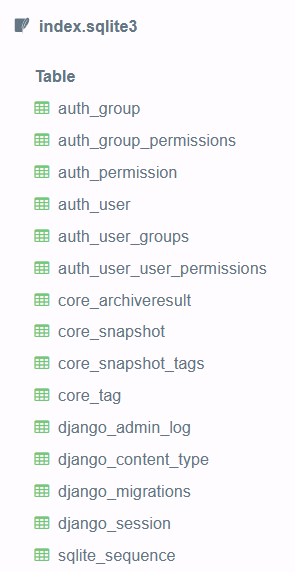
No idea how Synology handles it. You can also add a user row to the index.sqlite3 db using SQL manually if you need.

Thanks, that would be possible. However, as all tables are empty so far, it is not sufficient to add a user only. What other entries do I have to create, e.g. in groups etc.?
Thanks!
I came across this post https://github.com/ArchiveBox/ArchiveBox/issues/734 which the dev added the ability to use env variables to add admin and password but it doesn't seem to work for me

The environment variables to pre-set user/pass are not implemented yet, they're just an idea right now. Here's an example of how you could do it.
Option A: Modify the ArchiveBox db on another machine and copy it back into place
The easiest method is to open the archivebox collection index.sqlite3 on another machine or on the docker host to modify the db, then put it back after the changes.
# copy the db onto another machine or into another dir
mkdir -p /tmp/archivebox
cp /path/to/docker/archivebox/data/index.sqlite3 /tmp/archivebox/index.sqlite3

# make sure you have the archivebox CLI installed and use it to add the User to the temp db
cd /tmp/archivebox/
pip3 install archivebox
archivebox manage createsuperuser    # fill in new user's info here

# copy the modified db back into place for docker to use
cp /tmp/archivebox/index.sqlite3 /path/to/docker/archivebox/data/index.sqlite3
Option B: Insert the User row directly into the SQLite3 DB using SQL
This option does not require ArchiveBox to be installed on the machine doing the modification to the DB.
- Generate the hashed password in a Python shell using Django's
make_passwordfunction.
pip3 install django==3.1.3   # install the django version used by ArchiveBox
python3                      # open any python shell with django available, doesn't have to be the archivebox shell
>>> from django.contrib.auth.hashers import make_password
>>> make_password('somePasswordHere', 'someSaltHere', 'pbkdf2_sha256')         # choose a password and a salt (can be anything 12 chars long)
'pbkdf2_sha256$216000$someSaltHere$styW1Uoy8SHp3zbSwGRp20C9mPjOHVjP9rl5a8/UOVE='
- Use the generated hashed password to insert a new User row in the SQLite3 database directly:
cd ~/archivebox         # cd into your archivebox collection dir
sqlite3 index.sqlite3   # open the db with sqlite3 shell
INSERT INTO "auth_user" ("password", "last_login", "is_superuser", "username", "first_name", "last_name", "email", "is_staff", "is_active", "date_joined")
VALUES ('pbkdf2_sha256$216000$someSaltHere$+2beZufc3JUXnmn0tG+2peJEBh7MjxPYmT3YfIFzEl0=', NULL, 0, 'someUsername', '', '', '[email protected]', 0, 1, '2022-03-22 23:34:02.333042')
Replace the values above with the desired username, email, and password hash from python output^.
- Log in using the new generated user to confirm it works
https://localhost:8000/admin/login/ user:
someUsernamepass:somePasswordHere
More details here: https://github.com/ArchiveBox/ArchiveBox/wiki/Upgrading-or-Merging-Archives#modify-the-archivebox-sqlite3-db-directly
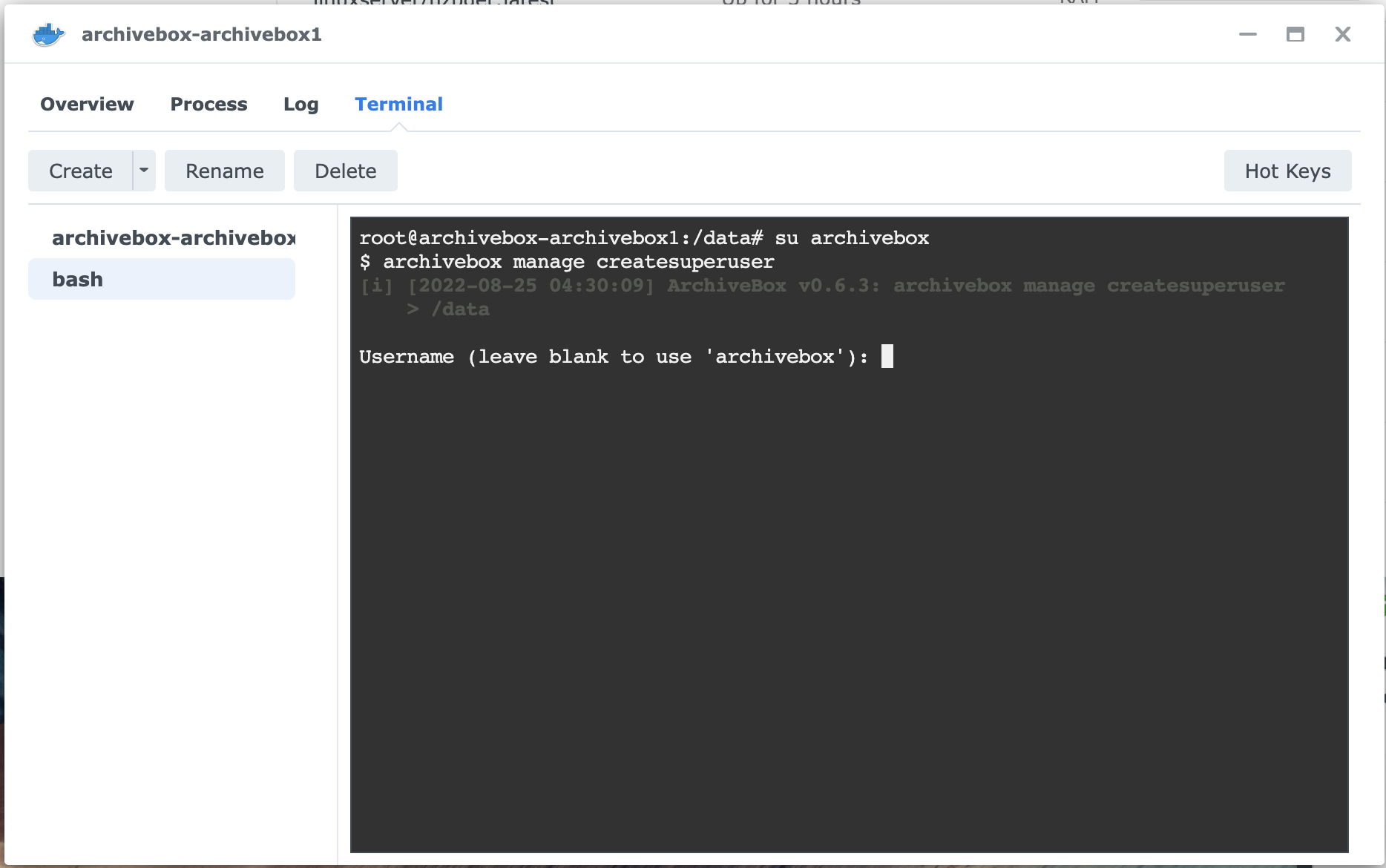
All you do is open the container's details window, click the 'Terminal' tab, click 'Create' to create a bash terminal, and enter:
su archivebox
archivebox manage createsuperuser

预设用户/密码的环境变量尚未实现,它们现在只是一个想法。这是您如何做到这一点的示例。
选项 A:在另一台机器上修改 ArchiveBox 数据库并将其复制回原位
最简单的方法是在另一台机器或docker主机上打开archivebox集合
index.sqlite3修改db,修改完后再放回去。# copy the db onto another machine or into another dir mkdir -p /tmp/archivebox cp /path/to/docker/archivebox/data/index.sqlite3 /tmp/archivebox/index.sqlite3 # make sure you have the archivebox CLI installed and use it to add the User to the temp db cd /tmp/archivebox/ pip3 install archivebox archivebox manage createsuperuser # fill in new user's info here # copy the modified db back into place for docker to use cp /tmp/archivebox/index.sqlite3 /path/to/docker/archivebox/data/index.sqlite3选项 B:使用 SQL 将用户行直接插入到 SQLite3 数据库中
此选项不需要在对数据库进行修改的机器上安装 ArchiveBox。
- 使用 Django 的函数在 Python shell 中生成散列密码
make_password。pip3 install django==3.1.3 # install the django version used by ArchiveBox python3 # open any python shell with django available, doesn't have to be the archivebox shell>>> from django.contrib.auth.hashers import make_password >>> make_password('somePasswordHere', 'someSaltHere', 'pbkdf2_sha256') # choose a password and a salt (can be anything 12 chars long) 'pbkdf2_sha256$216000$someSaltHere$styW1Uoy8SHp3zbSwGRp20C9mPjOHVjP9rl5a8/UOVE='
- 使用生成的哈希密码直接在 SQLite3 数据库中插入一个新的用户行:
cd ~/archivebox         # cd into your archivebox collection dir
sqlite3 index.sqlite3   # open the db with sqlite3 shell
INSERT INTO "auth_user" ("password", "last_login", "is_superuser", "username", "first_name", "last_name", "email", "is_staff", "is_active", "date_joined") VALUES ('pbkdf2_sha256$216000$someSaltHere$+2beZufc3JUXnmn0tG+2peJEBh7MjxPYmT3YfIFzEl0=', NULL, 0, 'someUsername', '', '', '[email protected]', 0, 1, '2022-03-22 23:34:02.333042')将上面的值替换为 python 输出中所需的用户名、电子邮件和密码哈希^。
- 使用新生成的用户登录以确认它有效 https://localhost:8000/admin/login/ user:
someUsernamepass:somePasswordHere更多细节在这里:https://github.com/ArchiveBox/ArchiveBox/wiki/Upgrading-or-Merging-Archives#modify-the-archivebox-sqlite3-db-directly
No working at docker tag 7.0 This issue make me crazy, why make this thing become so complex?

My solve method: copy the app folder in container to the host folder, and then edit the archive/config.py file, delete the root condition.