

 AppFlowy-IO
[Bug] Language selector does not save language when reopening
Describe the bug When using the language selector to use a language, UI changes to reflect it. However, if you close the app and reopen it, the language selector remains at the previously chosen language but the language of the UI returns to English.
To Reproduce Steps to reproduce the behavior:
- Go to settings through the settings icon on the top left, then pick the language option on the sidebar
- Pick any non-English language. You should see the UI updating the locale.
- Close and reopen the app.
- When the app reopens, you should see that the language has returned to English.
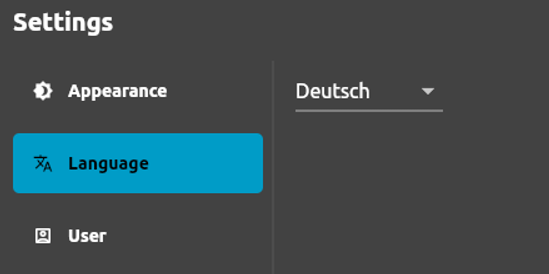
- Navigate to settings -> language again, you should see the language selector is at the language previously selected.
Expected behavior When choosing a new language, it should have saved the locale even after closing and opening a new session.
Screenshots
This is when I reopen Flowly after changing language.
Desktop (please complete the following information):
- OS -> Windows 10 with WSL2


@sunny7dusk , any update on this? If you no longer work on this issue, please let me know so I can release it to other contributors.
@sunny7dusk , thank you. It is merged? Can you share the link?
Found it: https://github.com/AppFlowy-IO/AppFlowy/pull/1089