
AppFlowy
 AppFlowy copied to clipboard
 AppFlowy-IO
[Bug] Links behaviour
Describe the bug
I did found some issues with the link usage. Here is the list of what I found (if prefixed with 🐛 it's a bug, otherwise it's a behaviour problem):
- 🐛 Links aren't clickable
- 🐛 Can't remove a link without deleting the text that contains the link
- 🐛 On the link edition/creation dialog you can type anything and it's still accepted, it should only accept URL (from web URL to system (I don't know how they are called) URL like
mailto,call, etc.) - Link icon on the tool bar disabled until you select some text, even if your cursor is on a existing link.
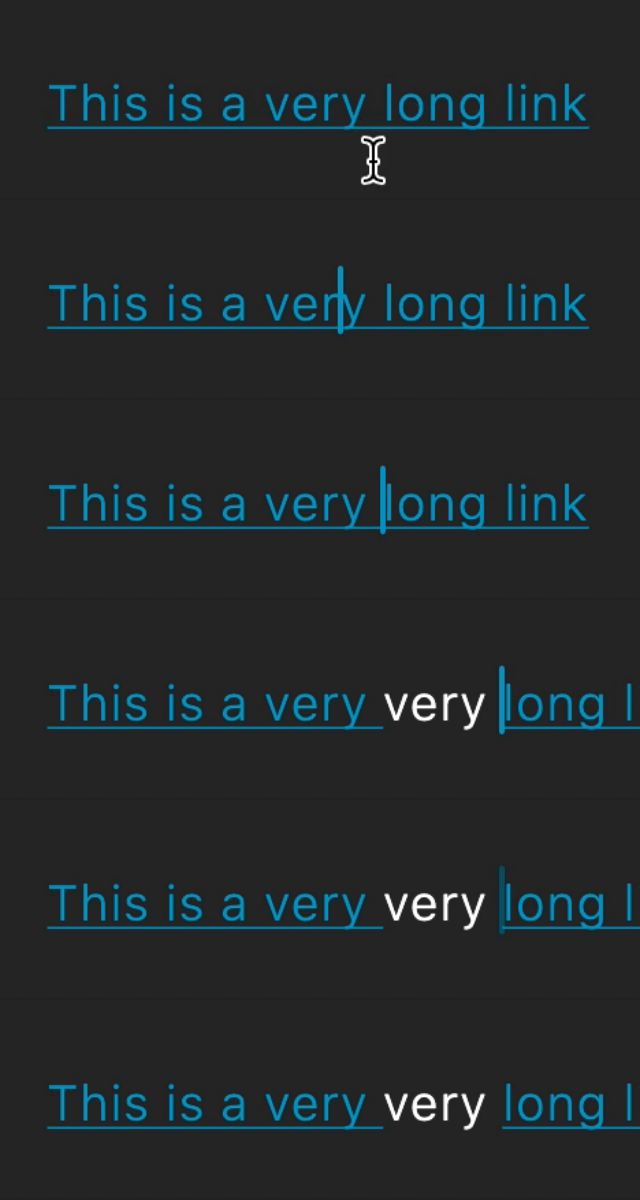
- UPDATE 🐛 On a link if you add text, the link is cut in two.
Link cut in two
Expected behavior
- A link should be clickable (or a tooltip should indicate how to open it, like for example: Ctrl + click)
- On the dialog to set a link we could have a 'delete'/'clear' button, when we clear the URL text field and click on 'save' the link should be deleted.
- If the URL is invalid the 'save' button should be disabled and an error message under the text field should explain the error
- If the cursor is positioned in a link, the link button is enabled.
- The added text should be added to the link.
Desktop (please complete the following information):
- OS: MacOS
- Version: 0.0.4.1

@appflowy I updated the description to add another bug:
UPDATE 🐛 On a link if you add text, the link is cut in two.

When the user clicks on link text nothing really happens. Ideally Appflowy would expand the link so the user can edit both the link text and the URL independently.
Normally we type [link text](http://site.com) by hand. When we do Appflowy does not recognize that this is a link. IMHO that would be very desirable. It's what a WYSIWYG Markdown editor would be expected to do.

When the user clicks on link text nothing really happens. Ideally Appflowy would expand the link so the user can edit both the link text and the URL independently.
Exact. Let me update the expected behaviour to include on a long hover, the user could see a helper that should allow to open or edit the link. Is it okay with you?
Normally we type
[link text](http://site.com)by hand. When we do Appflowy does not recognize that this is a link. IMHO that would be very desirable. It's what a WYSIWYG Markdown editor would be expected to do.
Currently, AppFlowy doesn't support Markdown at all (correct me if I'm wrong @appflowy)
A long hover over a link sounds like a terrific solution.
So I just assumed Workflowy was a Markdown editor?
Hi @apomalyn , the link feature has been significantly improved. Please have a try!
Most of the issues you reported are fixed, except for handling invalid URLs. I'll create a new issue for that. Hope to get more feedback from you soon!
- [x] Links aren't clickable
- [x] Can't remove a link without deleting the text that contains the link
- [ ] On the link edition/creation dialog you can type anything and it's still accepted, it should only accept URL (from web URL to system (I don't know how they are called) URL like mailto, call, etc.)
- [x] Link icon on the tool bar disabled until you select some text, even if your cursor is on a existing link.
- [x] UPDATE 🐛 On a link if you add text, the link is cut in two.
