
react-native-google-autocomplete

react-native-google-autocomplete copied to clipboard
 AppAndFlow
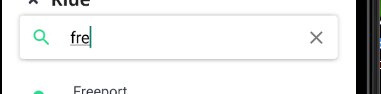
inputValue always lags behind 1
Can this be corrected? The passed argument is always the last value and not the current value.


inputValue: inputValue: f inputValue: fr
return (
    <GoogleAutoComplete
      apiKey={GOOGLE_API_KEY_PLACES}
      debounce={300}
      minLength={data.maxTextSearchLength}
      components={`country:${country.toLowerCase()}`}
      radius={`${radius}`}
      lat={location.latitude}
      lng={location.longitude}
      queryTypes={''}
    >
      {({ inputValue, handleTextChange, locationResults, fetchDetails, isSearching }) => (
        <View
          style={{ ...styles.container, ...style }}>
          <React.Fragment>
            <View style={{ ...styles.textInputContainer, height: insets.top + 30 }}>
              <Searchbar
                placeholder='Find your destination'
                onChangeText={props => { handleTextChange(props); onSearchingUpdate(inputValue, isSearching); console.log(`inputValue: ${inputValue}`); }}
                value={inputValue}
                icon={isSearching ? () => (<ActivityIndicator animating={true} color={Colors.blueA700} />) : () => (<MaterialIcons name={iconName ? iconName : 'search'} size={24} color={iconColor ? iconColor : theme.colors.black} />)}
                onIconPress={isSearching ? null : onIconPress}
                onFocus={onFocus}
              />
            </View>
            {
              handleSearchingUpdate(inputValue, locationResults) && locationResults.length
            ?
                <ScrollView
                  style={styles.listView}
                  keyboardShouldPersistTaps='handled'
                >
                  <List.Section>
                    {locationResults.map((el, i) => (
                      <LocationItem
                        {...el}
                        fetchDetails={fetchDetails}
                        key={String(i)}
                      />
                    ))}
                  </List.Section>
                </ScrollView>
              :
                null
            }
          </React.Fragment>
        </View>
      )}
    </GoogleAutoComplete>
  );
};
Or am I doing something wrong?