AnyChart
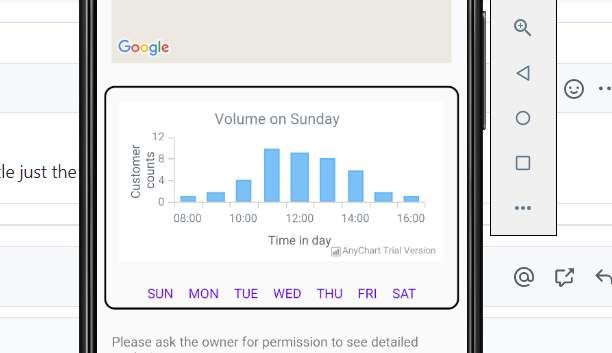
I know we can update the existing data to the chart, but how to update the existing title ?
Below is my code : Also, chartView.clear is not working private void setupChart(String day) { //BUG: cannot switch day AnyChartView chartView = findViewById(R.id.chart_view); if(chartView.isActivated()) { chartView.clear(); } APIlib.getInstance().setActiveAnyChartView(chartView); ProgressBar progressBar = findViewById(R.id.progress_bar); chartView.setProgressBar(progressBar); Cartesian cartesian = AnyChart.column();
    cartesian.title(String.format("Volume on %s", day));
    List<DataEntry> data = new ArrayList<>();
    data.add(new ValueDataEntry("08:00", 1));
    data.add(new ValueDataEntry("09:00", 2));
    data.add(new ValueDataEntry("10:00", 4));
    data.add(new ValueDataEntry("11:00", 10));
    data.add(new ValueDataEntry("12:00", 9));
    data.add(new ValueDataEntry("13:00", 8));
    data.add(new ValueDataEntry("14:00", 6));
    data.add(new ValueDataEntry("15:00", 2));
    data.add(new ValueDataEntry("16:00", 1));

    Column column = cartesian.column(data);

    column.tooltip()
            .titleFormat("{%X}")
            .position(Position.CENTER_BOTTOM)
            .anchor(Anchor.CENTER_BOTTOM)
            .offsetX(0d)
            .offsetY(5d)
            .format("{%Value}{groupsSeparator: }");

    cartesian.animation(false);


    cartesian.yScale().minimum(0d);
    cartesian.yAxis(0).labels().format("{%Value}{groupsSeparator: }");

    cartesian.tooltip().positionMode(TooltipPositionMode.POINT);
    cartesian.interactivity().hoverMode(HoverMode.BY_X);

    cartesian.xAxis(0).title(getString(R.string.UI_Time_in_day));
    cartesian.yAxis(0).title(getString(R.string.UI_Customer_counts));

    chartView.setChart(cartesian);
}

@1479839090 To update the title all you need is to apply a new title just the same as you did it initially in your code.

I tried that but it doesn't work, it is still the same. No matter what day I click, title will stay as sunday. It is supposed to change day by day.