AnyChart
using own variable in tooltip
How can i add my own variables in the tooltip , suppose i have declared a variable cost and i want to add this in tooltip

@saptarshidash You can apply any variable to the tooltip content string:
var myValue = 100;
series.tooltip().format("Series: " + myValue);
Or using string tokens you can apply any field value from your data:
series.tooltip().format("Series: {%value}");

another question sir , kindly please describe how to properly configure the unboundregion while using the choropleth map in Android , already gone through the documentation , still im not able to do it
@saptarshidash Please, can you specify the settings or the desired visual appearance of unbound regions and I will check the possibility?
    data.add(new CustomDataEntry("IN.SK", "", new LabelDataEntry(false)));
    data.add(new CustomDataEntry("IN.TN", "Tamil Nadu", regionalHashMap.tamilnadu.get("cnf"),regionalHashMap.tamilnadu.get("dischg"),regionalHashMap.tamilnadu.get("death")));
    data.add(new CustomDataEntry("IN.TR", "", new LabelDataEntry(true)));
i want to set the unbound region to this datas which are set to false , with a green color ,
and sir , im trying to set the ordinal color range for the map, please also specify the syntax for java android for the same with a example. im trying this way OrdinalColor ordinalColor=OrdinalColor.instantiate(); ordinalColor.colors(new String[]{"#e1f5fe", "#81d4fa", "#29b6f6", "#039be5","#01579b"}); ordinalColor.ranges(new String[]{"from 10 to 30"}); but not working
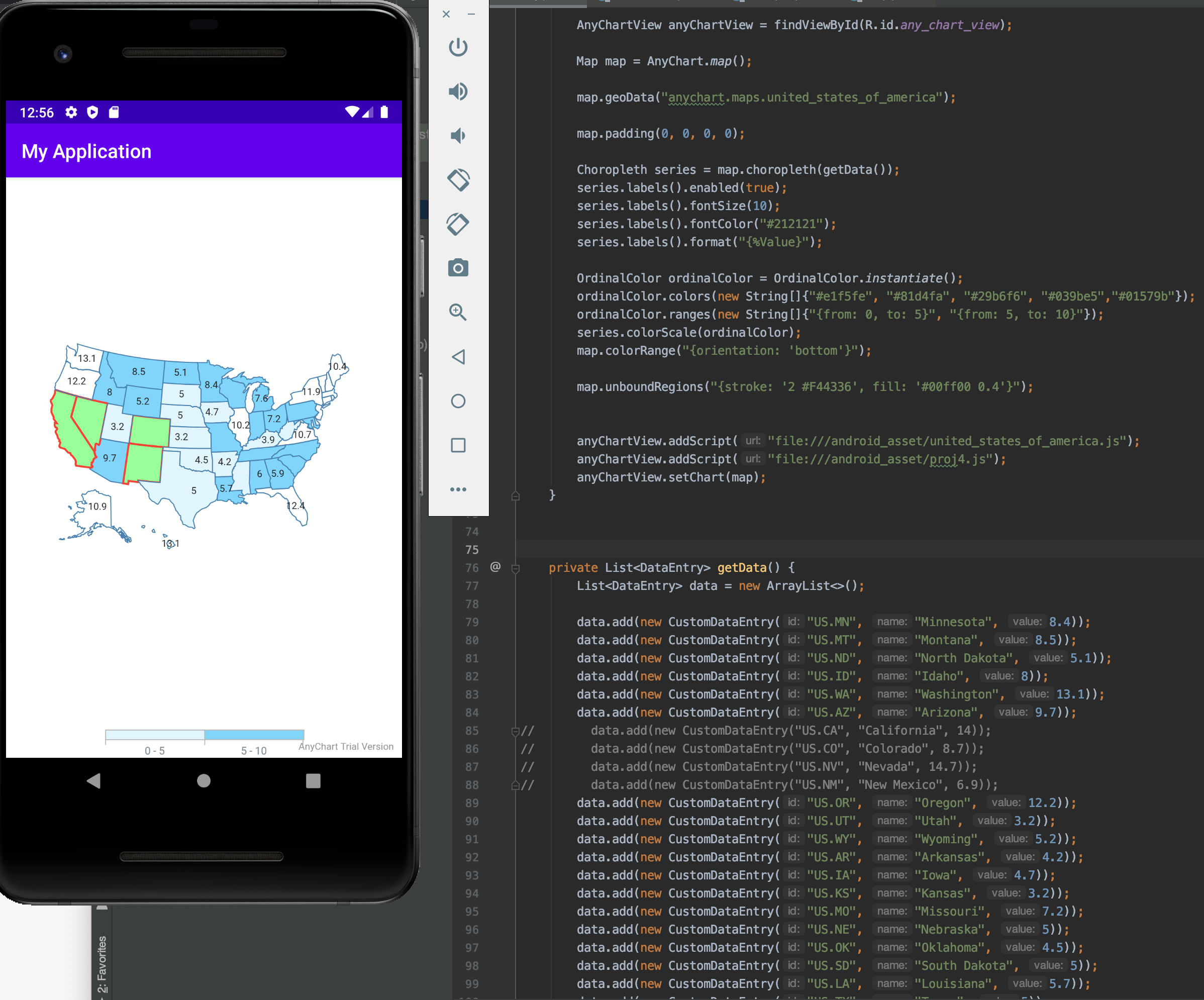
@saptarshidash Both options are available! Check the snippet below:
        OrdinalColor ordinalColor = OrdinalColor.instantiate();
        ordinalColor.colors(new String[]{"#e1f5fe", "#81d4fa", "#29b6f6", "#039be5","#01579b"});
        ordinalColor.ranges(new String[]{"{from: 0, to: 5}", "{from: 5, to: 10}"});
        series.colorScale(ordinalColor);
        map.colorRange("{orientation: 'bottom'}");

        map.unboundRegions("{stroke: '2 #F44336', fill: '#00ff00 0.4'}"); // 2 - stroke thickness, 0.4 - fill opacity
Below is the result and the full code: