

 Anaconda-Platform
Hiding conda environments
Is there a way to hide conda environments so they are not visible or discoverable via the notebook?
A common practice is to setup one or more base conda environment and then expose other environments. It is desired to hide these base conda environments from users of the nb_conda_kernel extension. Is this possible?

I'd like to see if there is something like this as well. I like having conda environments for my users picked up, but I create the kernel specs manually for site provided kernels and when I do that they're duplicated. I'm looking into this for the time being

Documentation says there is Regex env_filter:
Configuration This package introduces two additional configuration options:
env_filter: Regex to filter environment path matching it. Default: None (i.e. no filter)
It should be possible to setup a negative Regex, but I don't know where this setting (env_filter) is supposed to be located and how to edit it, eh.
Something like this (selects text with strawberry or green, but rejects text with poison even if there's strawberry with it):
https://regex101.com/r/PKmouO/3/

There's a mini-guide here how to stop nb_conda_kernels spam https://github.com/jupyterhub/jupyterhub/issues/715#issuecomment-463756411, but it doesn't work for me.
I see double kernels of everything:
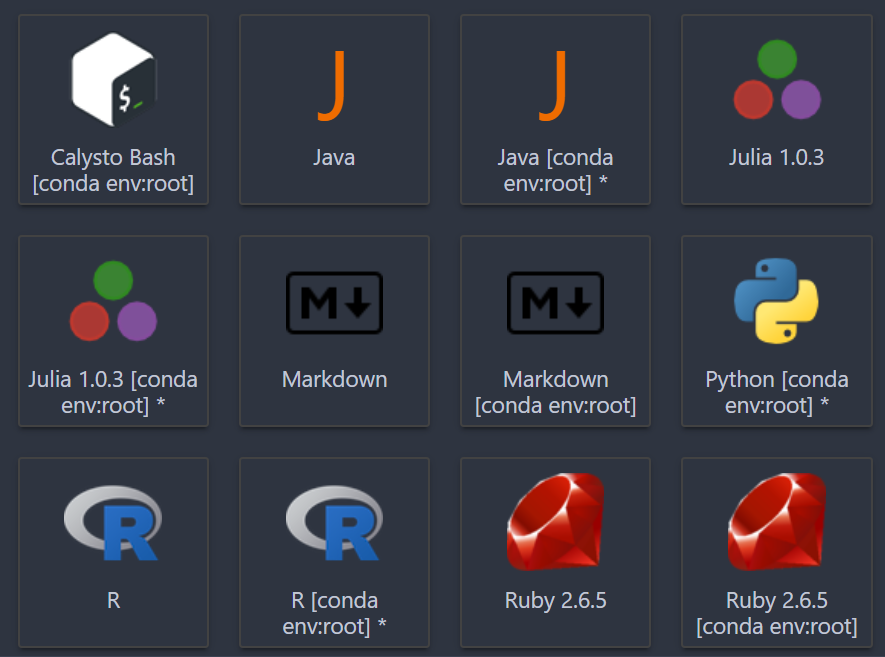
Tried setting filter like so:
c.NotebookApp.kernel_spec_manager_class = 'nb_conda_kernels.CondaKernelSpecManager'
c.CondaKernelSpecManager.env_filter = '(?:.*root.*|.*base.*)'
How do I either filter out [conda env:root] kernels from the list, or disable nb_conda_kernels entirely?
I build my image in Docker, nb_conda_kernels gets installed as a dependency and doing conda uninstall nb_conda_kernels causes conda do do hour+ long rebuild.
@Zireael So I found what's needed a bit ago, but never updated this issue. Anyways, for me the issue is solved by basically specifying the file system paths where the kernels are stored. Also, this is done in the $JUPYTER_PREFIX/etc/jupyter/jupyter_notebook_config.json file. Mine looks like the following:
{
  "NotebookApp": {
    "kernel_spec_manager_class": "nb_conda_kernels.CondaKernelSpecManager"
  },
  "CondaKernelSpecManager": {
    "env_filter": "/ncar/usr/jupyterhub/*|/glade/u/ssg/*"
   }
}
And that negated any kernels that I store under the directory trees of /ncar/usr/jupyterhub or /glade/u/ssg/ and my duplicates are now gone, but conda environments still are picked up for my users so they don't need to write kernel specs.
closing this one as stale; there is an env_filter but I wouldn't be surprised if it needs improving
