

 AlphaWallet
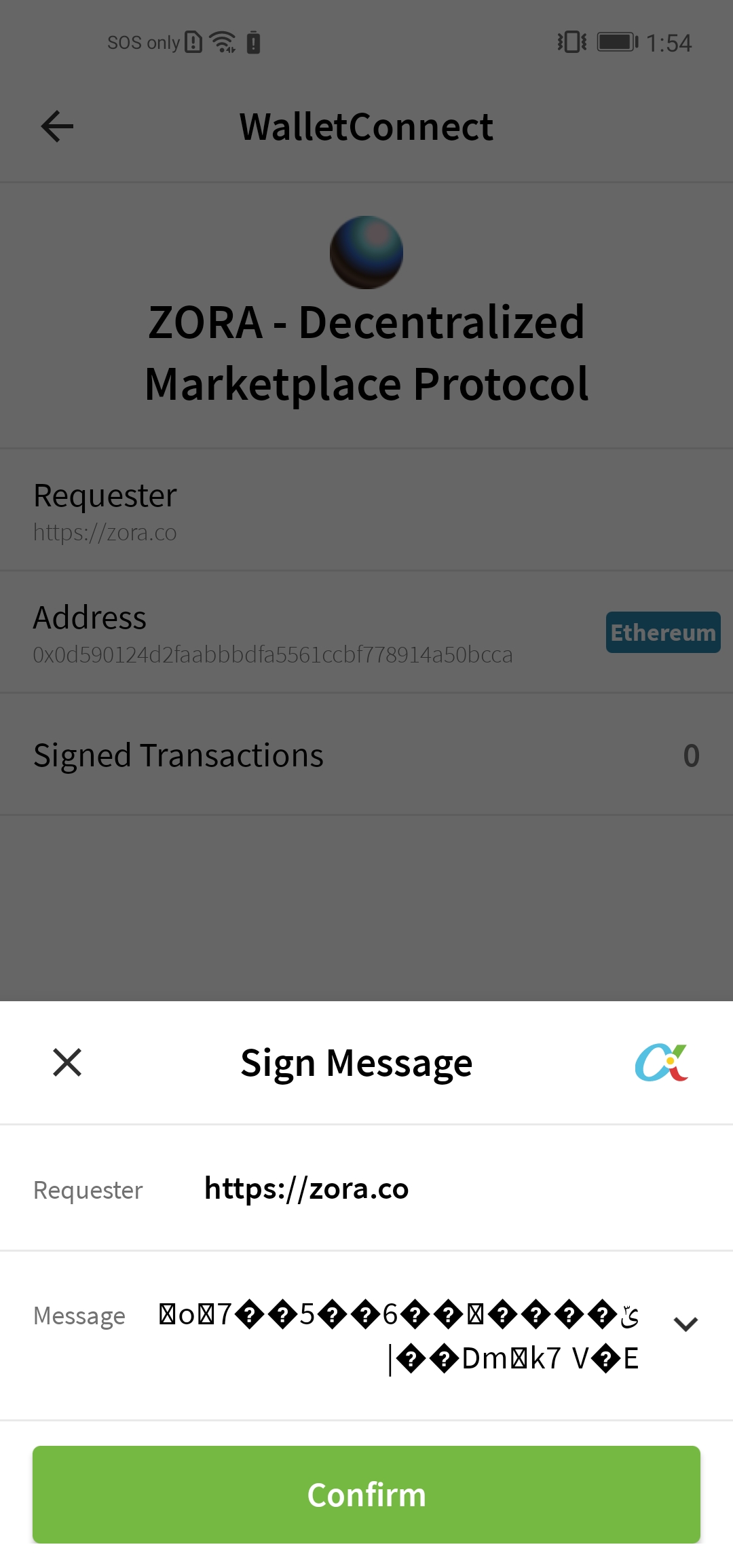
WalletConnect sign request prompts with garbled plaintext
When prompted to sign, the data displayed in the actionsheet looks garbled. Shall we display it like "0x796492d582dc3b93f13e9147f395702d10c71c47f5ce3e4a999ef370fa65441e" instead?
This is against the site https://zora.co. The prompt to sign happens after connecting via WalletConnect.
This is from another, but similar signing request from the same site, so the shape of the data is the same, but the data wouldn't match the screenshot:
{
   "id" : 1634105451753426,
   "jsonrpc" : "2.0",
   "method" : "eth_sign",
   "params" : [
      "0xba829c050941f1f50217a665205ccab4d227b851",
      "0x796492d582dc3b93f13e9147f395702d10c71c47f5ce3e4a999ef370fa65441e"
   ]
}

Nice idea, display the raw hex if it doesn't appear to be readable text. You'd need to check for something like Character.isAlphabetic(ch) || Character.isDigit(ch) || Character.isIdeographic(ch) but also allow for emojis, which are renderable in text. It shouldn't be hard to create a heuristic to detect renderable unicode characters.

@JamesSmartCell, @seabornlee or @justindg would you help re-assign among yourself and close this?