

 AlmasB
Tilesheet and Tiled map of non-uniform dimensions fail or render unexpected results
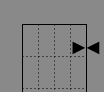
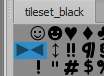
Describe the bug When creating a map in Tiled for tiles of size 32x16 and using a tilesheet defined with 16x32 tiles there are some cases in which tiles placed partially out of bounds throw an error. For example, placing an over-sized tiled at the top-left does not throw an error.
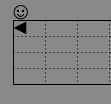
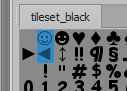
with tile:
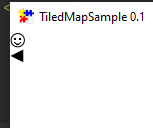
FXGL will render this:
However, adding a tile at the bottom makes the total height of the image larger than the map's defined height.
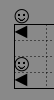
and it throws this error:
ava.lang.ArrayIndexOutOfBoundsException: arraycopy: last destination index 32832 out of bounds for byte[32768]
	at java.base/java.lang.System.arraycopy(Native Method)
	at javafx.graphics/com.sun.javafx.image.impl.BaseByteToByteConverter$ByteAnyToSameConverter.doConvert(BaseByteToByteConverter.java:176)
	at javafx.graphics/com.sun.javafx.image.impl.BaseByteToByteConverter.convert(BaseByteToByteConverter.java:99)
	at javafx.graphics/com.sun.javafx.image.impl.BaseByteToByteConverter$ByteAnyToSameConverter.convert(BaseByteToByteConverter.java:165)
	at javafx.graphics/com.sun.prism.Image$BaseAccessor.getPixels(Image.java:1031)
	at javafx.graphics/com.sun.prism.Image.getPixels(Image.java:697)
	at javafx.graphics/javafx.scene.image.Image$2.getPixels(Image.java:1217)
	at javafx.graphics/com.sun.prism.Image$ByteAccess.setPixels(Image.java:1123)
	at javafx.graphics/com.sun.prism.Image.setPixels(Image.java:754)
	at javafx.graphics/javafx.scene.image.WritableImage$2.setPixels(WritableImage.java:268)
	at com.almasb.fxgl.entity/com.almasb.fxgl.entity.level.tiled.TilesetLoader.loadView(TilesetLoader.kt:137)
	at com.almasb.fxgl.entity/com.almasb.fxgl.entity.level.tiled.TMXLevelLoader.createTileLayerEntities(TMXLevelLoader.kt:86)
	at com.almasb.fxgl.entity/com.almasb.fxgl.entity.level.tiled.TMXLevelLoader.load(TMXLevelLoader.kt:51)
	at com.almasb.fxgl.all/com.almasb.fxgl.app.services.FXGLAssetLoaderService.loadLevel(FXGLAssetLoaderService.kt:442)
	at com.almasb.fxgl.all/com.almasb.fxgl.dsl.FXGL$Companion.setLevelFromMap(FXGL.kt:532)
	at com.almasb.fxgl.all/com.almasb.fxgl.dsl.FXGL.setLevelFromMap(FXGL.kt)
	at samples.main/sandbox.TiledMapSample.initGame(TiledMapSample.java:53)
	at com.almasb.fxgl.all/com.almasb.fxgl.app.FXGLApplication$InitAppTask.initGame(FXGLApplication.kt:372)
	at com.almasb.fxgl.all/com.almasb.fxgl.app.FXGLApplication$InitAppTask.call(FXGLApplication.kt:352)
	at com.almasb.fxgl.all/com.almasb.fxgl.app.FXGLApplication$InitAppTask.call(FXGLApplication.kt:344)
	at javafx.graphics/javafx.concurrent.Task$TaskCallable.call(Task.java:1425)
	at java.base/java.util.concurrent.FutureTask.run(FutureTask.java:264)
	at java.base/java.util.concurrent.Executors$RunnableAdapter.call(Executors.java:515)
	at java.base/java.util.concurrent.FutureTask.run(FutureTask.java:264)
	at java.base/java.util.concurrent.ThreadPoolExecutor.runWorker(ThreadPoolExecutor.java:1128)
	at java.base/java.util.concurrent.ThreadPoolExecutor$Worker.run(ThreadPoolExecutor.java:628)
	at java.base/java.lang.Thread.run(Thread.java:830)
Likewise, trying to load a map for 16x32 tiles and placing 32x16 tiles will result in this:
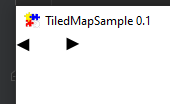
Yet adding another tile, will not throw an error and will overwrite part of the left tile placed with the overflow of the right placed one:
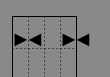
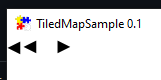
Lastly, keeping all tiles in bounds but with the same dimensions as the above example merges the tile images where there is overflow:
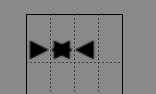
Whereas FXGL will overwrite the overflow of the first tile's image with the next parsed tile:
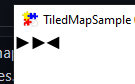
To Reproduce Steps to reproduce the behavior:
- Create a Tiled map and place tiles of varying dimensions which will overflow the map's defined tilespace. Ex) A map of 16x16 tiles and a tilesheet of 16x32 tiles.
- Load the map in a new FXGL application using
setLevelFromMap('map.tmx') - Run the application to see how FXGL handles overflowing tiles or witness an error similar to the one above.
Expected behavior I would expect that placing a tile outside of the bounds of the map to be ignored/cropped. As for tiles overflowing into other tilespace within the bounds of the map, I would expect that FXGL overwrite the overflowing image as it does in Tiled, by overlaying the current tile's image and whatever image overflows into it.
However, it may be simpler to say that no tile can overflow its bounds. For example, a map of 16x16 tile-spaces using a 32x16 would only ever render the first 16x16 pixels and crop off the rest. But this would cause the possible creation of maps in Tiled that look entirely different from how FXGL chooses to render.

@AlmasB I'm glad to work on this after determining what the expected behavior should be. However, if you have other open issues that are more pressing, just mention me or let me know.
Thanks
I will need to think about the expected behavior for these cases. Meanwhile, I'll mention you in a few other issues, which may be of interest.
