

 AllskyTeam
Raw16 files
Thomas - I have been using your wonderful all sky software for the past year, running with an ASI178MC and RPI-4 here in Central Oregon. I've spread the knowledge to others in my geographic area - in particular to two observatories whose new all sky cameras using your software should come online within a month.
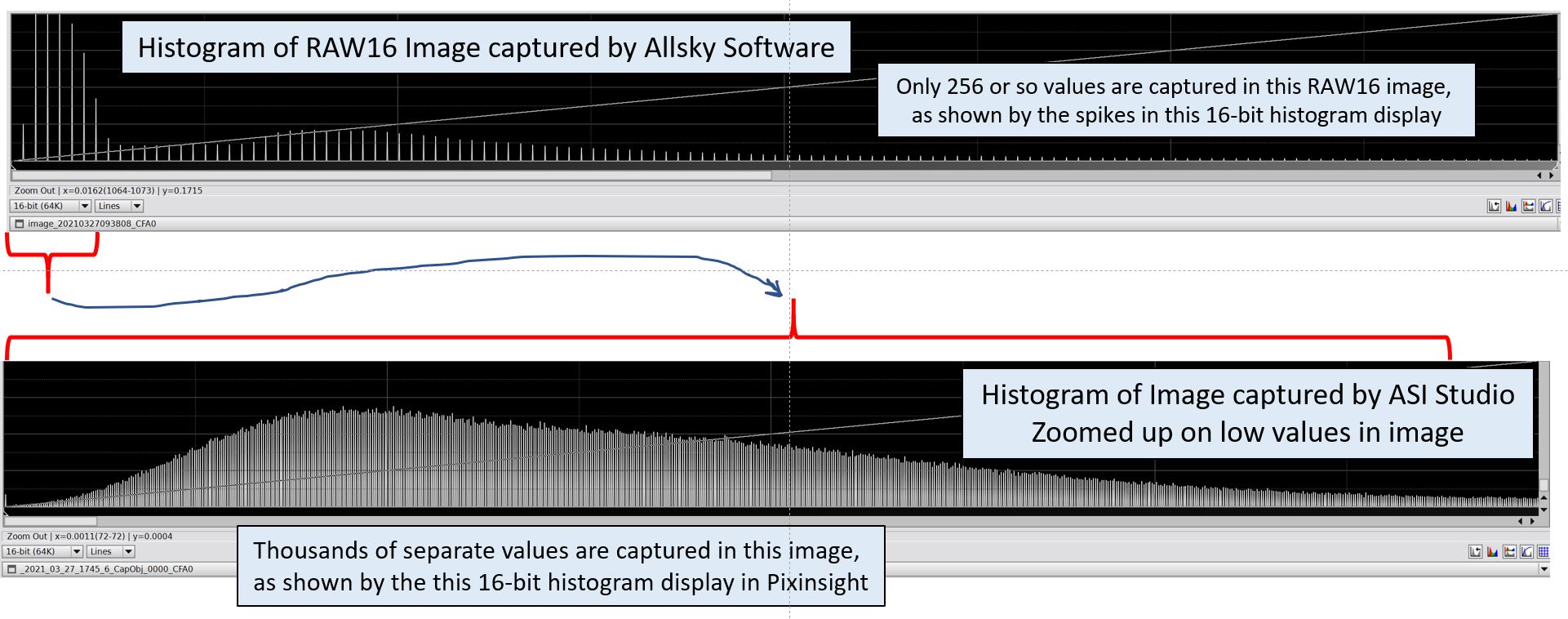
Moving forward, we are interested to measure skyglow and I may make the effort to calibrate my camera to allow estimation of radiance from the Raw16 images. In looking at the RAW16 images captured under Type=2 and PNG Quality=9, it seems that while they are encoded into 16-bit values, that there are only 256 unique 16-bit values in each of the color channels. Using the same camera, images captured via ZWO's ASI Studio software show RAW16 images with a very large number of unique values, not limited to 256 unique values.
My evidence is from looking at the two respective RAW16 images in the Pixinsight software, one image captured by the allsky software and the other by ASI Studio. After importing the two RAW16 images into Pixinsight and pulling apart the CFA pattern via the Pixinsight SplitCFA algorithm (which does not interpolate values of adjacent filter locations), the 64-bit histograms of each RAW16 image have very different character. The RAW16 from allsky has about 256 spikes across the 64-bit range. The RAW16 from ASI Studio has a completely filled-in histogram, indicating many more than 256 values are present in the image. See the figure below.
Perhaps there are other camera settings to overcome this apparent limitation of the RAW16 images from the allsky software? I look forward to any comments.

Thanks a lot for reporting that issue. I will investigate the source of this loss of data range. Since I am using the ZWO library, I believe the problem comes from the allsky code. It could be coming from the way openCV saves the image or from some convertion by imagemagick that drops some depth. I'll report my findings here.

You are welcome. Btw, I don't think the image is losing bit depth. Instead there are a limited number, perhaps 256, of 16-bit values being written to the RAW16 image. It's as if there is some look up table in the code that is limiting what is written to the image. Perhaps a table of 256 16-bit values is being applied, instead of the thousands of available 16-bit values.
Oh I see. It's like if it was a 256 indexed color image with 16-bit values used.
I'm thinking it's probably an issue with imagemagick trying to optimize the output. I'll explore what the -type option produces.
https://imagemagick.org/script/command-line-options.php#type
Thomas, were you able to look into this?
wsk412, have you tried this with ZWO's "demo" program that comes with their SDK and runs on the Pi? I believe on the Pi, the 16-bit mode is for mono cameras only, and there is no 16-bit mode for color cameras. The only color mode takes 3 bytes total for R, G, and B. Eric

@wsk412 have you tried this with ZWO's "demo" program that comes with their SDK and runs on the Pi? I believe on the Pi, the 16-bit mode is for mono cameras only, and there is no 16-bit mode for color cameras. The only color mode takes 3 bytes total for R, G, and B. Eric
Eric,
Thanks for this. I have not tried that ZWO program on the Pi.
I sent an email to ZWO just now, which I expect will confirm your note below about this bit-depth limitation on the Pi. I’ll let you know what I hear back from ZWO.
Sorry about the non-reply earlier and I understand that this topic is otherwise closed.
Cheers,
Bill
Reopening. Let's see what ZWO says, and whether or not it works on ZWO's Linux program.
Eric,
Thanks for following up. No, I never heard back from ZWO.
For what it’s worth, I found that the AllSkEye https://allskeye.com/ software does successfully create 16-bit FITS files from my ASI178MC camera.
Bill
@thomasjacquin Thomas, on March 31, 2021 you said:
Oh I see. It's like if it was a 256 indexed color image with 16-bit values used. I'm thinking it's probably an issue with
imagemagicktrying to optimize the output. I'll explore what the-typeoption produces. imagemagick options
Were you ever able to look into this?
Eric
I think with asi178mc (mc as multicolor), we'd need raw48 format for 16 bits of info in every channel. Allsky documentation states that raw16 is only for monochrome cameras.

@grue74 The ZWO library for Linux only supports the following modes:
ASI_IMG_RAW8 // Each pixel is an 8 bit (1 byte) gray level
ASI_IMG_RGB24 // Each pixel consists of RGB, 3 bytes totally (color cameras only)
ASI_IMG_RAW16 // 2 bytes for every pixel with 65536 gray levels
ASI_IMG_Y8 // mono chrome mode 1 byte every pixel (color cameras only)
The RAW16 produces mono images only and RGB24 is 8 bits per Red, Green, and Blue.
Everything in ZWO's documentation says RAW16 images sizes are width * height * 2 and RGB24 is width * height * 3.
It's possible the Windows drivers support 16-bit per channel color images.