

 AllenDang
Window auto sizing
Hi,
When a create a simple window like
w := giu.Window(title)
And a add a InputTextWidget on it with a label, the label falls partly out of the window. With other widgets e.g. buttons or progress bars this does not happen. So I guess something goes wrong in the auto sizing of the window. Does someone has a clue if this is a imgui or a giu thing.

Because there is a flag for label, aka ...Wrap which will cause label to wrap the text with specify width. Without it, label will expand as long as the text.

I can't find a ...Wrap flag in Flag.go. There is a Wrapped function for labels but that's not what I am using. So my issue is:
Using
g.InputText(&value).Label(label)
I get
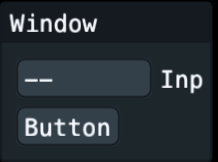
And with
g.InputText(&value).Label(label).Size(80)
I get
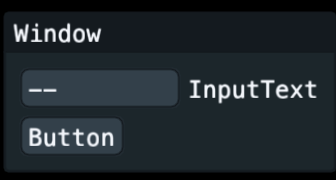
@r00tc0d3 I see, you are saying the label of input text widget, not label widget itself. Try set the window flags like this.
	g.Window("TestWindow").Flags(g.WindowFlagsAlwaysAutoResize).Layout(
		g.InputText(&content).Label("Long text as input text label"),
	)
I get
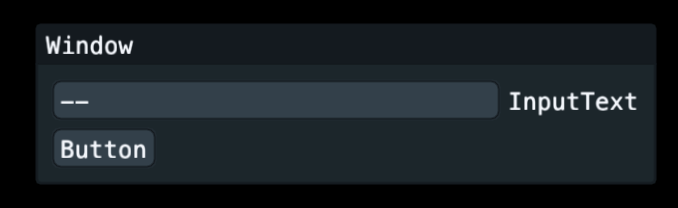 So it does the job but I can't explain the size difference of the edit box.
@r00tc0d3 I don't quite understand So it does the job but I can explain the size difference of the edit box....
I changed it just now to can't in stead of can. So I don't understand why the latter is bigger than the first without touching the sizes.
With the WindowFlagsAlwaysAutoResize flag it ignores now the Size() as in
g.InputText(&value).Label(label).Size(80)
@r00tc0d3 I'm confused now. What's your expectation and what actually happen?
Ok, I took your multi windows example and changed it a bit. Normally a window without an explicit size, sizes to the widgets it contains. As you can see in Window 2 I have a large label and the window wraps around it. All fine. Now Window 1 has a InputTextWidget with a label but it falls out of the window. It should in my opinion make the window as large as the input text box including the label.
package main

import (
	g "github.com/AllenDang/giu"
)

var (
	showWindow2 bool
	checked     bool
	value       string
)

func onShowWindow2() {
	showWindow2 = true
}

func onHideWindow2() {
	showWindow2 = false
}

func loop() {
	g.MainMenuBar().Layout(
		g.Menu("File").Layout(
			g.MenuItem("Open"),
			g.Separator(),
			g.MenuItem("Exit"),
		),
		g.Menu("Misc").Layout(
			g.Checkbox("Enable Me", &checked),
			g.Button("Button"),
		),
	).Build()

	g.Window("Window 1").Pos(10, 30).Layout(
		g.InputText(&value).Label("InputText label"),
		g.Label("I'm a label in window 1"),
		g.Button("Show Window 2").OnClick(onShowWindow2),
	)

	g.Window("Window 2").IsOpen(&showWindow2).Flags(g.WindowFlagsNone).Pos(200, 30).Layout(
		g.Label("I'm a label in window 2 and i am very long........"),
		g.Button("Hide me").OnClick(onHideWindow2),
	)
}

func main() {
	wnd := g.NewMasterWindow("Multi sub window demo", 700, 400, 0)
	wnd.Run(loop)
}