

 Agranom
Label on ngx-timepicker-field
Adding a label to a timepicker-field does not produce the expected output.
With this setup:
<mat-form-field class="form-element">
        <mat-label>Start Time</mat-label>
        <ngx-timepicker-field formControlName="startTime" defaultTime="startTime"></ngx-timepicker-field>
        <input matInput [hidden]="true" formControlName="startTime">
      </mat-form-field>
We see this in the browser:

The label is located on top of the input fields.
When a value is supplied to the input, the label looks correct:

With this setup:
 <mat-form-field class="form-element">
        <ngx-timepicker-field label="Start Time" formControlName="startTime" defaultTime="startTime"></ngx-timepicker-field>
        <input matInput [hidden]="true" formControlName="startTime">
      </mat-form-field>
We see this in browser:

The label does not appear.

I use the following html view and it's rendered fine for me
    <mat-form-field appearance="fill">
      <mat-label for="row-refTime">reference time</mat-label>
      <input id="row-refTime"  matInput [ngxTimepicker]="timepicker" [(ngModel)]="row.refTime">
      <ngx-material-timepicker #timepicker></ngx-material-timepicker>
    </mat-form-field>

That is for the ngx-material-timepicker, not the ngx-timepicker-field.
I had not! Let me give that a shot and I'll come back with my results.
It's react. We need angular equivalent though. But the design should be the same.
It should be floatLabel="always" in <mat-form-field tag
My example rewritten
<mat-form-field floatLabel="always" appearance="outline" >
  <mat-label for="row-refTime2">reference time</mat-label>
  <input id="row-refTime2"  matInput  [hidden]="true" [(ngModel)]="row.refTime">
  <ngx-timepicker-field  [(ngModel)]="row.refTime"></ngx-timepicker-field>
</mat-form-field>
Screenshot when empty
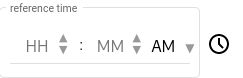 and with a value entered
