

 Agamnentzar
No spread parameter
Hi
I want to convert drop shadow to css
I have an object like this
dropShadow:
angle: 90
antialiased: true
blendMode: "normal"
choke:
units: "Pixels"
value: 11
__proto__: Object
color: {r: 0, g: 0, b: 0}
contour: {name: "Линейный", curve: Array(2)}
distance: {value: 0, units: "Pixels"}
enabled: true
layerConceals: true
noise: 0
opacity: 0.3
size: {value: 150, units: "Pixels"}
useGlobalLight: true
I found such a transformation on the Internet.
/ Assume we have the following values in Photoshop
// Blend Mode: Normal (no other blend mode is supported in CSS)
// Color: 0,0,0
// Opacity: 25%
// Angle: 135deg
// Distance: 4px
// Spread: 0%
// Size: 4px

// Here's some JavaScript that would do the math
function photoshopDropShadow2CSSBoxShadow(color, opacity, angle, distance, spread, size) {
  // convert the angle to radians
  angle = (180 - angle) * Math.PI / 180;

  // the color is just an rgba() color with the opacity.
  // for simplicity this function expects color to be an rgb string
  // in CSS, opacity is a decimal between 0 and 1 instead of a percentage
  color = "rgba(" + color + "," + opacity/100 + ")";

  // other calculations
  var offsetX = Math.round(Math.cos(angle) * distance) + "px",
      offsetY = Math.round(Math.sin(angle) * distance) + "px",
      spreadRadius = (size * spread / 100) + "px",
      blurRadius = (size - parseInt(spreadRadius, 10)) + "px";
  return offsetX + " " + offsetY + " " + blurRadius + " " + spreadRadius + " " + color;
}

// let's try it
// for simplicity drop all of the units
photoshopDropShadow2CSSBoxShadow("0,0,0", 25, 135, 4, 0, 4);
// -> 3px 3px 4px 0px rgba(0,0,0,0.25)
But in the object I have no spread parameter
Can you call it differently, or can it be calculated like that?


Released version 11.1.5 with fix for missing choke parameter in LayerEffectShadow interface, that should contain spread value. You'll have to adjust the conversion a bit since it seems choke parameter is stored in pixels and not percentages.
Yes. I see choke.
choke: {
units: "Pixels"
value: 11
}
Where can i read how convert this parameter to percent ?
It is very difficult to transfer parameters from psd, but something similar happened.
example: https://zababurinsv.github.io/ide-design/
Actually when I looked at some test files it doesn't seem the choke is relative to size, I don't know how to convert it. Right now it seems it's just 1pixel = 1% but I'm not sure if it's always the case.
I will deal with this while making the pages. Photoshop online shows only one effect, but when I insert it, the result differs from the layout. I have made a rough version so far.
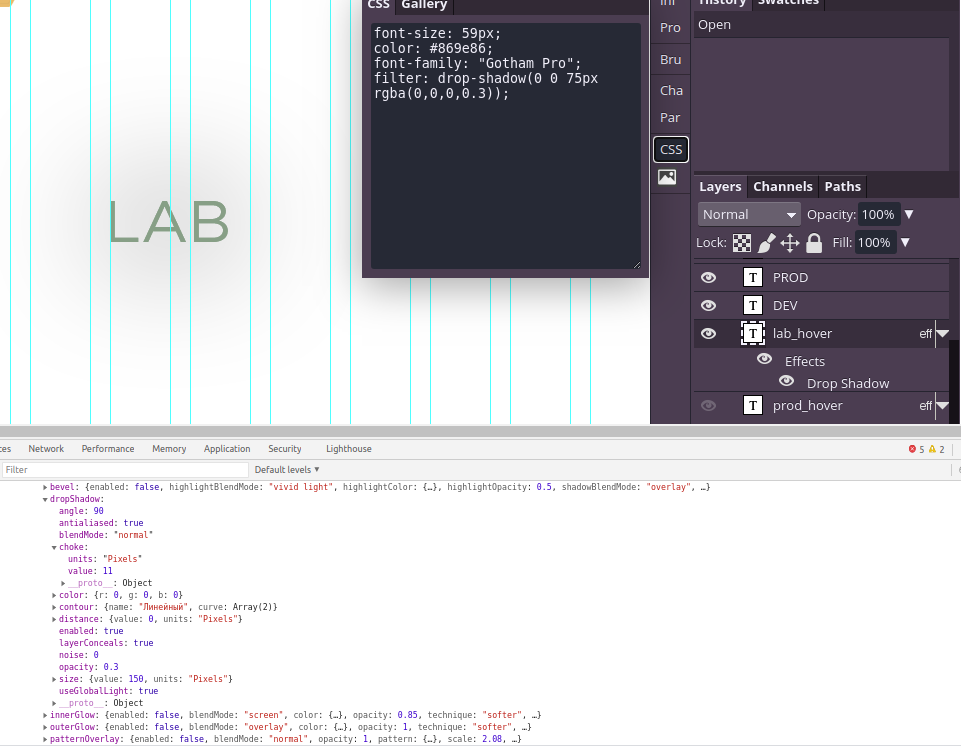
I am very poor at Photoshop. I still have to read everything. That's why it's hard for me to say now and it's already 3 o'clock in the morning.
I have inserted a button to download the standard psd which is processed by your library.
Tomorrow night or after tomorrow I'll take a look.
