

 Adobe-CEP
CEP 10 11 Tabbing inconsistency issues
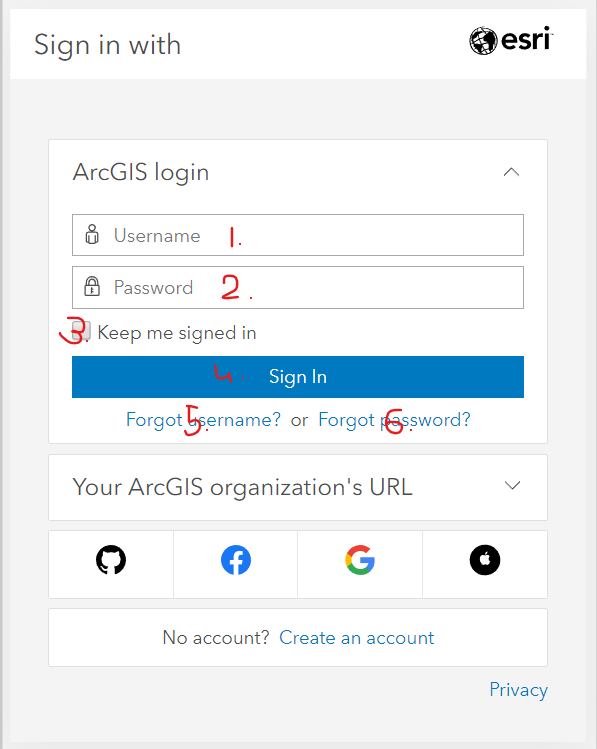
In full Chrome and in cefClient Tab key cycles through all input elements on the page, but within an extension tabbing cycles only through available text input fields.
- `window.location = "http://arcgis.com"
- Click "Sign In"
Chrome and cefTools will Tab 1. -> 2. -> 3. -> 4. -> 5. -> 6. .....
Inside an extension Tab goes 1. -> 2. -> 1. -> 2. -> 1. -> 2. .....

In the CEP Panel type extension, this is expected behavior we only allow tabbing on input fields of the same-site frames. while in Modal type extension one can tab as in chrome.

@rushilmahajan-adobe I'm not sure I understand quite what you mean.
All of the numbered elements in the initial example are in the same frame.
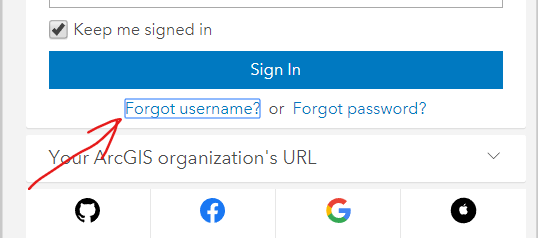
If by "only allow tabbing on input fields" you mean that only <input> elements should be reachable, then that also doesn't seem consistent because the "Keep me signed in" checkbox is an <input> but isn't reachable from the Username and Password inputs. Furthermore, if I click the ckeckbox and continue tabbing, the focus does continue shifting properly as in chrome on <input> and <a> elements:
@rushilmahajan-adobe 2 months went by. Any clarification on the comments above?
So, I met with @sujaisivanandan yesterday, and because this is considered "expected behavior" (as per @rushilmahajan-adobe above) it is not currently on a list of bugs to be fixed... as is my understanding.
We could probably even close this issue as "Won't Fix", if that's the case.
Perhaps there is some confusion above about the difference between "modal" and "panel"?

@ErinFinnegan I don't believe there is confusion on the difference between Modal and Panel. Yes, in a Modal, tabbing works as in chrome. But in a Panel extension type, it gets stuck on 2 text inputs(all inputs are reachable and generally tab-able). I am trying to figure out what I am missing because "we only allow tabbing on input fields of the same-site frames" doesn't answer why in a page with a single frame tabbing gets stuck in a loop between elements of specific input type. I can tab through all inputs, but eventually I get stuck tabbing between the two text inputs. I don't understand what I'm missing here. Are there frames I'm missing? Does 'input field' mean that only 'text input fields' are tab-able(if so, why can I tab through everything else)? If this is "expected behavior", is it documented somewhere?
@kYakovenk: For CEP Panel tabbing is allowed for a few input field type only ['text', 'number', 'time' , 'datetime', 'date', 'datetime','email', 'password', 'search', 'url']. This is by design has been there in CEP since inception. The behavioural differences between CEP Panel & Modal Window follows the difference in ownership of Panel & Model Window. The Panel window is owned by the host app while a Modal windows is created & owned by CEP. The existing behaviour should sustain & there is no further action here.

@manishkrmishra @rushilmahajan-adobe this is a critical (Severity 1) bug. It is an inaccessible design (failing WCAG SC 2.1.1), and it's unfortunate that it's been around for so long. Some disabled users are keyboard users, and this design prevents them from recovering their username or resetting their password. When can we get this fixed?
@kYakovenk @ErinFinnegan
