

 AdguardTeam
Disables fast refresh functionality from React JS Library
Steps to reproduce
- Build or start react project
- Go to localhost
- You can see fast refresh is disabled in console log and errors
Expected behavior
Fast refresh should not be disabled and it does not give any errors on console log
Actual behavior
It disables fast refresh functionality and gives some errors in console log. To get rid of the issue, you must clear history and cache from browser after adguard removed.
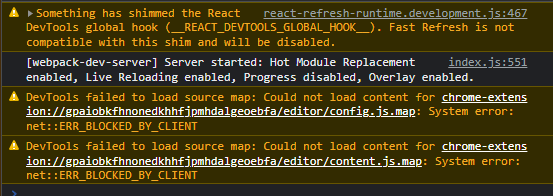
react-refresh-runtime.development.js:467 Something has shimmed the React DevTools global hook (__REACT_DEVTOOLS_GLOBAL_HOOK__). Fast Refresh is not compatible with this shim and will be disabled. injectIntoGlobalHook @ react-refresh-runtime.development.js:467 index.js:551 [webpack-dev-server] Server started: Hot Module Replacement enabled, Live Reloading enabled, Progress disabled, Overlay enabled. DevTools failed to load source map: Could not load content for chrome-extension://gpaiobkfhnonedkhhfjpmhdalgeoebfa/editor/config.js.map: System error: net::ERR_BLOCKED_BY_CLIENT DevTools failed to load source map: Could not load content for chrome-extension://gpaiobkfhnonedkhhfjpmhdalgeoebfa/editor/content.js.map: System error: net::ERR_BLOCKED_BY_CLIENT
Screenshot:
Customer ID
681838
Your environment
- Environment name and version: Vivaldi 5.6.2839.3
- Operating system and version: Windows 11 22H2, 22621.819

@crestcere Hi there! Sorry for a big delay.
- what if you turn off Filter localhost option in AdGuard? (Settings - General settings - Advanced settings - Filter localhost unchecked)
- could you provide a link to the project you are building?

It works with disabling filter localhost option.
It happens with any projects based on react library. More information is here; https://reactjs.org/docs/create-a-new-react-app.html
Basically, to create first react app; Install node js, npx create-react-app my-app cd my-app npm start
@crestcere
We will look into this problem. As a temporary solution disable Filter localhost option please.